
Q: I have an iPod classic and have voice memo recordings that I would like to play through a PA system. However, the recording volumes are all different. Is there a way to set all volumes to the same setting using iTunes, and then sync the iPod accordingly? I want all of the recordings the same volume so that I don’t have to keep adjusting the volume.
– Anonymous
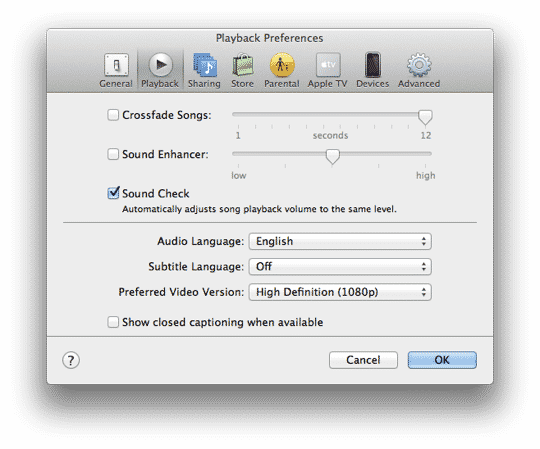
A: iTunes and Apple’s various media devices all support a feature known as “Sound Check” that is designed for the purpose of normalizing volume levels across multiple audio tracks. While commonly used for music tracks, the feature also applies to voice memos, audio podcasts and audiobooks (with the exception of those in the Audible format).
Sound Check works by analyzing the volume levels of the audio files in your library and applying an additional tag that instructs iTunes and your Apple media devices to adjust the volume accordingly when playing back that particular track.
Note that Sound Check does not actually modify the audio properties of the track, so if you listen to the track on a non-Apple device or application you may not hear the adjusted volume level unless the other device or application supports the iTunes Normalization ID3 tag.
To use Sound Check on an iPod or other Apple media device, you must first enable it in your iTunes Preferences, by going to the Playback settings and ensuring the Sound Check option is selected.
The first time you enable Sound Check, iTunes will scan through and analyze the tracks in your library in order to determine the normalized volume level, writing the volume adjustment information into each track as it goes. You can see this value by selecting any audio track in your library and choosing File, Get Info to view the track properties; the Sound Check volume adjustment is shown on the Summary tab. As long as Sound Check remains enabled in iTunes, the appropriate volume adjustments will also be automatically applied in the background to any new tracks that you add to your iTunes library.

Note that disabling Sound Check once the initial analysis has been completed will not actually remove this information; turning off Sound Check merely tells iTunes to ignore these settings, and if you later re-enable Sound Check again, it will simply use the adjustment data that has already been written into the tracks.
This saves having to do another full analysis pass on your library each time Sound Check is re-enabled.
Sound Check is also supported on iPods, iOS devices and even the Apple TV, however it must also be specifically enabled on each device where you want to use it. Further, Apple’s media devices do not perform any Sound Check analysis by themselves—they simply read the volume normalization tags supplied by iTunes, so you must have enabled Sound Check in your iTunes library as well for this information to actually be available to your iPod. The option to enable Sound Check is found in the settings menus on all of Apple’s media devices except for the iPod shuffle where it is enabled from the device’s settings in iTunes.
In most cases the volume normalization automatically applied by Sound Check should provide balanced listening levels across all of your tracks. However, it is also possible to adjust volume levels for individual tracks manually in iTunes.











