
iLoungeiLounge
  • News
    • Apple
      • AirPods Pro
      • AirPlay
      • Apps
        • Apple Music
      • iCloud
      • iTunes
      • HealthKit
      • HomeKit
      • HomePod
      • iOS 13
      • Apple Pay
      • Apple TV
      • Siri
    • Rumors
    • Humor
    • Technology
      • CES
    • Daily Deals
    • Articles
    • Web Stories
  • iPhone
    • iPhone Accessories
  • iPad
  • iPod
    • iPod Accessories
  • Apple Watch
    • Apple Watch Accessories
  • Mac
    • MacBook Air
    • MacBook Pro
  • Reviews
    • App Reviews
  • How-to
    • Ask iLounge
Font ResizerAa
iLoungeiLounge
Font ResizerAa
Search
  • News
    • Apple
    • Rumors
    • Humor
    • Technology
    • Daily Deals
    • Articles
    • Web Stories
  • iPhone
    • iPhone Accessories
  • iPad
  • iPod
    • iPod Accessories
  • Apple Watch
    • Apple Watch Accessories
  • Mac
    • MacBook Air
    • MacBook Pro
  • Reviews
    • App Reviews
  • How-to
    • Ask iLounge
Follow US

How-to › Ask iLounge

Ask iLoungeiCloudiPad

Multiple iPads sharing contacts in a company

Last updated: May 16, 2021 4:18 pm UTC
By Jesse Hollington
Multiple iPads sharing contacts in a company

Q: I have set up several iPads for my Board of Directors. One of them has all of his contacts showing up on several of the others. How do I stop the sharing and what must I do for the others to be able to have their own contacts shared?


– Derald
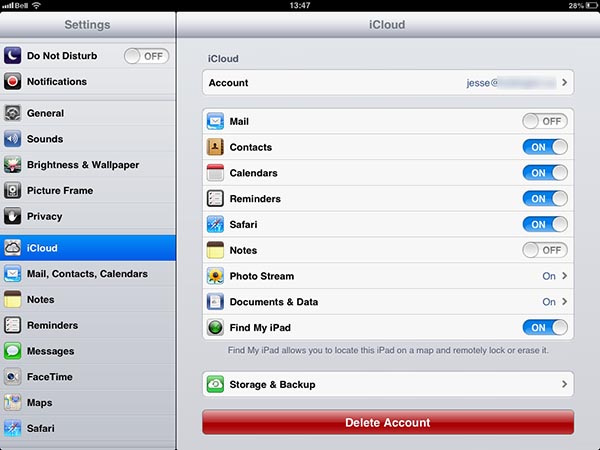
Multiple iPads sharing contacts in a company

A: If you’re setting up multiple iPads in a business environment, you’re likely using a single iTunes Store account to load a set of common apps onto these devices. Depending on your set up process, the Apple ID for your iTunes Store account will also be used as the default iCloud account, resulting in all of the iPads sharing the same contacts, calendars, and other iCloud information.

While this is handy for an individual user, since it saves them the trouble of logging in to the same account several times, it can obviously be a problem when configuring multiple devices for other people.


To address this, you should either disable iCloud contact synchronization or delete the iCloud account from each of the devices entirely, choosing to “Keep on My iPad” when prompted for what to do with contact and other iCloud information. This will result in contacts being stored locally on the device only, although they can still be synced over USB or Wi-Fi with iTunes on a Mac or Windows PC.

Alternatively, you can setup an individual iCloud account for each of your Directors so that they will be synchronizing their own contacts with their own accounts.


To do this, first delete the iCloud account on the device as above, and then sign in to or create a new iCloud account; the local contacts will automatically be uploaded to the new iCloud account and continue be synchronized from there.

Note that although creating and assigning individual iCloud accounts can be a useful way to allow wireless sync to a Mac, PC, or iPhone, you will need to ensure that this fits into any company policies or compliance legislation that you are required to observe regarding the storage of company information on external servers—Apple’s iCloud servers in this case. Alternative solutions such as Exchange ActiveSync can be used to sync contact information and calendars with an on-premises system such as an Exchange server, or a corporately approved online service such as Google Apps for Business.

The ideal way to deploy multiple iPads is to use the Apple Configurator tool for Mac or the iPhone Configuration Utility for Windows.



Latest News
The 14-inch MacBook Pro with M5 Chip 16GB RAM/512GB is $250 Off
1 Min Read
Noise and Static on AirPods Pro 3 Still Unfixed
1 Min Read
New iMac with 24-inch OLED Display May be Brighter With 600 Nits
1 Min Read
The 15-inch M4 MacBook Air 256GB Is $250 Off
1 Min Read
Internal Kernel Debug Kit from Apple Reveals Tests for a MacBook with A15 Chip
1 Min Read
Apple Currently In Talks With Suppliers for Chip Assembly & Packaging of iPhones in India
1 Min Read
Apple Allows Easier Battery Replacement For M5 MacBook Pro with 14-inch Display
1 Min Read
The Apple Watch SE 3 44mm GPS is $50 Off
1 Min Read
20th Anniversary iPhone May Launch in Two Years
1 Min Read
Better Image Generation Capabilities and Apple Music Integration Coming to ChatGPT
1 Min Read
A20 Pro Chip Coming to Next Gen iPad Mini OLED
1 Min Read
Amazon has the AirTag 4 Pack Marked $29 off
1 Min Read

iLounge logo

iLounge is an independent resource for all things iPod, iPhone, iPad, and beyond. iPod, iPhone, iPad, iTunes, Apple TV, and the Apple logo are trademarks of Apple Inc.

This website is not affiliated with Apple Inc.
iLounge © 2001 - 2025. All Rights Reserved.
  • Contact Us
  • Submit News
  • About Us
  • Forums
  • Privacy Policy
  • Terms Of Use
Welcome Back!

Sign in to your account

Lost your password?








