
iLoungeiLounge
  • News
    • Apple
      • AirPods Pro
      • AirPlay
      • Apps
        • Apple Music
      • iCloud
      • iTunes
      • HealthKit
      • HomeKit
      • HomePod
      • iOS 13
      • Apple Pay
      • Apple TV
      • Siri
    • Rumors
    • Humor
    • Technology
      • CES
    • Daily Deals
    • Articles
    • Web Stories
  • iPhone
    • iPhone Accessories
  • iPad
  • iPod
    • iPod Accessories
  • Apple Watch
    • Apple Watch Accessories
  • Mac
    • MacBook Air
    • MacBook Pro
  • Reviews
    • App Reviews
  • How-to
    • Ask iLounge
Font ResizerAa
iLoungeiLounge
Font ResizerAa
Search
  • News
    • Apple
    • Rumors
    • Humor
    • Technology
    • Daily Deals
    • Articles
    • Web Stories
  • iPhone
    • iPhone Accessories
  • iPad
  • iPod
    • iPod Accessories
  • Apple Watch
    • Apple Watch Accessories
  • Mac
    • MacBook Air
    • MacBook Pro
  • Reviews
    • App Reviews
  • How-to
    • Ask iLounge
Follow US

How-to › Ask iLounge

Ask iLoungeiPod

Missing built-in apps on iPod touch

Last updated: May 16, 2021 4:50 pm UTC
By Jesse Hollington
Missing built-in apps on iPod touch

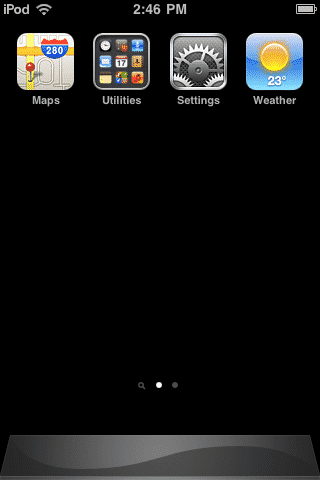
Q: My sister’s iPod touch has gone weird. She has a third-generation model and half of her icons the iPod came with are gone. The music, video, safari, App store, mail, calender, photos, contacts, maps, notes, clock, calculator and iTunes icons are not there any more. She has no way of listening to music, watching videos, going on the internet, buying apps on her iPod or anything like that.


We have no idea what happened. If anyone know please help us with this problem.
Missing built-in apps on iPod touch

– Quinn

A: Unless you have jailbroken your iPod touch it is extremely unusual for the built-in applications to disappear. Some of the apps can be hidden via the Restrictions option found in the iPod Settings, but this only applies to a few things that parents may want to restrict such as YouTube and the web browser, and cannot be used to disable or hide most of the other apps such as Mail, Music or Video.


Try swiping left and right to ensure that these apps haven’t inadvertently been moved to another page of your home screen, and if you’ve updated to iOS 4 be sure to look for any folders that these apps may have been moved into. It’s possible to reorganize and move any icon on the screen to alternate home screen pages or place them in folders, even with the built-in apps. Folders are displayed as small collections of icons, and you can identify if there are alternate home screen pages by looking for the dots near the bottom of the screen above the dock area.

You can also reset your icons back to their default home screen layout by going into the Settings app and choosing General, Reset, Reset Home Screen Layout.



Latest News
The Apple Watch Series 11 46mm GPS Is $100 Off
1 Min Read
Clamshell Style iPhone Being Looked Into By Apple
1 Min Read
Foldable iPhones May Have the Largest Battery Ever
1 Min Read
Apple and TSMC’s 10-Year Collaboration May Be Ending
1 Min Read
The 13-inch M5 iPad Pro 256GB Wi-Fi Is $149 Off
1 Min Read
M5 Pro and M5 Max Chips for the MacBook Pro could Roll Out with macOS 26.3
1 Min Read
Mac Ordering Process Revamped
1 Min Read
Check Signed By Steve Wozniak and Steve Jobs Sold For $2.4 Million
1 Min Read
The Anker 140W 4-Port GaN USB-C Charger is $35 Off
1 Min Read
No iPhone Air 2 This Year, according to Latest Report
1 Min Read
New Report Corroborates Split iPhone Release Dates
1 Min Read
Apple Losing More Researchers As They Plan To Release 2 Siri Versions
1 Min Read

iLounge logo

iLounge is an independent resource for all things iPod, iPhone, iPad, and beyond. iPod, iPhone, iPad, iTunes, Apple TV, and the Apple logo are trademarks of Apple Inc.

This website is not affiliated with Apple Inc.
iLounge © 2001 - 2025. All Rights Reserved.
  • Contact Us
  • Submit News
  • About Us
  • Forums
  • Privacy Policy
  • Terms Of Use
Welcome Back!

Sign in to your account

Lost your password?








