
Q: I recently created an account in iTunes for myself, and now my wife has an iPod as well. However, when I created an account for her in iTunes on the same computer and same iTunes Store page, all my music that I had was downloaded over to her account. This is fine, but it seems we have a shared account. All the music I originally have in iTunes all came from my years of collecting CD’s. I was told that if I did not buy my music from iTunes Store that all our media regardless would be shared. However, we just want seperate acounts with our own media content without having to filter and change everything back and forth. Thanks in advance for help.
– Tim
A: It sounds like you’re referring to an iTunes Store account, which actually has nothing to do with how content is organized within the iTunes library on your computer or synchronized to either of your iPods.
An iTunes Store account is used only to purchase content from the iTunes Store and access certain other Store-related features such as automatically retrieving album covers and the new iTunes 8 “Genius” feature. Setting up an iTunes Store account on your computer merely allows you to use these features, and authorizes your computer and any associated iPods to play music and other media content purchased with that particular account. iTunes Store accounts are not user or iPod specific, and in fact if you have set up two iTunes Store accounts in a single iTunes library, then all of the iPod devices that you synchronize with that library will be authorized for both accounts.
If you want to control which content is synchronized with each iPod, you will need to either set up a series of independent playlists for each iPod in the same iTunes library, or create different iTunes libraries entirely.
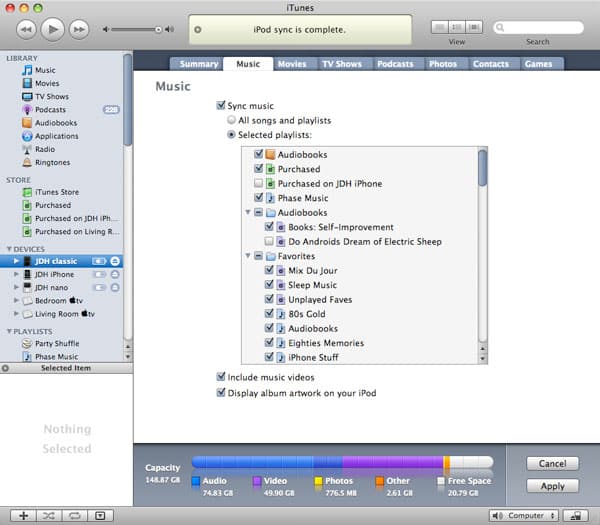
Generally, if you and your wife share the same general musical tastes but don’t necessarily want all of the same music, your best option is to create separate playlists for the music that you each want on your iPods, and then set each iPod to synchronize only those playlists. You can find the setting to synchronize selected playlists by connecting your iPod to your computer, selecting it from the iTunes “Devices” list on the left-hand side of the screen, and then choosing the “Music” tab:

Simply choose “Selected playlists” and then place a checkmark beside each playlist that you want on your iPod.
Only music contained in those specific playlists will be synchronized to that particular iPod. These synchronization settings are configured independently for each iPod, so you can then perform the same process for your wife’s iPod to select her playlists for synchronization to her iPod.
You can also use Smart Playlists for this purpose to easily collect larger quantities of music, favourite tracks, or recently-added tracks. Simply create the Smart Playlists with the criteria you would like, and then select them for synchronization in the same manner as any other playlist.
Note that in this scenario, since you are still sharing a single iTunes library, information such as ratings and play counts will be shared between both iPods. If this is a problem, or your music tastes vary more widely, you can create completely separate iTunes libraries instead, and then just sync your iPod to your own personal iTunes library, and have your wife sync her iPod to her library.
The easiest way to do this is to create separate user accounts in your Windows or Mac operating system.











