
iLoungeiLounge
  • News
    • Apple
      • AirPods Pro
      • AirPlay
      • Apps
        • Apple Music
      • iCloud
      • iTunes
      • HealthKit
      • HomeKit
      • HomePod
      • iOS 13
      • Apple Pay
      • Apple TV
      • Siri
    • Rumors
    • Humor
    • Technology
      • CES
    • Daily Deals
    • Articles
    • Web Stories
  • iPhone
    • iPhone Accessories
  • iPad
  • iPod
    • iPod Accessories
  • Apple Watch
    • Apple Watch Accessories
  • Mac
    • MacBook Air
    • MacBook Pro
  • Reviews
    • App Reviews
  • How-to
    • Ask iLounge
Font ResizerAa
iLoungeiLounge
Font ResizerAa
Search
  • News
    • Apple
    • Rumors
    • Humor
    • Technology
    • Daily Deals
    • Articles
    • Web Stories
  • iPhone
    • iPhone Accessories
  • iPad
  • iPod
    • iPod Accessories
  • Apple Watch
    • Apple Watch Accessories
  • Mac
    • MacBook Air
    • MacBook Pro
  • Reviews
    • App Reviews
  • How-to
    • Ask iLounge
Follow US

How-to › Ask iLounge

Ask iLoungeiCloudiPadiTunes

Managing Devices in your iTunes Store Account

Last updated: May 16, 2021 4:29 pm UTC
By Jesse Hollington
Managing Devices in your iTunes Store Account

Q: I recently replaced my iPad 2 with an iPad 3. I removed the old iPad from “Account Information / Manage Devices” in the iTunes Store. The person to whom I gave the iPad 2 performed a Restore within iTunes, and set it up as a new iPad. I restored from the backup of the iPad 2 during the initial setup of the iPad 3. However, the iTunes Store still thinks my iPad 2 is associated with my account. I removed it again, and repeated logging in to the iTunes Store from the new iPad, but the Store still shows my iPad 2 as an associated device (albeit with the current date).


Is this a bug in the iTunes Store? Did I miss or incorrectly perform a step in transitioning from the old iPad to the new? Will I have issues with the iTunes Store on the new iPad in the future?
Managing Devices in your iTunes Store Account

– Farnsworth

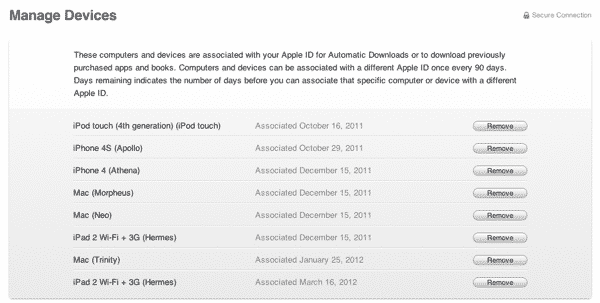
A: Actually, there does appear to be a problem in the iTunes Store with regard to actually identifying the new iPad models in the Manage Devices section. Basically, iTunes seems to be misidentifying at least some third-generation iPad models as second-generation devices—at least two of our editors are experiencing the exact same problem in this regard. In the example below, the first “iPad 2 Wi-Fi + 3G” entry represents an actual iPad 2 that would have been registered on that date; the last entry is actually a third-generation iPad that was setup from a backup of the previous iPad 2, similar to the scenario you describe. Note that the original iPad 2 is still in use with this account, yet despite being erased and setup as an entirely new device it also still appears under the old name.


The good news is that this appears to be merely a cosmetic issue—simply a matter of the wrong device model name being displayed. If you can connect to the iTunes Store from your device, and play and download content, your device is setup correctly regardless of what the Manage Devices screen shows.

In the same way as iTunes computer authorizations work, iOS devices and computers are registered with iTunes based on a specific hardware identifier in addition to the registration information being stored on the device itself. Restoring an iOS backup from one device to another will not transfer the iTunes Store registration; the new device still registers as a new device.


If you erase an iOS device and set it up as a new device you will still need to sign into the iTunes Store with your Apple ID and password to access your account regardless of whether it is still listed in the Manage Devices section. So in other words, even if you had not removed your old iPad from that list, the new owner can’t do anything with regard to your iTunes Store account unless they actually know your Apple ID and password, nor will the iPad display any indication of being registered for your account—the Manage Devices list only applies to the iTunes Store side and the iTunes Store does not push any account settings out to your devices, registered or not.

In fact, the device associations listed in iTunes are actually only used for features such as iTunes in the Cloud and iTunes Match. The only reason you even need to bother removing an older device from the Manage Devices screen is to free up a registration slot as there is a ten-device limit for these services.



Latest News
The 14-inch MacBook Pro with M5 Chip 16GB RAM/512GB is $250 Off
1 Min Read
Noise and Static on AirPods Pro 3 Still Unfixed
1 Min Read
New iMac with 24-inch OLED Display May be Brighter With 600 Nits
1 Min Read
The 15-inch M4 MacBook Air 256GB Is $250 Off
1 Min Read
Internal Kernel Debug Kit from Apple Reveals Tests for a MacBook with A15 Chip
1 Min Read
Apple Currently In Talks With Suppliers for Chip Assembly & Packaging of iPhones in India
1 Min Read
Apple Allows Easier Battery Replacement For M5 MacBook Pro with 14-inch Display
1 Min Read
The Apple Watch SE 3 44mm GPS is $50 Off
1 Min Read
20th Anniversary iPhone May Launch in Two Years
1 Min Read
Better Image Generation Capabilities and Apple Music Integration Coming to ChatGPT
1 Min Read
A20 Pro Chip Coming to Next Gen iPad Mini OLED
1 Min Read
Amazon has the AirTag 4 Pack Marked $29 off
1 Min Read

iLounge logo

iLounge is an independent resource for all things iPod, iPhone, iPad, and beyond. iPod, iPhone, iPad, iTunes, Apple TV, and the Apple logo are trademarks of Apple Inc.

This website is not affiliated with Apple Inc.
iLounge © 2001 - 2025. All Rights Reserved.
  • Contact Us
  • Submit News
  • About Us
  • Forums
  • Privacy Policy
  • Terms Of Use
Welcome Back!

Sign in to your account

Lost your password?








