iLoungeiLounge
  • News
    • Apple
      • AirPods Pro
      • AirPlay
      • Apps
        • Apple Music
      • iCloud
      • iTunes
      • HealthKit
      • HomeKit
      • HomePod
      • iOS 13
      • Apple Pay
      • Apple TV
      • Siri
    • Rumors
    • Humor
    • Technology
      • CES
    • Daily Deals
    • Articles
    • Web Stories
  • iPhone
    • iPhone Accessories
  • iPad
  • iPod
    • iPod Accessories
  • Apple Watch
    • Apple Watch Accessories
  • Mac
    • MacBook Air
    • MacBook Pro
  • Reviews
    • App Reviews
  • How-to
    • Ask iLounge
Font ResizerAa
iLoungeiLounge
Font ResizerAa
Search
  • News
    • Apple
    • Rumors
    • Humor
    • Technology
    • Daily Deals
    • Articles
    • Web Stories
  • iPhone
    • iPhone Accessories
  • iPad
  • iPod
    • iPod Accessories
  • Apple Watch
    • Apple Watch Accessories
  • Mac
    • MacBook Air
    • MacBook Pro
  • Reviews
    • App Reviews
  • How-to
    • Ask iLounge
Follow US

How-to › Ask iLounge

ArticlesAsk iLounge

Maintaining sort order on large playlists

Last updated: May 12, 2021 7:22 pm UTC
By Jerrod H.
Maintaining sort order on large playlists

Q: I’d like to create a playlist containing Rolling Stones’ Top 500 songs, and order them by the rank that Rolling Stone’s gave them in their list, i.e.:


I certainly want to keep the existing info for each file, track, album, etc. How would you suggest creating this type of playlist and still maintaining the ranking?

Maintaining sort order on large playlists

– Blake

  A: There are several ways this can be done. First, the easiest: simply create a manual playlist containing the songs in the Top 500 list. Then, put the songs into their appropriate ranking by dragging them up and down the list. Make sure that the leftmost column header is colored blue.

When this is column header is active (and shuffle is off), the sort will be maintained in iTunes and sent to the iPod. Change to another column heading or turn shuffle on, and your sort will temporarily disappear. If you do this accidentally, don’t fret: your sort is still maintained, and all you have to do is reselect the leftmost column header. It’s a bit confusing that the numbers on the left don’t change as you play with the columns, but know that you can always restore your manual sort.

Sure, that method is drag-and-drop easy, but in our opinion, it’s very dangerous.

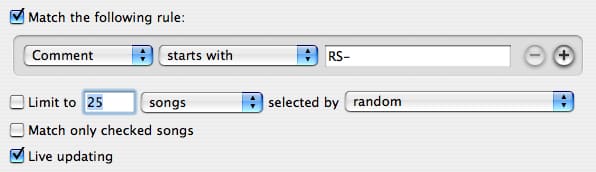
If you accidentally delete that playlist, you’ve likely lost hours of dragging and dropping. How would we do it? We’d use the “Comment” tag to permanently mark each member of the list with its ranking. If you do, be sure that you’ll use something that is unique, and will correctly behave in a computerized sort. For example, we’d use something like “RS-001 through RS-500.”

You may find it worthwhile to do the first method before beginning to tag your “Comments” field, so that you can keep the “Get Info” window open, and press “Next” to advance to the next song’s “Get Info” panel directly.

With these tags in the “Comments” field, you could then create a smart playlist that looks like the following:

image

Then, sort the contents of the smart playlist by the “Comment” tag, in ascending mode (triangle pointing up), and you have a Top 500 list that’s simple to regenerate! Sure, it will take a lot of repetitive work to initially create, but it’s far more permanent.

Rank Title Artist Year
1 Like a Rolling Stone Bob Dylan 1965
2 (I Can’t Get No) Satisfaction The Rolling Stones 1965
3 Imagine John Lennon 1971
4 What’s Going On Marvin Gaye 1971
5 Respect Aretha Franklin 1967
6 Good Vibrations The Beach Boys 1966
7 Johnny B. Goode Chuck Berry 1958

Latest News
The 14-inch MacBook Pro with M5 Chip 16GB RAM/512GB is $250 Off
1 Min Read
Noise and Static on AirPods Pro 3 Still Unfixed
1 Min Read
New iMac with 24-inch OLED Display May be Brighter With 600 Nits
1 Min Read
The 15-inch M4 MacBook Air 256GB Is $250 Off
1 Min Read
Internal Kernel Debug Kit from Apple Reveals Tests for a MacBook with A15 Chip
1 Min Read
Apple Currently In Talks With Suppliers for Chip Assembly & Packaging of iPhones in India
1 Min Read
Apple Allows Easier Battery Replacement For M5 MacBook Pro with 14-inch Display
1 Min Read
The Apple Watch SE 3 44mm GPS is $50 Off
1 Min Read
20th Anniversary iPhone May Launch in Two Years
1 Min Read
Better Image Generation Capabilities and Apple Music Integration Coming to ChatGPT
1 Min Read
A20 Pro Chip Coming to Next Gen iPad Mini OLED
1 Min Read
Amazon has the AirTag 4 Pack Marked $29 off
1 Min Read

iLounge logo

iLounge is an independent resource for all things iPod, iPhone, iPad, and beyond. iPod, iPhone, iPad, iTunes, Apple TV, and the Apple logo are trademarks of Apple Inc.

This website is not affiliated with Apple Inc.
iLounge © 2001 - 2025. All Rights Reserved.
  • Contact Us
  • Submit News
  • About Us
  • Forums
  • Privacy Policy
  • Terms Of Use
Welcome Back!

Sign in to your account

Lost your password?











