
iLoungeiLounge
  • News
    • Apple
      • AirPods Pro
      • AirPlay
      • Apps
        • Apple Music
      • iCloud
      • iTunes
      • HealthKit
      • HomeKit
      • HomePod
      • iOS 13
      • Apple Pay
      • Apple TV
      • Siri
    • Rumors
    • Humor
    • Technology
      • CES
    • Daily Deals
    • Articles
    • Web Stories
  • iPhone
    • iPhone Accessories
  • iPad
  • iPod
    • iPod Accessories
  • Apple Watch
    • Apple Watch Accessories
  • Mac
    • MacBook Air
    • MacBook Pro
  • Reviews
    • App Reviews
  • How-to
    • Ask iLounge
Font ResizerAa
iLoungeiLounge
Font ResizerAa
Search
  • News
    • Apple
    • Rumors
    • Humor
    • Technology
    • Daily Deals
    • Articles
    • Web Stories
  • iPhone
    • iPhone Accessories
  • iPad
  • iPod
    • iPod Accessories
  • Apple Watch
    • Apple Watch Accessories
  • Mac
    • MacBook Air
    • MacBook Pro
  • Reviews
    • App Reviews
  • How-to
    • Ask iLounge
Follow US

How-to › Ask iLounge

ArticlesAsk iLoungeiPod

Maintaining Playback Position on iPod

Last updated: May 16, 2021 5:12 pm UTC
By Jesse Hollington
Maintaining Playback Position on iPod

Q: How long can I safely leave my iPod on “Pause”? I like to play songs randomly, but when I turn the iPod off, the random list expires and a new one is created the next time I turn it on, often resulting in playing of music I heard the last time I played the iPod. I am hoping that pause is a way to turn it off but have it keep the same random list and remember what has been played.


– Bay
Maintaining Playback Position on iPod

A: With the traditional iPod models there really is not any difference between “pause’ mode and “off” mode, since you can’t actually power the device off manually—you can only put it to sleep. The iPod touch and iPhone are a little bit different in this regard, as there is a full power-off mode on these two devices, but typical users should seldom need to power the device right off versus putting it into sleep mode.

When pausing a track on the iPod, the content of the “Now Playing” queue is maintained, and you should normally be able to return to the last playing track just by hitting the “Play/Pause” button, or returning to the “Now Playing” menu item, which will be shown at the bottom of the main menu on the traditional iPods, or as a small “Now Playing” icon in the top-right corner in the “iPod” application on the iPod touch and iPhone.


This “Now Playing” queue is normally retained until you connect your iPod to a computer or the iPod goes into a hibernate or “Deep Sleep” mode, depending on the model of iPod. Older iPod models prior to the fifth-generation would go into “Deep Sleep” mode after 36 hours of inactivity. This was effectively a “power-off” mode to conserve battery life, and would result in the “Now Playing” queue being cleared.

Effectively, “Deep Sleep” involved powering down the iPod, requiring it to be restarted in the same way that manually rebooting the iPod would.


As of the fifth-generation iPod, this has now been replaced with a “Hibernate” mode, which still puts the iPod into a power-conservation mode, after 14 hours in this case, but returns to the point where you left off, including not only the content of the “Now Playing” queue, but your actual position that you left off in whichever track you were currently playing.

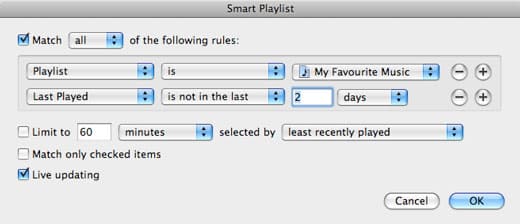
Another option for avoiding listening to the same tracks repeatedly, even across computer syncs (where the “Now Playing” queue gets cleared) would be to use a Smart Playlist with a criteria that would filter out any tracks you had recently listened to. You could create this Smart Playlist based on tags and/or ratings within your music, or you could even base it on whatever current playlist(s) you’re already using.



Latest News
The 14-inch MacBook Pro with M5 Chip 16GB RAM/512GB is $250 Off
1 Min Read
Noise and Static on AirPods Pro 3 Still Unfixed
1 Min Read
New iMac with 24-inch OLED Display May be Brighter With 600 Nits
1 Min Read
The 15-inch M4 MacBook Air 256GB Is $250 Off
1 Min Read
Internal Kernel Debug Kit from Apple Reveals Tests for a MacBook with A15 Chip
1 Min Read
Apple Currently In Talks With Suppliers for Chip Assembly & Packaging of iPhones in India
1 Min Read
Apple Allows Easier Battery Replacement For M5 MacBook Pro with 14-inch Display
1 Min Read
The Apple Watch SE 3 44mm GPS is $50 Off
1 Min Read
20th Anniversary iPhone May Launch in Two Years
1 Min Read
Better Image Generation Capabilities and Apple Music Integration Coming to ChatGPT
1 Min Read
A20 Pro Chip Coming to Next Gen iPad Mini OLED
1 Min Read
Amazon has the AirTag 4 Pack Marked $29 off
1 Min Read

iLounge logo

iLounge is an independent resource for all things iPod, iPhone, iPad, and beyond. iPod, iPhone, iPad, iTunes, Apple TV, and the Apple logo are trademarks of Apple Inc.

This website is not affiliated with Apple Inc.
iLounge © 2001 - 2025. All Rights Reserved.
  • Contact Us
  • Submit News
  • About Us
  • Forums
  • Privacy Policy
  • Terms Of Use
Welcome Back!

Sign in to your account

Lost your password?








