
Q: I’m extremely paranoid about the idea of my iPhone tracking my location for services like Facebook, having been the victim of a stalker once. As a result, I keep all of the location settings disabled on my iPhone. When I downloaded Facebook’s new Camera program, however, it says it needs to use my location in order to access photos from my Camera Roll. What gives here? Why does Facebook need to track my location to upload photos that are already stored on my iPhone? The normal Facebook app doesn’t care about this—I’ve never needed to turn location on to post photos from there, yet the Facebook Camera app, which is dedicated to posting photos wants to force me to turn location services on to use it. Or is it possible that the main Facebook app is somehow bypassing that I have location services OFF and actually tracking my location anyway? My husband keeps telling me I should just get off Facebook as they’re always spying on people, and I’m starting to wonder if he’s right.
– Anonymous
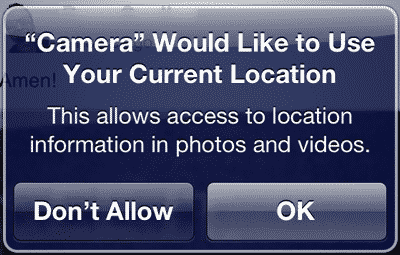
A: The issue here is not that the Facebook Camera application is specifically tracking your location, but rather that iOS is erring on the side of caution when it comes to exposing your stored location data to any third-party application or service.
The iPhone has supported geo-tagging of photos since 2008 with the addition of the GPS capabilities in the iPhone 3G, storing your location in every photo you take with the built-in Camera app. However, prior to iOS 4.1 this information was not available at all to third-party apps accessing photos from your Camera Roll—it only appeared in your photos when they were transferred directly to your computer via a USB connection. Basically, iOS stripped out all of this data under the hood before handing photos over to third-party apps, avoiding the risk of users inadvertently sharing private location data in photos uploaded to online services such as Flickr, Picasa or Facebook.
With the release of iOS 4.1, Apple created a new interface that allowed third-party apps to access all of the stored data in a photo, including the location information. However, in the interest of user privacy this ability was tied into the iOS location service with warnings added to ensure that users were at least somewhat aware that they may potentially be sharing personal location information when uploading photos from third-party apps. If location services is enabled on your device, you normally receive a permission request the first time you attempt to access your Camera Roll from a third-party app, although it’s important to keep in mind that you will not see a separate warning for the camera roll if the app already has already requested access to location services for another reason—once you’ve given the app permission to use location services, this presumes authorization for accessing the stored location information in your camera roll as well.
However, if you have location services disabled globally, or you have previously denied the app permission to use location services, you will instead simply see an error message advising you that the application is unable to access your camera roll photos. Sadly, this is an all-or-nothing choice and there seems to be no way to simply go back to the old behaviour of stripping the location data out before uploading the photo.

Remember, however, this has nothing to do with the iPhone or the third-party app tracking your current location; it is merely a warning based on the fact that the app could be accessing the location information in the photos, revealing where the photos you’re uploading were actually taken. However, it’s also worth noting that just because an app can access this location data doesn’t mean that it’s actually using it; many apps, including Facebook, convert or resize photos before uploading them anyway, effectively discarding the stored location data in the process.
Ironically, if you have location services turned off entirely, it’s very likely your photos weren’t even geo-tagged in the first place. Unfortunately, it seems that iOS isn’t quite clever enough to actually check whether any of your photos actually have location information contained in them; it simply makes a blanket assumption that some might include location data and thereby denies access to the camera roll using the newer interface if location services are disabled.











