
Q: I’m seeing a really confusing inconsistency in iTunes that I’m hoping you can help explain how to fix as I’ve been tearing my hair out trying to figure out what’s wrong. The problem is that the total storage space that iTunes says it’s using for my TV shows is way off when compared to the actual disk space being used, by dozens of gigabytes in fact. At first I thought maybe I had some extra files in my iTunes folders left over from ripping my own DVDs, but I’ve been through them twice now and can’t find any extra stuff in there that isn’t already listed in iTunes. I’ve even gone so far as to add everything up manually in the “size” column in iTunes in case there’s a calculation error in iTunes, but it matches what iTunes is showing me at the bottom of the screen. Strangely, this problem only seems to apply to TV shows—movies, music, podcasts, and books all more or less add up correctly (or close enough at least). Any idea how I can find the hidden content on my hard drive that’s taking up this extra space?
– George
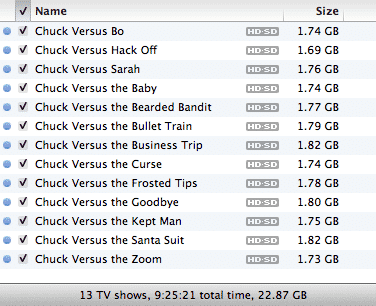
A: Since you say this issue is only showing up for your TV shows, it sounds like the problem might be related to how iTunes handles items that are available in your library in multiple SD and HD formats.
The storage sizes shown in iTunes reflect the actual content that is displayed in your iTunes library. The problem is that with TV shows purchased from the iTunes Store, you may have up to three different versions of the same item stored on your hard drive—standard-definition, 720p HD and 1080p HD. For these items, both the individual size and the total at the bottom of the screen will only display the size of the selected version, not the cumulative size of all of the versions that are actually stored on your hard drive.


Which version is displayed for your movies and TV shows by default is determined by the Preferred Video Version setting in your iTunes Playback preferences.

You can also override this default on a per-item basis by right-clicking on the item and choosing your preferred version from the Version sub-menu.

When changing these settings, you’ll notice that iTunes will update the individual storage sizes and calculated totals to reflect what content is actually selected for playback in iTunes, which can result in quite a discrepancy in some cases, particularly between SD and either format of HD content.

Unfortunately, getting a total is not as simple as changing the default format and adding up the numbers, since there’s very likely going to be a lot of overlap here. As the name implies, the Preferred Video Versionsetting in iTunes only specifies the preferred format to display; if an item is not available in the preferred format, iTunes will display the best available format. This means that your totals for each setting will include content that is only available in one of the other formats. Further, iTunes does not provide any way to actually search or filter by video format; no Smart Playlist criteria or even columns are available to display this information. You can use Windows or Mac OS X search tools to search for and total up your video file sizes manually—720p HD files will have an (HD) suffix and 1080p versions get a (1080p HD) suffix—but there isn’t any way to easily correlate this to the totals displayed in iTunes.
If you are concerned that there is extra content laying around in your iTunes Media folder that isn’t actually in your iTunes library, one way to deal with this is to simply transfer your library to another directory or hard drive using iTunes’ Consolidate feature, as explained in our article on Transferring your iTunes Library.











