
iLoungeiLounge
  • News
    • Apple
      • AirPods Pro
      • AirPlay
      • Apps
        • Apple Music
      • iCloud
      • iTunes
      • HealthKit
      • HomeKit
      • HomePod
      • iOS 13
      • Apple Pay
      • Apple TV
      • Siri
    • Rumors
    • Humor
    • Technology
      • CES
    • Daily Deals
    • Articles
    • Web Stories
  • iPhone
    • iPhone Accessories
  • iPad
  • iPod
    • iPod Accessories
  • Apple Watch
    • Apple Watch Accessories
  • Mac
    • MacBook Air
    • MacBook Pro
  • Reviews
    • App Reviews
  • How-to
    • Ask iLounge
Font ResizerAa
iLoungeiLounge
Font ResizerAa
Search
  • News
    • Apple
    • Rumors
    • Humor
    • Technology
    • Daily Deals
    • Articles
    • Web Stories
  • iPhone
    • iPhone Accessories
  • iPad
  • iPod
    • iPod Accessories
  • Apple Watch
    • Apple Watch Accessories
  • Mac
    • MacBook Air
    • MacBook Pro
  • Reviews
    • App Reviews
  • How-to
    • Ask iLounge
Follow US

Articles

Articles

iTunes Store HD Movies Don’t Play on My Monitor: Solutions

Last updated: May 15, 2021 11:28 am UTC
By Jeremy Horwitz
iTunes Store HD Movies Don’t Play on My Monitor: Solutions

Yesterday, Apple announced that the iTunes Store was now selling $20 high-definition movies for viewing on a computer, as well as renting computer-ready versions for $4-$5 in the same way that it has been through the Apple TV. In an impressive, though space-consuming feat, Apple provides users with both a high-definition video for computer and Apple TV use, as well as one that’s lower-resolution and capable of being played on your iPod or iPhone. The test video we downloaded, Punisher: War Zone, came in a 3.09GB, 1280×532 file, as well as a DVD-quality 1.15GB, 853×354 version. Unfortunately, the HD version refused to play back from a current-model MacBook through a high-definition external monitor—even an Apple Cinema Display.

iTunes Store HD Movies Don’t Play on My Monitor: Solutions

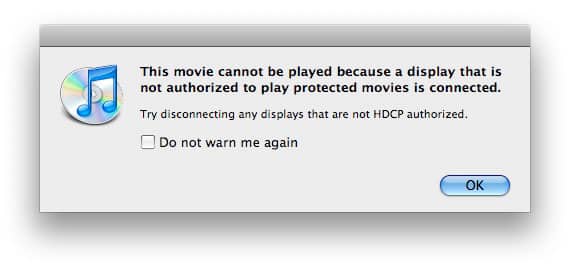
If you’re using a relatively new Mac, specifically one with a Mini DisplayPort connector, and trying to play iTunes Store HD movies through any external monitor other than Apple’s recently-released 24” LED Cinema Display, you’re most likely out of luck. Click on the video and iTunes will give you an error message: “This movie cannot be played because a display that is not authorized to play protected movies is connected. Try disconnecting any displays that are not HDCP authorized.” Try again to play it, and the video playback window will appear, completely black, and no audio will be present.


But if you try to play the same video on the screen built into your Mac, or on Apple’s LED Cinema Display, it will work just as expected.


iTunes Store HD Movies Don’t Play on My Monitor: Solutions

The reasons for this error message are simple: Apple has started to support HDCP, “high-bandwidth digital content protection,” an Intel-developed way to stop high-definition videos from being played on older, less secure receiving devices. Virtually all VGA- and DVI connector-equipped external computer monitors sold in the past are non-compliant, so users of Apple’s latest Mini DisplayPort-based Mac computers will need to either watch the HD videos on the screens built into their computers, buy new, HDCP-compliant monitors, or transfer their files to an iTunes-authorized computer without Mini DisplayPort.


iTunes Store HD Movies Don’t Play on My Monitor: Solutions

That latter option is available because Apple does not appear to enforce HDCP protection on earlier computers. We tested the same HD video on an older, DVI connector-equipped Mac mini with the same prior-generation Cinema Display, and it played without incident—as soon as we installed iTunes 8.1. iTunes 8.0.2 refused to play the HD movie at all, suggesting that iTunes would not authorize the video for that computer.


iTunes Store HD Movies Don’t Play on My Monitor: Solutions

Even though Apple includes both HD and SD versions of videos when you make an HD movie purchase, iTunes doesn’t currently handle external monitor playback in an especially bright way.


The HDCP error message is basically a dead-end, offering no obvious solution or alternative for users who want to watch the videos they’ve just purchased on their external monitors. Thankfully, there is an option. Right click on the movie, and an option will appear in the list of choices: “Version.” By “Default,” iTunes selects HD. But by selecting “Standard Definition (SD),” iTunes will play that movie on an external monitor—at the standard-definition resolution. It doesn’t make the best use of the monitor’s capabilities, but at least users can watch part of what they’ve purchased.


iTunes Store HD Movies Don’t Play on My Monitor: Solutions

Also note that HDCP isn’t required for all HD videos. High-definition TV shows purchased through the iTunes Store will generally play back on both a computer and an external monitor without a fuss—a reason that users most likely haven’t come across this error message up until now.



Latest News
The 14-inch MacBook Pro with M5 Chip 16GB RAM/512GB is $250 Off
1 Min Read
Noise and Static on AirPods Pro 3 Still Unfixed
1 Min Read
New iMac with 24-inch OLED Display May be Brighter With 600 Nits
1 Min Read
The 15-inch M4 MacBook Air 256GB Is $250 Off
1 Min Read
Internal Kernel Debug Kit from Apple Reveals Tests for a MacBook with A15 Chip
1 Min Read
Apple Currently In Talks With Suppliers for Chip Assembly & Packaging of iPhones in India
1 Min Read
Apple Allows Easier Battery Replacement For M5 MacBook Pro with 14-inch Display
1 Min Read
The Apple Watch SE 3 44mm GPS is $50 Off
1 Min Read
20th Anniversary iPhone May Launch in Two Years
1 Min Read
Better Image Generation Capabilities and Apple Music Integration Coming to ChatGPT
1 Min Read
A20 Pro Chip Coming to Next Gen iPad Mini OLED
1 Min Read
Amazon has the AirTag 4 Pack Marked $29 off
1 Min Read

iLounge logo

iLounge is an independent resource for all things iPod, iPhone, iPad, and beyond. iPod, iPhone, iPad, iTunes, Apple TV, and the Apple logo are trademarks of Apple Inc.

This website is not affiliated with Apple Inc.
iLounge © 2001 - 2025. All Rights Reserved.
  • Contact Us
  • Submit News
  • About Us
  • Forums
  • Privacy Policy
  • Terms Of Use
Welcome Back!

Sign in to your account

Lost your password?








