
Q: I’ve run into a problem with trying to import CDs that have been burned by my mother’s iMac into iTunes on my PC running Windows Vista. Half the time, iTunes doesn’t even recognize the CD at all and just lists “Track 01” “Track 02” etc.
On the rare occasion that it does recognize the CD correctly there are often either huge spelling errors or the tags are vastly different than the original iTunes tracks. All of these original tracks were purchased through iTunes, so why does the information get so jumbled and is there anything I can do about it?
– Christina
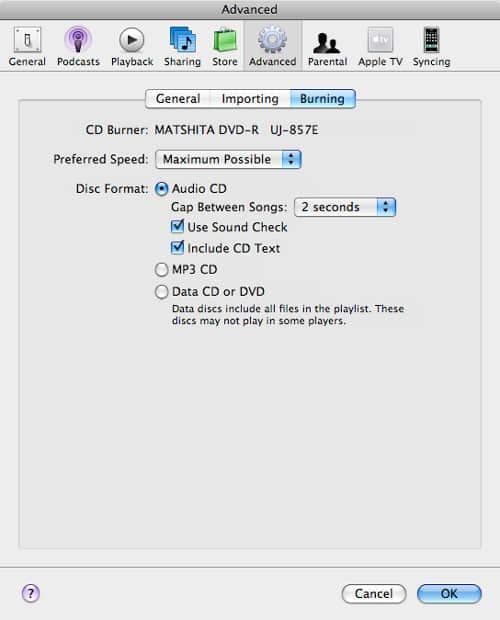
A: The problem here is that by default the audio CD format does not actually store track information, so when you insert a CD into iTunes to import that music, it is not reading the track information from the CD itself. What it is actually doing is looking up the track information on the Internet using the Gracenote CD Database (CDDB). This look up is based on trying to identify the unique properties of the CD itself, rather than anything about the individual tracks.
This works reasonably well for commercial CDs or CDs burned of actual albums (which should more or less match the commercial CD of the same album).
However, for “mix CDs” it’s unlikely to work at all, since such mixes are generally unique, and therefore wouldn’t be listed in CDDB.
Further, keep in mind that CDDB is a user-contributed system, whereby most of the track information has been uploaded by users such as yourself. The CDDB team strives to correct errors, but most of the time these are corrected by multiple submissions for more common CDs. Spelling errors do sometimes slip through, particularly for less popular CDs where there aren’t a lot of repeated user submissions to correct the information. Further, the CDDB system will sometimes misidentify a CD that you have burned yourself as actually being completely different, largely due to the algorithm that is used to match the CD you’ve inserted against the CDDB system.
Unfortunately, there isn’t really any way you can fix this without burning the CDs again from the source computer.
iTunes 7 introduced a “CD-Text” feature that can be enabled when burning CDs which will include the track information on the CD using the CD-Text standard, although it should be noted that both the CD burner on the source computer and your CD drive on Windows Vista must support the CD-TEXT standard for this to work—not all drives support this. This is a useful feature for burning an audio CD that can display track information on a standard CD player that supports CD-Text (ie some car stereos, for instance), but it’s not really the preferred method for burning CDs to move songs between computers.
The better option is to burn a data CD (or DVD) from your mother’s computer. This will provide the advantage of fitting five to ten times more tracks on a single disc (since they are stored in their original MP3 or AAC compressed format), and of course all tag information is automatically included. Further, burning an audio CD and then re-ripping it to MP3 or AAC normally results in a quality loss since you are compressing the digital audio twice by converting it back to an audio CD and then “re-ripping” it back into MP3 or AAC.
Note that if these tracks were purchased from the iTunes Store and are not “iTunes Plus” tracks then your computer will need to be authorized for the account that was used to purchase them in order to play them back.











