
Back in the early days of MP3, I used WinAMP as my primary media player. While the focus of my experience was primarily on simply listening to my music, I did find quite a bit of enjoyment in using many of the (thousands of) add-ons that were available for it. These included “skins” (which change the application’s appearance and/or interface), audio enhancers (which enhance the sound characteristics of the music), and visualizer plug-ins (which enable stunning visual art displayed in motion synchronized to the music).
While the number of third-party addons for iTunes does not even come close to those available for WinAMP even in it’s early days, there are several nifty add-ons available that the average iTunes user may be interested in. As a basic introduction to these iTunes addons, this article will not be presented as an in-depth “how-to” article like most of the iPod 101/201 series, but instead will read more like a tour. By focusing on breadth instead of depth, this article will present the reader with the features, prices, and locations of a large assortment of cool add-ons for both the Mac and PC iTunes user. However, as a result of this shifted breadth/depth balance, the reader will be required to consult the website of each plug-in for specific instructions for installation and use—they will certainly differ for each item.
One last note: You may notice that there are a few more plug-ins mentioned for the MacOS version of iTunes than for the Windows version. Keep in mind, PC users, that iTunes has been around for years longer on the Mac than on the PC, and that more plugins are certainly coming your way as more developers jump on-board iTunes’ soaring popularity.
Without further (painful?) introduction, let’s get started; we have a lot to cover!
Visualization Plug-ins
iTunes Vis – (Free and included, Mac/PC)
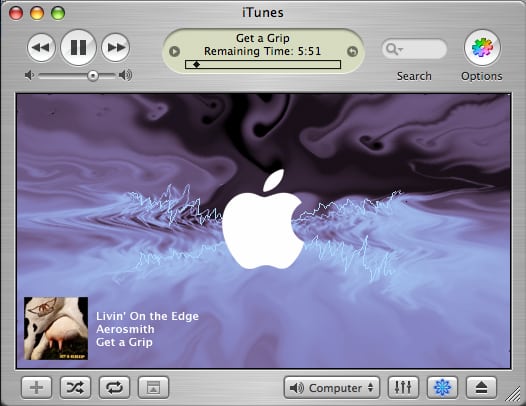
As many of you have likely already discovered, iTunes does include it’s own visualizer. (To activate it, click the 8-point rose icon in the bottom right corner of the iTunes window) However, many iTunes “power users” may find themselves looking for more features, more customization, and better graphics. Luckily, however, there are quite a few excellent offerings in this category, many of them free!

WhiteCap – (Free, Mac/PC)
SoundSpectrum software offers iTunes users (Mac AND PC) two distinct visualization plug-ins. Their first visualizer offering is WhiteCap.
WhiteCap works some amazing visual wonders with wireframe “twists” on a spectrum analyzer. WhiteCap’s wireframe designs bounce, as expected, to the music. Pre-defined “scenes” of wireframe creations—flags, donut shapes, lips, volcanos, and dozens more—actually morph from one preset to the next – the effect is very neat.
WhiteCap is extremely customizable both to the individual’s aesthetic tastes and to the capabilities of their computer. A “Gold” version of WhiteCap will soon be released, and will offer similar capabilities as “G-Force Gold” like Album Art display.

G-Force – (Free, Mac/PC)
G-Force Gold – ($10, Mac/PC)
SoundSpectrum’s second visualizer is G-Force, pictured above.
G-Force is an incredibly popular (and generally gorgeous!) visualizer plug-in available for several media players. G-Force improves upon WhiteCap’s wireframe simplicity, adding stunning and sophisticated visual effects—anti-aliasing, blurs, and massive particle motion.
G-Force Gold, available for $10, adds new effects, video recording, and album cover art display.

iGoom – (Free, Mac only)
iGoom is an open-source (and thus, free) visualization plug-in similar to G-Force. I find it equally stunning to G-Force, and oftentimes better.
At this point, iGoom is only available for Mac iTunes and non-iTunes Windows media programs. A Windows iTunes version is supposedly in the works—keep an eye out.

GasLight – (Free, Mac only)
GasLight from Steel Skies software, also a Mac-only visualizer, is perhaps the most visually stunning visualization plug-in available for iTunes to date. GasLight takes advantage of the fragment shaders built into advanced graphics cards and Panther’s OpenGL extensions to add some incredible glow, zoom, and blur effects to an otherwise fairly standard frequency spectrum analyzer.
As a result, an ATI Radeon 9600-9800 or nVidia GeForceFX video card are required for the full effect. MacOS X v10.3 (Panther) is required to use GasLight at all.
Audio Plug-ins

VolumeLogic – (Free, Mac/PC)
Currently the only significant iTunes audio enhancer add-on is VolumeLogic from Octiv Software. Available for both Mac and PC as a $20 commercial product, VolumeLogic processes iTunes’ audio and makes it sound significantly better.
VolumeLogic’s audio output is customizable by Volume, Drive, and Bass Boost, and many preset configurations are available for various musical genres.
VolumeLogic’s devout users report significant increase in sound quality for small and large speakers, as well as headphones. In our testing experience (there is a 12-day demo available), the difference was most profound when listening to our PowerBook’s small built-in laptop speakers.
Miscellaneous Add-ons

Multi-Plugin – (Free, PC only)
The iTunes “Multi-Plugin” developed by Neowin.net forum member “localhost” adds a plethora of features to the Windows version of iTunes 4.7. In addition to “skinning” PC iTunes slightly to look more like the MacOS X version, the Multi-Plugin offers the following features:
- Copies the name of the current song to the clipboard
- Creates a file with the current song info
- Changes iTunes’s window caption to “Artist – Song – iTunes” format
- Minimize To Tray (Using less memory when in tray than iTunes’s own Minimize To Tray feature)
- Control when iTunes will be Always-On-Top or not shown in the taskbar
- Makes programs recognize iTunes as if it were Winamp
- Makes ObjectBar recognize iTunes’s menu
- Increased compatibility with multimedia keyboard media player control keys
- Integration with EvilLyrics for finding a song’s lyrics
- Replaces the font used in iTunes (Tahoma) with a font similiar to Lucida Grande.
- Hides iTunes’s menu. You can still access it by pressing Alt+Down or by hovering the place where the menu was.
While many of these features require a bit of user creativity to actually find a use for (like the file created with song info), others may prove useful to the average user, like the aesthetic changes and lyrics intergration.

iTunes-LAME – (Free, Mac only)
iTunes-LAME from popular MacOS developer Blacktree, Inc. integrates the well-renowned high quality MP3 encoder known as LAME into the iTunes interface.
This small software package, which is free of charge, places direct access to a customizable LAME encoder into the “Script Menu” atop a Mac iTunes. The encoder will import audio tracks using the widely popular “—alt-preset standard,” “—alt-preset extreme,” or “—alt-preset insane” configuration options, or using any of an infinite number of combinations of bitrate, verbosity, and dozens of other power-user options.












