
Apple today announced a long-awaited major revision to its iTunes software, iTunes 5, available immediately for both Mac and PC.
In June, iLounge’s Editors compiled a list of their Top 10 iTunes 5 Feature Requests. The incredible volume of reader responses this article generated clearly indicates the widespread anticipation of a non-trivial iTunes update.
It’s finally here. While it’s obvious iTunes 5 doesn’t include all the features that we (and our readers) had hoped for, we’re generally impressed with what we’ve seen so far: iTunes 5 boasts playlist folders, Windows contact syncing, parental controls, a new search function, album reviews, a slick new look, and more.
Here is a brief overview of each of these features: Download iTunes 5 and follow along!
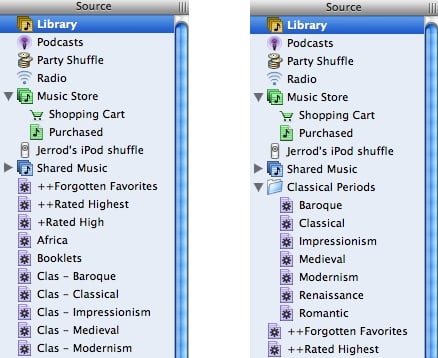
Playlist Folders:
Satisfying one of the most-requested iTunes features, Apple gave iTunes 5 the ability to categorize playlists into “folders.”
To create a new playlist folder, simply choose “New Folder” from iTunes’ “File” menu. A new folder will be created in the Source column, ready for you to rename and drag-and-drop playlists into.

Tip: If you select the playlist folder in iTunes’ Source column, the Library window will contain the contents of all playlists inside that folder.
Disappointingly, however, Apple’s new (iPod Software Updater 2005-09-06), released today, does not include iPod updates to allow these playlist folders to be navigable on the iPod itself. Instead, the individual playlists will appear on the iPod as they did when using iTunes 4.9 and below.
Still, we’ll be using this feature extensively, as we’ve had a couple dozen playlists crowding our iTunes Music Libraries’ “Source” columns for ages.
Search Bar:
One of iTunes’ neatest new features is hidden unless you try to use it.
Type a few letters into the familiar-looking iTunes “Search” field in the upper right corner of the display, and you’ll be surprised to find a new “Search Bar” appear at the top of your library window.
Much like the Spotlight Search Bar that MacOS X Tiger users are no doubt familiar with, this search bar allows the user to easily narrow their existing search with one or two additional clicks. Ever typed a search request, only to find there’s 300 valid results? Narrow them down by Type (the buttons on the left), or field (the buttons on the right), and the long list of results will instantly shrink accordingly.

Sure… this feature is helpful within your own library, but what about the Music Store? Try a search while viewing the Music Store… you’ll notice the same “Search Bar” appears along with a new search results panel, as below:

Tip: You can permanently activate the “Search Bar” by using the “Show Search Bar” menu item in iTunes’ “Edit” menu.
While this new Spotlight-esque search enhancement is neat, we were disappointed to see that it is lacking one key analog to a popular Spotlight feature—the ability to instantly save a search as a “Smart Folder” (or Smart Playlist, in this case).
Windows Contact Synchronizing:
Since the 2nd Generation iPod, Mac iPod users have been able to easily keep their computer’s contact information stored in Apple’s “Address Book” program synchronized with the iPod using MacOS X’s iSync software. Since iTunes 4.8, this functionality has been incorporated into iTunes itself… but again for Mac users only. All the while, Windows users had been required the to export vCard files from their favorite contacts management program and drag-and-drop them to a folder on the iPod. No longer is the process so un-elegant, and neither is “Enable Disk Use” still a prerequisite; now, Windows users can set up iTunes to automatically synchronize contacts from either Microsoft Outlook or Outlook Express to the iPod.
To do so, open iTunes’ “Preferences” window from the “File” menu, and choose the “iPod” tab (your iPod must be connected). The appropriate settings are on this panel.
Parental Controls:
Also new to iTunes 5 is the ability for administrators/parents to restrict various capabilities for unauthorized users or children.
To activate these features, open iTunes’ Preferences window, and click on the “Parental” tab. This will reveal 4 important (and largely self-explanatory) control features, shown in the screenshot below:

Note that these settings are worthless unless you activate the “Click the lock to prevent future changes” feature at the bottom of the window, preventing unauthorized users from changing the security settings.
Though none of iLounge’s editors is a parent, we think this feature will be a welcome addition for many. iLounge’s previous sentiments regarding uncensored pornographic podcasts no longer apply… Kudos, Apple!
Album Reviews:
The iTunes Music Store now accomodates the viewing of Album Reviews. Reviews can be read by simply navigating to an album page in the iTunes Music Store, such as “Demon Days” by Gorillaz. Only 1000 albums display reviews at this time.
It appears that Album Reviews are currently provided by “All Music Guide,” and user reviews cannot be submitted. Thus, this feature improvement is not terribly major, but the additional information is welcome.
Lyrics:
iTunes 5 now includes the ability to store lyrics text as a part of each Track’s “Get Info” panel. Simply select any song in your library, right-click, and choose “Get Info.” You’ll notice a “Lyrics” tab, into which you can paste as much text as you want.

Click OK, and the lyrics are stored along with the song.
It remains to be seen whether or not there will be an upcoming iPod Software Update that will allow these lyrics to be displayed on current and past iPods. However, if the new iPod nano’s capability to do so is any indication, there will be.
There’s one item about lyrics that leads iLounge’s editors to feel that Apple has missed an opportunity for a neat feature: lyrics content cannot yet be used as a criteria for a Smart Playlist. Imagine creating a smart playlist of all songs which contain the word “love,” for example.











