
For years, iPod tinkerers have known that holding down the correct two sequences of buttons (currently, hold Menu plus central Action button, then Reverse plus Action button) would reset an iPod and then bring up a hidden diagnostic mode. Various tests, including hard disk, screen, and Wheel diagnostics would appear, and the iPod could even be forced into a slave-like disk mode from this menu system.
But the diagnostic menus were written in geek Greek – odd abbreviations that only techies (read: engineers, computer scientists, or trained technicians) would understand. Apple could plausibly blame the iPod’s screen for this, as there just weren’t enough characters per line (using Chicago or the bizarro Asiatic Times-alike font used on the iPod test menus, at least) to display more than a handful of letters for each test. The practical consequence was that few people played with the tests – incidentally a good thing, most likely – and the diagnostic menu became the sort of relatively open secret that someone would charge $19.95 to tell you about in an iPod book.
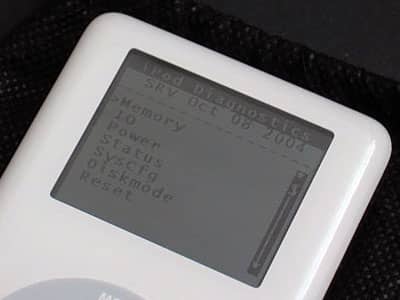
The iPod Photo’s enhanced screen provided Apple with an easy way to create a far less Byzantine iPod Diagnostic menu, which appears in the photo gallery attached here. At the top of the menu is what appears to be the latest software revision (SRV), of October 8, 2004, which would be only slightly before the date of Apple’s October 20, 2004 iPod Software Updater. Below are seven choices:
Memory
IO
Power
Status
SysCfg
Diskmode, and
Reset
Diskmode is the same as the aforementioned slave mode from old iPods, and reset just restarts the iPod Photo, bringing up the Apple logo and then its main menu. The top five menu items are the options of most interest.

Memory
Includes tests of the iPod’s SDRAM, Flash memory, and IRAM. SDRAM has an option called SDRAM Fulltest which takes a few minutes, indicated by a percentage number at screen’s bottom (picture 11), then displays a screen saying SDRAM OK.
MENU cancels this, and many other tests. Flash runs a checksum test of the iPod’s flash memory, verifying through a coded number that its contents (iPod firmware) are as expected. IRAM waits for a while, apparently runs a quick test, then resets the machine.
IO
A deeper menu than Memory, IO has the following options and sub-menus.
Comms is the communication ports menu (picture 3). It includes USBTest (is a USB cable connected?), FireWireTest (is a FireWire cable connected?), and Remote (is an iPod Remote connected? If so, plug it in and you can test the five buttons, otherwise it reports nothing (NG) in the HP (headphone port)).

Wheel presents two options: Keytest (hit all five buttons to end) and Wheeltest (first checks the wheel’s part ID, then gives you a readout of where your finger is on the pad),
LCD also has two options. Backlight tests the iPod’s screen’s backlighting, which defaults at 128 and can be lowered to 0 or raised to 255 – almost twice the default brightness level. Color lets you see the screen display flat colors, gradients, and a checkered pattern. For photos of the color tests visit the iPod Photo Diagnostic Mode gallery.
HeadphoneDetect gives you two options, present and hold.
Are headphones connected? Is the hold switch being used?
HardDrive includes four options. HDSpecs presents all details of the HD, from size and serial number to temperature. HDScan performs a full read verify scan of the hard drive, which uses the backlit screen (unlike most tests) for some reason. HDSMARTData presents more hard drive statistics. Finally, HDRW is a read-write disk test, with pass or fail readouts.

Audio presents two options. Playback plays an audio sample and MIC performs a recording test.
Power
A simple menu that either performs tests or puts the iPod to sleep. A submenu called A2DTests leads into multiple options: PhilipsID just checks to see that the power management system is active, while A2D lists a series of test results from other tests listed here (picture 10), namely Battery A2D, VCC, Battery Temp, USBDP and USBDN. These just measure the battery’s current strength and operating characteristics.
Status
Displays the status of four potentially connected systems.











