
Q: I have a 160 GB iPod Classic. I have downloaded some movies on it and they look and sound great. I want to play these movies on my 61” HDTV, so I bought the Composite Video Cables from the Apple Store and I also bought the docking station so that I could use the remote control. I was able to get the movie to show on my TV but going from the small iPod screen to a 61” HDTV did not work well at all. The video was very pixelated. Is there anything that can be done to have the video play on my TV just as clear as it does on the iPod?
– Anthony
A: The output quality from the iPod to a television screen will generally be of a lower quality than the video viewed on the iPod itself simply because of the difference in screen size. Further, the maximum image size of a video stored on the iPod classic is 640×480, without anamorphic encoding.
This resolution falls below what you might expect to see on an HDTV.
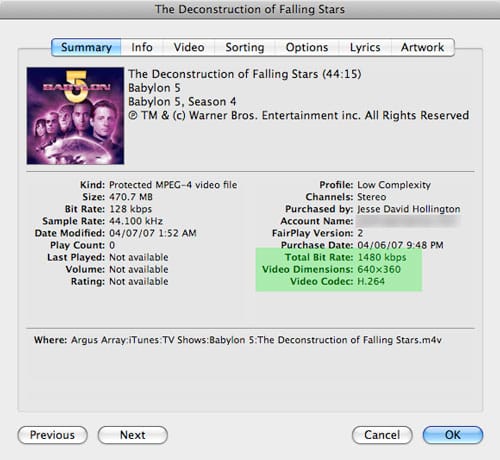
If a video is properly encoded on the iPod, however, it should not look any worse than an average standard-definition television broadcast station. If you are seeing quality significantly below this, you should check the quality of the source video itself, and the software that was used to encode the video and the settings that were used to do so. You can check the resolution of a video file from within iTunes simply by selecting the file and choosing File, Get Info from the iTunes menu. The “Summary” tab will show the resolution and bit-rate of the selected video:

Most videos purchased from the iTunes Store after September 2006 should be encoded with near-DVD quality settings, which will vary depending upon when you purchased the movie and how old it is. Most of Apple’s video content is encoded at a maximum of 640×480, which means that widescreen content is rendered at 640×352 or 640×272—lower than what your HDTV is capable of, but still reasonable enough for casual viewing and again roughly equivalent to an analog TV signal.
Most movies released since Apple announced movie rentals this past January are now being encoded anamorphically to provide a full 480-line presentation (resolutions of 640×480 being anamorphically stretched to 854×480—very close to DVD quality for all intents and purposes).
Note that any video content purchased from the iTunes Store prior to September 2006, however, will likely be encoded in 320×240, which was the original maximum resolution of the fifth-generation iPod prior to that time, and still matches the screen resolution of the current iPod classic models.
The quality of movies downloaded from other sources will vary widely, on the other hand. It is not uncommon to find movies from online file sharing services to be encoded in resolutions of 320×240 or even lower. These will look very poor when presented on a large television screen.
For movies that you encode/convert yourself, you can generally control the settings in the encoding software, assuming that the original source video is of sufficient resolution to begin with. Whenever possible, anamorphic 854×480 encoding at a minimum bit-rate of 1500 kbps should be used to produce acceptable TV output quality. Using higher settings on a lower-resolution source video, however, will not increase the quality of the original video.











