
Q: According to Apple, my nano is supposed to hold 1000 songs. However, when I try to sync over 900, I’m told that there is not enough room. Some songs that are less than 3 minutes long are 20.3 MB while some songs that are more than 3 minutes long are 3 MB. What causes this and can it be fixed?
– Kenneth
A: The amount of space a song takes up is directly proportional to its bit-rate, which is the amount of data that is encoded for each second of audio. This is normally expressed in kilobits per second, or kbps. A higher bit-rate normally means a higher quality audio file, since there is more data (bits) available to encode the sound you’re listening to. Of course, this also means a larger file.
As you might expect, a 256kbps audio file would take up twice as much space as the same audio file encoded at 128kbps, since there are twice as many bits of data for each second of audio.
In this case, the likely problem is that you may have your music encoded at higher bit-rates than what Apple considers to be typical. Apple’s storage calculations are still based on four-minute tracks encoded at 128kbps, which would work out to roughly 4MB of storage required per track (and therefore roughly 1000 tracks on a 4GB nano by extension). However, it is not uncommon with today’s digital music to find tracks encoded at higher bit-rates from various sources. In fact, even the iTunes Store offers “iTunes Plus” tracks at 256kbps—twice the bit-rate traditionally offered by the iTunes Store.
In the example you’ve provided above, the 20.3 MB 3-minute track is obviously encoded at a much higher bit-rate. In this case, it sounds like this track is in Apple Lossless format, which produces very high audio quality (technically indistinguishable from the original CD), but produces significantly larger files.
If you are encoding your entire library in Apple Lossless format, you will be able to store significantly fewer tracks on a 4GB nano, and may want to consider a higher-capacity player.
You can check out our iPod Storage Calculator to help you determine how much content you would be able to fit on a given iPod model at various bit-rates.
Of course, if audio quality is not critically important to you, then you can re-encode these tracks into a lower bit-rate by using the built-in conversion option available in iTunes. Keep in mind that generally only the most extreme audiophiles are concerned about putting Lossless quality files on their iPods—most average users will likely not be able to hear the difference between a Lossless file and a high-bitrate MP3/AAC file, and even this distinction is further diminished if you are not using high-quality earphones with your iPod.
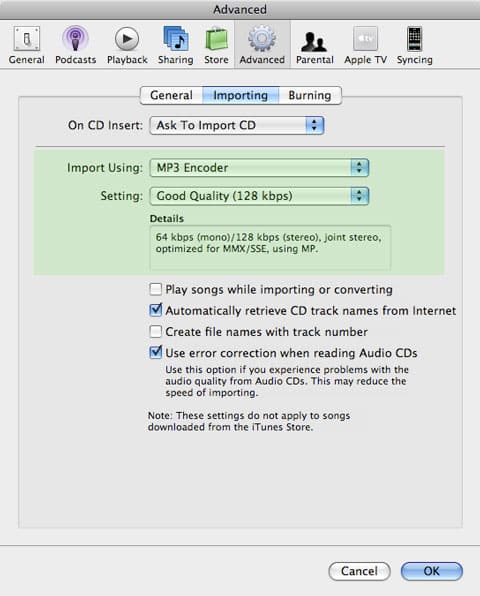
To convert your files, first check your default format settings by going to iTunes’ Preferences, and check the Advanced, Importing tab:

Ensure that the preferences here are set to your preferred encoder (MP3 or AAC) and a lower bit-rate of your choice. If you’re only using the stock Apple earbuds with your iPod nano, chances are that 128kbps will be more than sufficient in this regard, although you may want to choose a slightly higher bit-rate if you also plan to listen to your digital music library on other higher-quality devices. Bear in mind that any discussion about bit-rates will always be largely subjective—there are many users who swear that Apple Lossless is the only acceptable quality, and others who are more than happy with 128kbps files.











