
Welcome to this week’s first edition of iPhone + iPad Gems. Today, we’re looking at an interesting and relatively well-rated collection of iPad applications that are all either based upon earlier iPhone apps or arriving in forms that are both iPad- and iPhone-compatible. They range in purpose from news readers and remote computer access software to Twitter and educational tools.
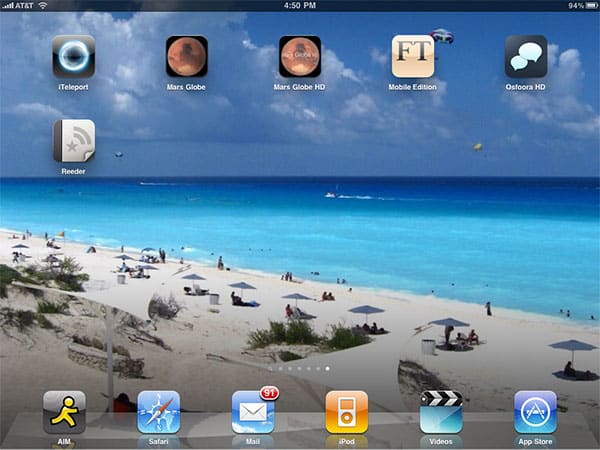
The top-rated apps this week are iTeleport, Osfoora HD, and Reeder for iPad. Read on for all the details.

Though the backstory is a little confusing, the appeal of iTeleport: Jaadu VNC for iPhone/iPad ($25) from iTeleport LLC is as clear as day: this program turns your iPad into a mirror of your Mac’s or PC’s screen, enabling you to control your computer—assuming that it’s turned on, in Screen Sharing mode, and running the company’s free iTeleport Connect software—over a Wi-Fi or 3G connection. Yes, that’s correct: you can access your computer from your iPad, and interact with the screen over a wireless connection. Once the computer-side app is running and you’ve used a Google Gmail account to log in, there’s little more to do than load iTeleport on the iPad, click on your computer’s name, and then watch as the iPad’s screen fills up with whatever’s on the computer’s screen. There’s virtually no configuration or thinking to be done; it just works. The initial screen-drawing process takes only a few seconds over 3G, and minor updates run only a second or so behind realtime, with bigger updates—video playback—slowing things down more. Over Wi-Fi, updates are nearly instantaneous. Cut, copy, and paste are supported, too, with a remote copy feature that enables you to grab content from your desktop machine and drop it onto your iPad.


Using the computer from the iPad is simple: touching the iPad screen gives you control over an arrow cursor, while pinch gestures zoom in and out of the screen. The full-screen view will be adequate for some tasks, while zooming in manually will be necessary for others—such as text entry—and you can call up an on-screen keyboard for that purpose as necessary. When iTeleport zooms in, it enables you to see pixels at larger than real-life size, and at completely zoomed out, an entire 27” iMac display can fit on screen at once. Control, video quality, and other adjustments can be made manually to improve speed or fidelity.
While the actual experience of accessing your computer from afar will vary somewhat based on the resolution of your machine’s display and the input scheme you’re using—accessing, say, a MacBook with a 13” display using an iPad with a Bluetooth keyboard will be easier than panning and zooming through a 30” monitor’s pixels with only the on-screen keyboard—it’s hard not to be impressed by the power iTeleport offers, and the speed with which it works. The only issue is the aforementioned confusing backstory: iTeleport is offered now in two versions, one with iPad and iPhone support, the other only for iPad, both at the same $25 price. Grab the one linked here, which works on both 3.5” and 9.7” screens. Apart from the price, iTeleport a no-brainer for times when you need to get access to your home computer via your iPad. iLounge Rating: A-.


A couple of weeks ago, we looked at the iPad and iPhone application Solar Walk, which provides users the opportunity to take a touch-assisted tour of our solar system; Michael Howard’s new app called Mars Globe HD ($1) has a different approach to the same concept. Rather than offering shallow looks at every planet and moon, Mars Globe HD focuses solely on Mars, wrapping a comparatively very high-resolution texture around a spinnable globe that can be overlaid with five categories of text: “highlights,” “terrain,” “spacecraft,” “albedo,” or “people,” with highlights focusing on the major elements from the other categories. Each text element can be tapped to bring up a window with additional text information and web links, or examined collectively via a clickable alphabetized list of items.

On a positive note, Mars Globe offers the sort of depth and outbound linking that we’d have loved to see in Solar Walk, but the lack of additional imagery, music, and fun factors collectively make the application feel dry—not as enjoyable as Solar Walk, and certainly not as worth fully exploring as, say, The Elements. Apart from a mode that shifts the map from accurate coloration to elevation, and another that changes from “normal” to “grayscale,” “night vision,” and anaglyph 3D viewing modes, there’s not much here to appeal to users other than Mars-obsessed students. A free, earlier version for the iPhone called Mars Globe gives you a chance to check out the same content, albeit in vertical orientation only, and without the high-resolution textures. iLounge Rating (Both): B.

Major international newspapers have rushed to create iPad-ready editions, and the Financial Times has recently released its own take on its famously pink printed publication. From now until July 31, 2010, the Financial Times iPad Edition is free—thanks to an advertiser’s sponsorship—which gives the economically- and politically-focused paper an opportunity to win new readers before switching to a locked-down subscription model. For now, 10 free articles will be displayed in a 30-day period before you register for a free account. The paper’s U.K. edition is displayed by default, but a quick tap on the top of the page reveals settings including a news region toggle, offering access to United States, Europe, Asia Pacific and Middle East versions.

What’s most surprising about FT’s iPad version is that the paper even felt a need for it at all.
The application uses somewhat different and better fonts than the paper’s web site, but is effectively repackaging the same content—at least, some of the same content—in a different wrapper. Search for Apple, for instance, and you’ll see a nicely formatted stock tracking page with an About the Company section that ends abruptly with “Visit FT.com for further detail.” Stories are the same as on the free web site, only with layout tweaks, and in some cases, fewer graphics; a “games people play” infographic and photo section from the web site was missing from the app version of a story about video games. Rather than running a news story down a single column with eleven or thirteen words per line running in downward-scrolling paragraphs, the app creates multi-column layouts with four or six words, pushing you to scroll left or right. From a user experience standpoint, the app in some ways feels more like looking at the paper than the web site, but then, adding HTML5 support to the site and changing the page layouts would enable the same font and UI improvements. Until the FT app offers more than what can be found on the web site rather than just a lesser, different version, it’ll be hard to imagine paying a subscription fee for what’s here, but as a demonstration of how the iPad can provide a nice front end for a traditional paper, this isn’t bad. iLounge Rating: B-.

Even in the wake of Twitter’s acquisition of Loren Brichter’s Tweetie application for the iPhone, third-party Twitter applications continue to thrive, and Said Marouf’s Osfoora HD for Twitter ($4) offers another very good option for browsing and posting to the micro-blogging service. Regardless of whether you’re in vertical or horizontal orientation, Osfoora operates in a mode that automatically splits the screen into two panes as necessary, letting you use the full height for timeline scrolling until you see a tweet that’s of specific interest. Tap on it and you’ll see more information about the user at the top of the screen, with highlighted clickable links to web pages and user names, and large text—arguably too big for some eyes, but easy to read in any case.

The star feature of Osfoora is the collection of tools it places at one- or two-tap disposal. Click on a tweet and you’re given an icon bar with everything from replying to sharing, retweeting and translating tools; send a tweet and you have easy access to photo, music title, geotag, shortening and other tools; browsing gives you one-tap switching ability between your timeline, @ mentions, direct messages, lists, favorites, nearby tweets, and a search feature. Switching between multiple accounts is easy, and there’s never a sense that something you’ll need to use is buried too deep or missing from the app. That said, the gray interface is really optimized for larger fonts, and doesn’t make maximum use of the screen when you try to drop the font size down. While it’s not the most beautiful Twitter client we’ve seen, it’s definitely amongst the best in functionality, and one that we plan to use actively going forward. iLounge Rating: A-.

There’s been so much hype over Silvio Rizzi’s Google Reader RSS application Reeder for iPad ($5) that we feel compelled to make one point up front—it’s really not that amazing if you’ve used NewsRack—but the more we used Reeder, the more we wanted to use it. On the surface, Rizzi’s interface appears to be charmlessly plain, a mix of white, black, and gray tones that don’t make great use of the iPad’s beautiful color screen. Yet there are so many nice little interface touches to discover that Reeder begins to feel like it was made for you, just by virtue of the fact that it does things you want to do when you experiment with it.











