
This week, iLounge’s editors are rounding up a number of iPhone and iPod touch games and apps that we’ve really liked, but haven’t been able to shoehorn into neat comparative reviews with other releases. Today, we’re taking a quick look at three new releases: Google Earth, Spin, and Beer Bounce.
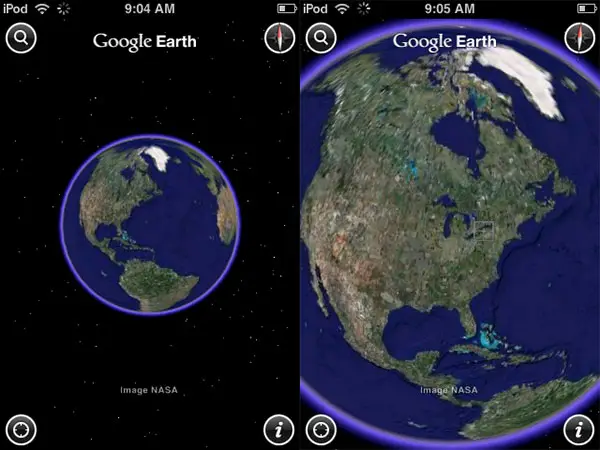
After seeing Earth 3-D last month, it was obvious that the iPhone OS could easily handle realistic 3-D models of planets, but that developers would need to have a lot of skill to do something more than just make them rotate around attractively on the screen. Enter Google Earth (Free), an iPhone- and iPod touch-specific version of Google’s popular web-dependent satellite map viewing software. You start with a view of the planet from space, and use two buttons or a finger gesture to find a specific location—as well as related information. Pinch and expand gestures let you zoom in on the map, but you’ll really want to use the magnifying glass for searches elsewhere, or the location finder button to pinpoint where you currently are.

Google’s search feature lets you look up addresses or proper names for locations. Using a full address increases your chance of quickly finding the right place, but the latter tool yields highly unpredictable results; for example, a search for a certain Tokyo temple brought up locations of a tour operator in San Francisco. If you’re hunting for landmarks, adding the city and country reduces errors, as does using the location-aware button when you’re in the area you’re trying to search. Hitting the search button a second time after an incorrect result is returned will also bring up a list of other plausible options, which you can click on in hopes of finding the right spot.

W icons on the map indicate related Wikipedia entries for your search. They’re actually pretty impressive; a search for Apple Inc.‘s address—not its name—brought up entries on both Apple and the specific street the headquarters are located on.

The maps are scalable and littered with little blue dots that indicate photographs that were apparently geotagged at the specific map coordinates you’re searching.
Landmarks are indicated by blue bubble points, though not always accurately in our experiences; businesses are indicated by red bubble points. Links to the landmarks and businesses bring up Google pages in an app-specific browser, with links to Safari if you prefer to use that. What you find is substantially user-generated content, however, much more of it is right and useful than wrong—especially if you search properly.

One of the interesting parts of the application is its approach to elevation. Google depends on 2-D satellite photography, but uses faux 3-D elevation data to simulate depth in its imagery. You can use two-finger upward or downward gestures to try and see the world in greater 3-D perspective—it works best with mountains, not the Eiffel Tower—or tilt the device to force the view change, a feature that can be turned off. Much of the time, the terrain’s 3-D presence is a subtle effect, but it’s nice to have there.

Is Google Earth a must-have app for the iPhone? Not at this point. The version we tested, 1.0.0, was unstable on both our iPhone and iPod touch, randomly crashing, frequently slowing down when the orientation of the device was changed, and returning results that weren’t quite as impressive as the ones we’re accustomed to seeing in Apple’s Google Maps app. Without question, Maps is faster, more reliable at finding specific locations, and optimized for driving directions, GPS, and other practical purposes. Google Earth still feels like a toy, albeit, an educational one.
For most of the things we do on a daily basis, we’d pick Maps, but there’s no reason that you can’t keep both apps on your iPhone or iPod touch. Google Earth is free, and adds a lot of photos and information you mightn’t find in Maps.
Consider it a worthwhile addition to your device if you have an interest in finding even more details about a given area you’re visiting; it will certainly be an A-quality app when it’s more stable, and hopefully, runs more fluidly. In an ideal world, a next-generation iPhone would have the power to use a hybrid of Earth and Maps rather than two different apps. iLounge Rating: B+.

If beauty were the only thing we considered important in an iPhone game, Spin – The Silhouette Game ($5) by Secret Exit would be an instant must-buy. It is one of the most attractive-looking games we’ve yet seen on the platform, loaded with beautiful 2-D backdrops, highly attractive graphic design, and a neat central idea: you rotate 3-D models of objects until they match the flat 2-D silhouette in the center of the screen. The fewer rotations you need to match the silhouette, the better you score, and if you match enough properly, you move on to a new background and stage.


Spin’s simplicity is both a blessing and a curse. All there is to do is use single-finger gestures to rotate items around in 90-degree turns upwards, downwards, left, and right. Matches are more a matter of you knowing how a given shape will look on a different angle, and how to get it there, than any other skill; kids can play as easily as adults.


Ultimately, Spin is visually impressive, but the game is shallow. There are apparently 100 3-D objects in the game to be aligned, and you’ll quickly find that you’re seeing them repeat over and over again, even before you’ve reached the 10th of 100 stages. Similarly, there’s built-in music, but it’s grating—closer to Game Boy-style beeping than a real soundtrack. Players looking for a “casual game” with super-simple controls and amazingly stylized art may like this a lot; we think that it’s good, but for $5, it could have used more depth and better audio. iLounge Rating: B.

The last of today’s titles is one that we couldn’t quite believe was actually a game: Beer Bounce (Quarters) ($2) from Publisher X.











