
Today’s edition of iPhone Gems is another highly random mix of nine titles, all of which have caught our attention over the last week or two on the App Store.
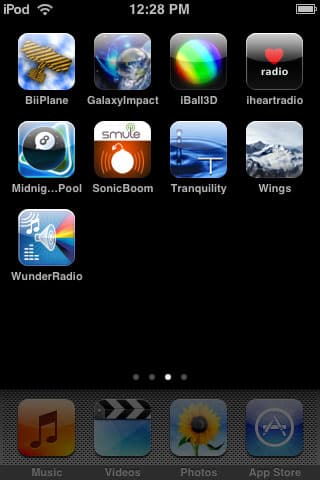
We’ve broken them down into three sections: Flying, Radio + Audio Titles, and Everything Else—the last one a collection of titles that add to previous multi-game or multi-application reviews we’ve published. Read on for the details; our pick of the bunch is Weather Underground’s WunderRadio, with Gameloft’s Midnight Pool also meriting a quick look.
The two flying titles we look at today couldn’t be more different from one another. One is a game, and one is an interesting flying-themed demo.


BiiPlane ($4) by Bootant.com is the game. We’ve previously reviewed a few titles by Bootant, noting that the small developer has a nice little 3-D graphics engine that it’s putting to interesting use in developing simple games: a couple of Breakout clones, one of which was good, and a roll-a-ball-through-a-maze game, which was also neat. Keeping with what appears to be a recycled components development theme, BiiPlane uses a similar engine and similar textures for a very simple flying title. You pilot a biplane through linear mazes, flying through hoops and collecting stars, controlling both the plane’s height and turning using the accelerometer. You complete a maze by collecting all the stars, which are suspended from balloons unless you smack into the balloons, knocking the stars to the ground. Then you’ll need to swoop down especially low and grab it on another pass through the maze. Scrape too many walls or too much ground and you lose a plane.


In addition to so-so controls—the game really needs, and lacks, a calibration feature, as you’re extremely limited in the angle you can play the game from—there’s too little to BiiPlane’s gameplay to merit a $4 asking price. Rather than becoming more fun or mentally dextrous, the mazes are repetitive, and just become progressively more frustrating; they start to feature sharper, angular turns that merely make it more difficult to see and hit the stars as you’re flying. Every hoop you fly through gives you one automatic mid-air turnaround so that you’re not re-looping the maze endlessly in an effort to get the remaining stars. It’s an attempt, and not a successful one, to prevent the flying from being tedious; if there was more to do and learn in these environments, this could have been a good game. We were glad to see that BiiPlane featured a “Resume” feature to let players continue where they leave off, but don’t expect to use it. iLounge Rating: C+.


In an apparent effort to succeed in the “cool $1 demo category” that has previously been trailblazed by apps such as Koi Pond, Bottle Rocket has released Wings ($1), a program that does three things: it lets you fly over mountainous landscapes, plays one of three new agey synthesized songs—or silence, not your music—and enables you to take modest or more considerable control over the flight.


It wouldn’t be fair to call Wings a flight simulator, given what X-Plane 9 has accomplished, nor a game given that there’s no objective, no crashing, and no score. All you do is pick one of four backgrounds, generally tracking with mountains and valleys during the four seasons, and pick “floating” or “flying” mode. In floating mode, you mostly hover over landscapes, while in flying mode, you can turn upside down, spiral into the ground, and mess up what could otherwise be a relaxing view of a simple landscape. You can’t crash, but you can find yourself pointed at the ground for an extended period of time unless you fix whatever’s wrong with your orientation; everything is controlled via the device’s accelerometer.

Wings isn’t exactly a sophisticated piece of software; in addition to generating more than its fair share of pop-up, which is thankfully smooth rather than chunky, the mountainscapes it generates are better viewed from a distance than up close, where the textures tend to be pretty blocky. That said, it’s interesting to leave on as a relaxing piece of moving art if you have a widescreen dock or stand, and given the price, it’s not bad. iLounge Rating: B-.
We are constantly on the lookout for ways to expand the iPod touch and iPhone’s audio capabilities, especially since Apple’s iPod Radio Remote doesn’t work with these devices. This week, we checked out two applications that are supposed to add radio tuning functionality to these models; one is from a huge radio and concert company, while the other comes from a popular web-based weather site.

Amazingly, Clear Channel Broadcasting’s Iheart radio (Free) is not the better of these applications. Given Clear Channel’s considerable footprint in the U.S. radio broadcasting market, we had expected that its program—a simple collection of 20 streaming radio stations taken from around the country—would work flawlessly. The company’s page describes the app as using high-quality AAC for streaming, and pulls stations from various genres, including music, talk, and news.

The problem? It doesn’t work properly. We couldn’t get it to succeed even once in tuning a station on the iPod touch—it stuttered out an audio signal—and on the iPhone 3G, it briefly tuned only one station before cutting out. Less reliable than an FM or AM radio, even when it’s on a Wi-Fi network? Yup; as of now, at least, there’s no need to download this app, despite its apparent appeal. AOL Radio makes it look like a joke. iLounge Rating: F.

WunderRadio ($6) by Weather Underground is a completely different story. If you can get past the fact that its developer is charging $6 to provide you with access to a radio tuner, and that the tuner’s stations don’t always work the way they should, you’ll be pretty impressed by what this little program can do. It uses your device’s location finder to figure out where you are, then provides local and international radio station results taken from RadioTime, a massive directory of FM and AM stations. Each station is tagged with bandwidth requirements—all are Wi-Fi-ready, while some are EDGE and others 3G—as well as genre, country, city, state, and call letters. There’s also access to Scanamerica.us’s emergency scanner directory, providing you with streaming access to a limited number of scanners in certain U.S. counties, and Weather Underground’s local weather information service.

The killer component of this app is, of course, the AM/FM radio tuning. Though the app doesn’t do as much as it should to pinpoint your local constellation of radio stations based on the GPS or location information it checks—it didn’t match our East Amherst location to the Buffalo/Niagara radio station database—it offered a list of virtually every major local station when we manually accessed the Buffalo area, and connected to more than 70% of the stations without any problem. Each also included a list of other, similar stations from around the country, and then, there’s a massive directory of international stations organized by country and city. We were able to pull in stations from Mexico, Japan, and the United Kingdom just by picking countries and genres that interested us; there’s a ton here to explore.

Our only major disappointment: other stations repeatedly timed out, but predictably, suggesting that the stations were in RadioTime’s directory despite their incompatibility with the WunderRadio software. Ideally, the developers will find a way to add support for these stations rather than pulling them from the WunderRadio app’s list. A minor disappointment: the tracks that are pulled in generally appear without any sort of data or lookup capability, so if you hear something you like, you’ll need to write it down or make a mental note rather than doing an instant Safari or iTunes search. These issues aside, this is a highly impressive little radio tuner and will only get better as more stations and features are added. For iPhone users in particular, it may well prove a strong substitute for portable FM radio tuning hardware in the absence of an accessory; its ability to pull in some AM stations puts it ahead of any of the portable tuner add-ons we’ve previously tested. iLounge Rating: B+.

Back in September, we reviewed a couple of ambient noise generators called Ambiance and aSleep, both selling for $1 and offering large collections of sound effects. More recently, we downloaded Tranquility ($1) by Freeverse, a competing program that offers 17 audio samples and a full 60-minute relaxation track.
Though Freeverse’s interface is interesting, and its sounds are pleasant—there’s the standard assortment of elemental noises and synthesizer music, albeit with half or a third the number of samples found in the other apps mentioned above—using Tranquility isn’t as easy as either of the others. Rather than presenting you with a list of labelled sounds, you scroll one by one through a collection of photos to pick your effect. The only options you have are volume and a timer. And you have a lower chance of finding the type of sound you really want than in the other apps. Tranquility’s a fine little program, but we’d pick Ambiance or aSleep first by quite a margin. iLounge Rating: B-.
The remaining four items on this list consist of two we’re officially rating, and two we’re holding off on rating for the time being. They have nothing in common with one another, but they’re all at least a little interesting.

First up is iBall3D (Free) from StoneTrip. We’ve previously reviewed a collection of move-the-ball-around-the-maze titles such as Labyrinth, aMaze, and MarbleMash; iBall3D is the first title we’ve seen that has the potential to turn this genre properly on its ear.

All of the games we’ve previously stuck in 2-D overhead presentations, much like the original wooden labyrinth maze games they were based upon. Not iBall3D. You can play this game from an overhead view, but there’s also a legitimately useful 3-D mode where you get a closer, angled view of the ball as you tilt the device to avoid holes and reach the end exit point. More interestingly, StoneTrip hasn’t limited itself to a single choice of textures—each stage has its own theme, and its own music.

For better or worse, iBall3D is also hard. The trap holes in the maze actually try to suck your ball in, and they’ve been positioned for maximum challenge.











