
iLoungeiLounge
  • News
    • Apple
      • AirPods Pro
      • AirPlay
      • Apps
        • Apple Music
      • iCloud
      • iTunes
      • HealthKit
      • HomeKit
      • HomePod
      • iOS 13
      • Apple Pay
      • Apple TV
      • Siri
    • Rumors
    • Humor
    • Technology
      • CES
    • Daily Deals
    • Articles
    • Web Stories
  • iPhone
    • iPhone Accessories
  • iPad
  • iPod
    • iPod Accessories
  • Apple Watch
    • Apple Watch Accessories
  • Mac
    • MacBook Air
    • MacBook Pro
  • Reviews
    • App Reviews
  • How-to
    • Ask iLounge
Font ResizerAa
iLoungeiLounge
Font ResizerAa
Search
  • News
    • Apple
    • Rumors
    • Humor
    • Technology
    • Daily Deals
    • Articles
    • Web Stories
  • iPhone
    • iPhone Accessories
  • iPad
  • iPod
    • iPod Accessories
  • Apple Watch
    • Apple Watch Accessories
  • Mac
    • MacBook Air
    • MacBook Pro
  • Reviews
    • App Reviews
  • How-to
    • Ask iLounge
Follow US

How-to › Ask iLounge

Ask iLoungeiPad

iPad doesn’t make sound when connecting sync cable

Last updated: May 16, 2021 4:23 pm UTC
By Jesse Hollington
iPad doesn’t make sound when connecting sync cable

Q: I remember in the past that when I connected and disconnected the power/sync cable from my iPad it made a sound and now it does not. Was this function a part of an iOS upgrade? I have looked everywhere in settings and cannot find one that affects it. It was a way to hear that the cord was disconnected as happens when it gets bumped when laying it down.


– Roy
iPad doesn’t make sound when connecting sync cable

A: The function hasn’t gone away, but it is part of the notification/alert sounds on the iPad and it is therefore possible that you may have inadvertently muted it without realizing it.

Note, however, that a notification only sounds when connecting the Dock Connector cable; no sound is made when the cable is disconnected.

As with other iOS devices, the iPad distinguishes alert sounds—for things like mail and calendar alerts, clock alarms and incoming FaceTime calls—from audio such as music and video playback and game sounds. The hardware volume buttons control the standard audio playback and do not affect alert sounds, however there is a separate mute function that allows all alert sounds to be muted, including the Dock Connector notification sound.


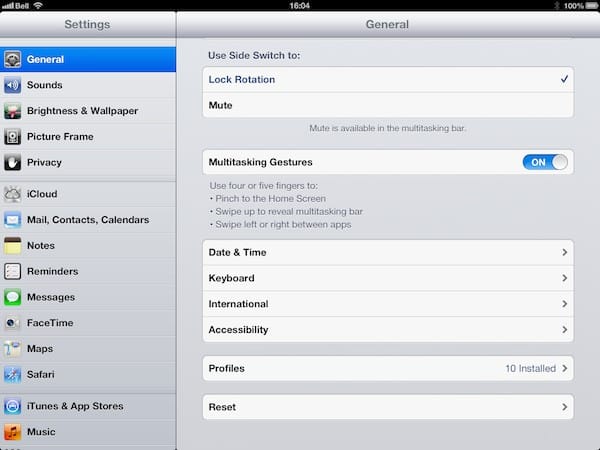
Where this option is found will depend on how you have set the function of the side switch on your iPad, as defined in the General section of your iPad Settings.

If Use Side Switch to is set to “Mute” then the side switch is used to mute system alert sounds, and therefore when in the lower position the Dock Connector notification sound will be suppressed as well. If set to “Lock Rotation” then the mute function will be found instead at the far left side of the multitasking tray; simply double-tap the home button and swipe left to right to reveal the mute, brightness, playback and volume controls.


iPad doesn’t make sound when connecting sync cable

Tapping on the mute button will toggle mute off or on, which will be indicated by the icon within the button itself—a speaker icon when sounds are on and a speaker icon with a slash through it when alert sounds are muted. Remember, however, that this only mutes alert sounds and will not affect your normal system audio sounds which are instead controlled independently by using the volume slider here or the hardware buttons on your iPad.



Latest News
The 14-inch MacBook Pro with M5 Chip 16GB RAM/512GB is $250 Off
1 Min Read
Noise and Static on AirPods Pro 3 Still Unfixed
1 Min Read
New iMac with 24-inch OLED Display May be Brighter With 600 Nits
1 Min Read
The 15-inch M4 MacBook Air 256GB Is $250 Off
1 Min Read
Internal Kernel Debug Kit from Apple Reveals Tests for a MacBook with A15 Chip
1 Min Read
Apple Currently In Talks With Suppliers for Chip Assembly & Packaging of iPhones in India
1 Min Read
Apple Allows Easier Battery Replacement For M5 MacBook Pro with 14-inch Display
1 Min Read
The Apple Watch SE 3 44mm GPS is $50 Off
1 Min Read
20th Anniversary iPhone May Launch in Two Years
1 Min Read
Better Image Generation Capabilities and Apple Music Integration Coming to ChatGPT
1 Min Read
A20 Pro Chip Coming to Next Gen iPad Mini OLED
1 Min Read
Amazon has the AirTag 4 Pack Marked $29 off
1 Min Read

iLounge logo

iLounge is an independent resource for all things iPod, iPhone, iPad, and beyond. iPod, iPhone, iPad, iTunes, Apple TV, and the Apple logo are trademarks of Apple Inc.

This website is not affiliated with Apple Inc.
iLounge © 2001 - 2025. All Rights Reserved.
  • Contact Us
  • Submit News
  • About Us
  • Forums
  • Privacy Policy
  • Terms Of Use
Welcome Back!

Sign in to your account

Lost your password?








