
iLoungeiLounge
  • News
    • Apple
      • AirPods Pro
      • AirPlay
      • Apps
        • Apple Music
      • iCloud
      • iTunes
      • HealthKit
      • HomeKit
      • HomePod
      • iOS 13
      • Apple Pay
      • Apple TV
      • Siri
    • Rumors
    • Humor
    • Technology
      • CES
    • Daily Deals
    • Articles
    • Web Stories
  • iPhone
    • iPhone Accessories
  • iPad
  • iPod
    • iPod Accessories
  • Apple Watch
    • Apple Watch Accessories
  • Mac
    • MacBook Air
    • MacBook Pro
  • Reviews
    • App Reviews
  • How-to
    • Ask iLounge
Font ResizerAa
iLoungeiLounge
Font ResizerAa
Search
  • News
    • Apple
    • Rumors
    • Humor
    • Technology
    • Daily Deals
    • Articles
    • Web Stories
  • iPhone
    • iPhone Accessories
  • iPad
  • iPod
    • iPod Accessories
  • Apple Watch
    • Apple Watch Accessories
  • Mac
    • MacBook Air
    • MacBook Pro
  • Reviews
    • App Reviews
  • How-to
    • Ask iLounge
Follow US

How-to › Ask iLounge

Ask iLoungeiPadReviews

iPad Camera Connectors – USB vs SD card

Last updated: May 16, 2021 4:21 pm UTC
By Jesse Hollington
iPad Camera Connectors – USB vs SD card

Q: I believe that Apple used to sell both the USB and SD card iPad Camera Connectors in a single package, but it appears that now for the newer iPads, they’re selling them separately. Is there any reason for this beyond an obvious cash grab? More importantly, I’m wondering if I really need to buy both connectors, or if I do, if there’s another, cheaper option available. My camera uses SD cards, but I’m wondering if there’s an advantage to connecting via USB, such as being able to do some kind of tethering shooting or live preview that might make me want to purchase that one instead of, or in addition to the SD one. Any advice would be a big help.


– Adam
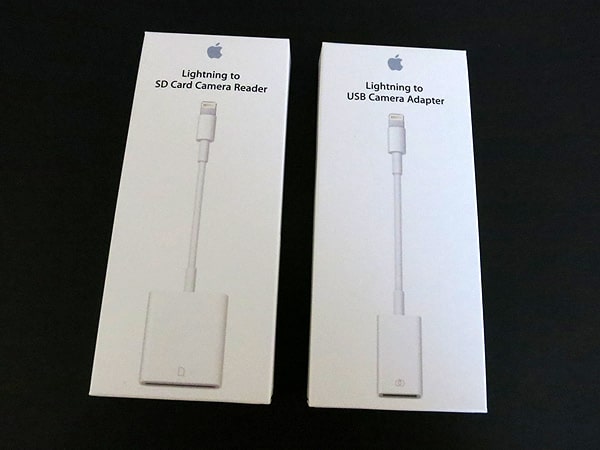
iPad Camera Connectors – USB vs SD card

A: Apple actually still sells the single iPad Camera Connection Kit that includes both a USB adapter and SD card reader, however it’s only for the older Dock Connector based iPads.

With the transition to the Lightning connector in the iPad mini and fourth-generation iPad, Apple chose to package the Lightning connector versions of these accessories separately as the Lightning to SD Card Camera Reader and the Lightning to USB Camera Adapter and price them at the same $29—each—as the original iPad Camera Connection Kit sold for.


There is no valid reason we can see for doing this beyond the “obvious cash grab” but some good news is that for the purpose of connecting digital cameras, at least most users will not need to buy both versions. The USB version only provides basic photo transfer for connecting a camera, and therefore provides the same functionality that you would get by popping your SD card into the SD card camera reader. The only real pros and cons of each one are the obvious: whether you prefer to attach a USB cable between your camera and your iPad or move the SD card back and forth between your camera and SD card reader.


Note that if you already own the original, Dock Connector based iPad Camera Connection Kit, another option is to simply purchase the $35 Apple Lightning to 30-pin Adapter, which will allow you to use both of the Dock Connector Camera adapters with the newer iPads with the Lightning connector.

The $35 price of the adapter, however, does not make this a cost-effective solution unless you already own the older iPad Camera Connection Kit and still want to have both the USB and SD card connectivity options available.


Note that the Lightning to USB Camera Adapter can be used with some USB audio and MIDI devices in addition to digital cameras. Although this is officially unsupported, Apple does acknowledge the possibility. Note that USB keyboards, which once did work with the older Dock Connector USB adapter, are simply not supported in iOS 6 at all.

If you do want to have both connections available, unofficial third-party options exist such as the Photojojo Lightning SD Card Reader, which sells for $20 and includes a USB port, SD card reader, and micro-SD card reader.



Latest News
The 14-inch MacBook Pro with M5 Chip 16GB RAM/512GB is $250 Off
1 Min Read
Noise and Static on AirPods Pro 3 Still Unfixed
1 Min Read
New iMac with 24-inch OLED Display May be Brighter With 600 Nits
1 Min Read
The 15-inch M4 MacBook Air 256GB Is $250 Off
1 Min Read
Internal Kernel Debug Kit from Apple Reveals Tests for a MacBook with A15 Chip
1 Min Read
Apple Currently In Talks With Suppliers for Chip Assembly & Packaging of iPhones in India
1 Min Read
Apple Allows Easier Battery Replacement For M5 MacBook Pro with 14-inch Display
1 Min Read
The Apple Watch SE 3 44mm GPS is $50 Off
1 Min Read
20th Anniversary iPhone May Launch in Two Years
1 Min Read
Better Image Generation Capabilities and Apple Music Integration Coming to ChatGPT
1 Min Read
A20 Pro Chip Coming to Next Gen iPad Mini OLED
1 Min Read
Amazon has the AirTag 4 Pack Marked $29 off
1 Min Read

iLounge logo

iLounge is an independent resource for all things iPod, iPhone, iPad, and beyond. iPod, iPhone, iPad, iTunes, Apple TV, and the Apple logo are trademarks of Apple Inc.

This website is not affiliated with Apple Inc.
iLounge © 2001 - 2025. All Rights Reserved.
  • Contact Us
  • Submit News
  • About Us
  • Forums
  • Privacy Policy
  • Terms Of Use
Welcome Back!

Sign in to your account

Lost your password?








