
iLoungeiLounge
  • News
    • Apple
      • AirPods Pro
      • AirPlay
      • Apps
        • Apple Music
      • iCloud
      • iTunes
      • HealthKit
      • HomeKit
      • HomePod
      • iOS 13
      • Apple Pay
      • Apple TV
      • Siri
    • Rumors
    • Humor
    • Technology
      • CES
    • Daily Deals
    • Articles
    • Web Stories
  • iPhone
    • iPhone Accessories
  • iPad
  • iPod
    • iPod Accessories
  • Apple Watch
    • Apple Watch Accessories
  • Mac
    • MacBook Air
    • MacBook Pro
  • Reviews
    • App Reviews
  • How-to
    • Ask iLounge
Font ResizerAa
iLoungeiLounge
Font ResizerAa
Search
  • News
    • Apple
    • Rumors
    • Humor
    • Technology
    • Daily Deals
    • Articles
    • Web Stories
  • iPhone
    • iPhone Accessories
  • iPad
  • iPod
    • iPod Accessories
  • Apple Watch
    • Apple Watch Accessories
  • Mac
    • MacBook Air
    • MacBook Pro
  • Reviews
    • App Reviews
  • How-to
    • Ask iLounge
Follow US

How-to › Ask iLounge

Ask iLoungeiCloudiPadiPhoneiPod

iOS 7: Find My iPhone only available on primary iCloud account

Last updated: May 16, 2021 4:10 pm UTC
By Jesse Hollington
iOS 7: Find My iPhone only available on primary iCloud account

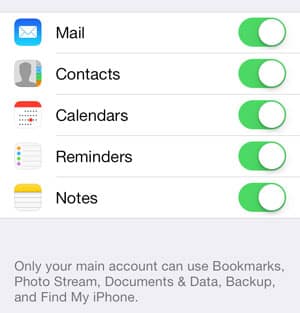
Q: Is the method you describe in Using a single iCloud account for Find My iPhone now dead with iOS7? I now get a message of “Only your main account can use Bookmarks, Photo Stream, Documents & Data, Backup and Find My iPhone” under the second iCloud account I had set up on my wife’s iPhone to centrally manage the feature from one account. I mistakenly selected “turn off” during the upgrade screen. Will have to see if it sticks as legacy if I don’t select that when I update other family member’s devices.


– Steve
iOS 7: Find My iPhone only available on primary iCloud account

Q: I really appreciated your article back in April, Using a single iCloud account for Find My iPhone. I was in the same situation, and your solution was the perfect way to keep track of all of our devices with one ID.

We updated our iPhones to iOS 7 last night, and it looks like iOS 7 has removed this ability. Have you heard of another solution?

– Mike

A: Unfortunately, you are both correct that this capability has disappeared in iOS 7, along with the ability to choose to use a secondary account for syncing the Safari Reading List and bookmarks. These features are now only available with the primary iCloud account, with the secondary one now being limited to only Mail, Contacts, Calendars, Reminders, and Notes.


While it’s not specifically clear why Apple made this change, the most likely explanation would seem to be that it’s connected in some way to the new Activation Lock feature in iOS 7, which is inherently tied to Find My iPhone. Designed to prevent a lost or stolen iOS device from being used by anybody other than the original owner, this essentially ties the device to the Apple ID used for Find My iPhone.

While it’s doubtful that there are any technical limitations that would preclude Apple from making this feature work with a secondary iCloud account, it may have been a decision to simply avoid confusion by ensuring that the “owner” account corresponds to the user’s primary iCloud account.


iOS 7: Find My iPhone only available on primary iCloud account

Unfortunately, there are no workarounds other than perhaps looking to third-party apps, however these will be limited to simply locating your devices, as Apple understandably doesn’t allow third-party apps to do things like wipe your entire device.

If you’re simply looking for a way to keep track of where all of your devices are, Apple’s own Find My Friends app is probably the best alternative, and in fact doesn’t require that users share a single iCloud account at all.

Of course, you can also still setup your Find My iPhone under your individual Apple IDs and simply log out and log back in. The Find My iPhone iOS app isn’t tied to a specific Apple ID and you can easily log in and out of multiple accounts.



Latest News
The 14-inch MacBook Pro with M5 Chip 16GB RAM/512GB is $250 Off
1 Min Read
Noise and Static on AirPods Pro 3 Still Unfixed
1 Min Read
New iMac with 24-inch OLED Display May be Brighter With 600 Nits
1 Min Read
The 15-inch M4 MacBook Air 256GB Is $250 Off
1 Min Read
Internal Kernel Debug Kit from Apple Reveals Tests for a MacBook with A15 Chip
1 Min Read
Apple Currently In Talks With Suppliers for Chip Assembly & Packaging of iPhones in India
1 Min Read
Apple Allows Easier Battery Replacement For M5 MacBook Pro with 14-inch Display
1 Min Read
The Apple Watch SE 3 44mm GPS is $50 Off
1 Min Read
20th Anniversary iPhone May Launch in Two Years
1 Min Read
Better Image Generation Capabilities and Apple Music Integration Coming to ChatGPT
1 Min Read
A20 Pro Chip Coming to Next Gen iPad Mini OLED
1 Min Read
Amazon has the AirTag 4 Pack Marked $29 off
1 Min Read

iLounge logo

iLounge is an independent resource for all things iPod, iPhone, iPad, and beyond. iPod, iPhone, iPad, iTunes, Apple TV, and the Apple logo are trademarks of Apple Inc.

This website is not affiliated with Apple Inc.
iLounge © 2001 - 2025. All Rights Reserved.
  • Contact Us
  • Submit News
  • About Us
  • Forums
  • Privacy Policy
  • Terms Of Use
Welcome Back!

Sign in to your account

Lost your password?








