
iLoungeiLounge
  • News
    • Apple
      • AirPods Pro
      • AirPlay
      • Apps
        • Apple Music
      • iCloud
      • iTunes
      • HealthKit
      • HomeKit
      • HomePod
      • iOS 13
      • Apple Pay
      • Apple TV
      • Siri
    • Rumors
    • Humor
    • Technology
      • CES
    • Daily Deals
    • Articles
    • Web Stories
  • iPhone
    • iPhone Accessories
  • iPad
  • iPod
    • iPod Accessories
  • Apple Watch
    • Apple Watch Accessories
  • Mac
    • MacBook Air
    • MacBook Pro
  • Reviews
    • App Reviews
  • How-to
    • Ask iLounge
Font ResizerAa
iLoungeiLounge
Font ResizerAa
Search
  • News
    • Apple
    • Rumors
    • Humor
    • Technology
    • Daily Deals
    • Articles
    • Web Stories
  • iPhone
    • iPhone Accessories
  • iPad
  • iPod
    • iPod Accessories
  • Apple Watch
    • Apple Watch Accessories
  • Mac
    • MacBook Air
    • MacBook Pro
  • Reviews
    • App Reviews
  • How-to
    • Ask iLounge
Follow US

Articles

Articles

iOS 7: Siri + Voice Control

Last updated: May 16, 2021 8:16 pm UTC
By Nick Guy
iOS 7: Siri + Voice Control

Soon after Apple debuted the completely redesigned iOS 7 on June 10, 2013, it became obvious that the iOS user experience has changed enough to merit a public re-introduction—a forward-looking discussion of the updated user interface and integrated apps. Over the next week, our series on iOS 7 will look at every key section of Apple’s new operating system, starting with setting up iOS devices, the new Lock Screen and Home Screen, then continuing through other major UI elements and built-in apps. For a broad look at all of iOS 7’s changes from iOS 6, check out our big picture look at iOS 7, published on June 10, as well as our articles on iOS 7 setup, the Home Screen, and Lock Screen. Note that some features and graphics may change before iOS 7’s final release.


Siri
iOS 7: Siri + Voice Control

iOS 7: Siri + Voice Control

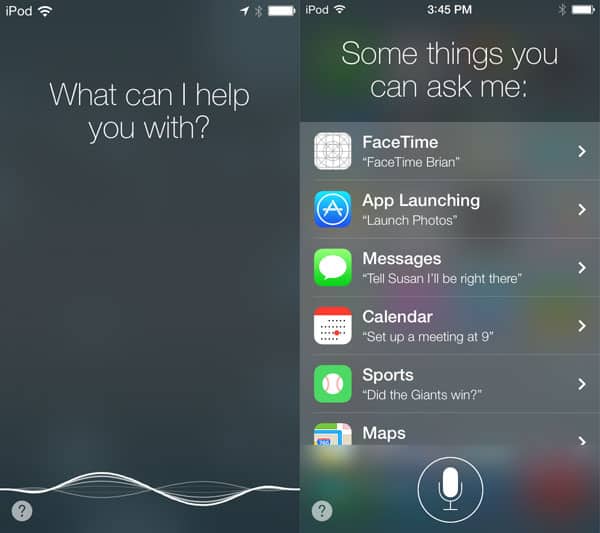
Following its iPhone 4S/iOS 5 introduction and subsequent expansion in iOS 6, Siri has received another overhaul for iOS 7. The third-generation Siri brings even more capabilities, as well as a completely new design, and voice options. Instead of sliding up from the bottom of the screen, Siri now takes over the entire display when activated.

It displays the phrase “What can I help you with?” at the top, and a classic Voice Control-style waveform along the bottom (see Voice Control, below), with a “?” icon in the bottom right corner. Tapping the icon reveals prompts of different commands you can use. If you don’t say anything, Siri will cycle through a number of different phrases you can ask.


iOS 7: Siri + Voice Control

The iOS 7 version of Siri recognizes a number of new commands. It can search Twitter for tweets on certain topics or from specific users, and enable your voice to toggle features such as Bluetooth and Airplane Mode. 


iOS 7: Siri + Voice Control

You can also adjust settings such as brightness, using only your voice. At this point, Siri doesn’t recognize specific increments, but rather, simple “up” and “down” statements.


iOS 7: Siri + Voice Control

Apple has partnered with Wikipedia and Bing to enhance Siri search results.


Ask about a topic, and Siri may respond with the related Wikipedia article. Additionally, Microsoft’s search engine is now the tool used to search the web, replacing Google. Rather than having to pull up the information by opening Safari, web listings can be accessed directly within Siri; you can even follow many links to other articles without leaving Siri’s interface.


iOS 7: Siri + Voice Control

Siri can be toggled on or off in the Settings app; if it’s disabled, the prior-generation iOS voice recognition interface Voice Control pops up instead. The language, voice gender, and voice feedback are also adjustable, as is what Siri calls you. Apple has refined the voices to sound more natural.

Voice Control


iOS 7: Siri + Voice Control

As Apple’s first-generation voice recognition feature for iOS devices, Voice Control has been included in iPhones and iPod touches for years, and remained a (mostly hidden) option even after the introduction of Siri.



Latest News
The 14-inch MacBook Pro with M5 Chip 16GB RAM/512GB is $250 Off
1 Min Read
Noise and Static on AirPods Pro 3 Still Unfixed
1 Min Read
New iMac with 24-inch OLED Display May be Brighter With 600 Nits
1 Min Read
The 15-inch M4 MacBook Air 256GB Is $250 Off
1 Min Read
Internal Kernel Debug Kit from Apple Reveals Tests for a MacBook with A15 Chip
1 Min Read
Apple Currently In Talks With Suppliers for Chip Assembly & Packaging of iPhones in India
1 Min Read
Apple Allows Easier Battery Replacement For M5 MacBook Pro with 14-inch Display
1 Min Read
The Apple Watch SE 3 44mm GPS is $50 Off
1 Min Read
20th Anniversary iPhone May Launch in Two Years
1 Min Read
Better Image Generation Capabilities and Apple Music Integration Coming to ChatGPT
1 Min Read
A20 Pro Chip Coming to Next Gen iPad Mini OLED
1 Min Read
Amazon has the AirTag 4 Pack Marked $29 off
1 Min Read

iLounge logo

iLounge is an independent resource for all things iPod, iPhone, iPad, and beyond. iPod, iPhone, iPad, iTunes, Apple TV, and the Apple logo are trademarks of Apple Inc.

This website is not affiliated with Apple Inc.
iLounge © 2001 - 2025. All Rights Reserved.
  • Contact Us
  • Submit News
  • About Us
  • Forums
  • Privacy Policy
  • Terms Of Use
Welcome Back!

Sign in to your account

Lost your password?








