
Soon after Apple debuted the completely redesigned iOS 7 on June 10, 2013, it became obvious that the iOS user experience changed enough to merit a public re-introduction—a forward-looking discussion of the updated user interface and integrated apps. Our series on iOS 7 has looked at every key section of Apple’s new operating system, starting with setting up iOS devices, the new Lock Screen and Home Screen, then continuing through other major UI elements and built-in apps. For a broad look at all of iOS 7’s changes from iOS 6, check out our big picture look at iOS 7, published on June 10, as well as our articles on iOS 7 setup, the Home Screen, and Lock Screen; this article was originally published on June 17 and subsequently updated with new details. Note that some features and graphics may change before iOS 7’s final release.
Phone
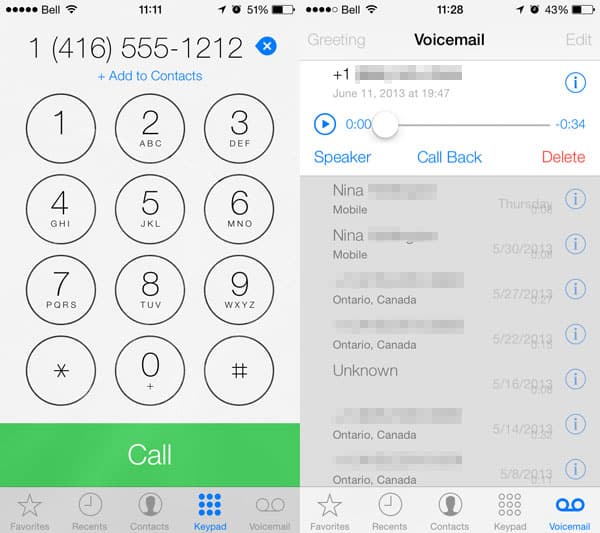

With iOS 7, Apple has made relatively few changes to its Phone app, outside of a different cosmetic design that’s consistent with the rest of the operating system. Apart from largely aesthetic changes to the Contacts tab, which are discussed further in the standalone Contacts app section below, the major changes are in the Keypad and (Visual) Voicemail features. Keypad looks considerably different but works almost the same way. Instead of square buttons, all of the number buttons are round, and pressing one lets your Home Screen wallpaper shine through. The Add To Contacts and Delete buttons have been removed from their prior places next to the Call button. They now appear only after you’ve entered a number, and oddly sit below and next to the number you’re dialing—our gut feeling is that this app will be redesigned before iOS 7 is released.

Voicemail is somewhat of a mess at this point. While all of the controls carry over from iOS 6, they’ve been moved around. The scrubber, Call Back, and Delete buttons now appear below the message that is selected, while Greeting and Edit buttons remain at the top. Apple is attempting to add duration stamps to each message, but hasn’t yet figured out where to place them. Again, this part of the app will surely be sorted out before iOS 7 is released. Redesigns to the incoming call and call-in-progress screens have turned prior rounded buttons into blocks, which we’d expect to see improved later this year.
FaceTime

Likewise, FaceTime is functionally very similar to past versions. Apart from tweaks to the calling screens that are consistent with the rest of the UI and Phone app, the biggest change is the addition of FaceTime Audio. Voice-only calls can now be placed directly from iOS device to iOS device using Wi-Fi; there’s no need for a cellular connection. In early testing, the audio is very clear—superior to calling over most cellular networks we’ve heard—and the service works well on the iPod touch.
Apple didn’t make a big deal about its VoIP solution at WWDC, but we think we’ll be hearing more about it this Fall.
Messages

Messages looks quite similar to the iOS 6 app. In iOS 7, tapping on the Contact button in the top right corner drops down FaceTime Audio and Video buttons, as well as the ability to access more info about the person. The edit button is gone, but messages can be forwarded or copied by holding down on them and selecting more from the menu that pops up.

Apple has added the ability for contextual elements such as dates to be automatically recognized in Messages, although in this early release, tapping on the underlined phrase does nothing. Also, instead of seeing contacts’ full names in group texts, a setting lets you show only the first names and last initials.
Contacts

Beyond cosmetic changes—including displaying photos inside of circles rather than boxes, and cleaning up the layout of contact pages—a few new features have been added to the Contacts app, which can still be accessed through its own Home Screen icon, or within the Contacts tab in Phone. The ability to link contacts has been added, which will merge the data between two entries. In its current state, it doesn’t delete either entry, but that will likely change.

When adding a number as a Favorite, FaceTime Audio has been added as an option.











