
iLoungeiLounge
  • News
    • Apple
      • AirPods Pro
      • AirPlay
      • Apps
        • Apple Music
      • iCloud
      • iTunes
      • HealthKit
      • HomeKit
      • HomePod
      • iOS 13
      • Apple Pay
      • Apple TV
      • Siri
    • Rumors
    • Humor
    • Technology
      • CES
    • Daily Deals
    • Articles
    • Web Stories
  • iPhone
    • iPhone Accessories
  • iPad
  • iPod
    • iPod Accessories
  • Apple Watch
    • Apple Watch Accessories
  • Mac
    • MacBook Air
    • MacBook Pro
  • Reviews
    • App Reviews
  • How-to
    • Ask iLounge
Font ResizerAa
iLoungeiLounge
Font ResizerAa
Search
  • News
    • Apple
    • Rumors
    • Humor
    • Technology
    • Daily Deals
    • Articles
    • Web Stories
  • iPhone
    • iPhone Accessories
  • iPad
  • iPod
    • iPod Accessories
  • Apple Watch
    • Apple Watch Accessories
  • Mac
    • MacBook Air
    • MacBook Pro
  • Reviews
    • App Reviews
  • How-to
    • Ask iLounge
Follow US

Articles

Articles

iOS 7: Nike + iPod, Photo Booth + Voice Memos

Last updated: May 16, 2021 8:12 pm UTC
By Nick Guy
iOS 7: Nike + iPod, Photo Booth + Voice Memos

Soon after Apple debuted the completely redesigned iOS 7 on June 10, 2013, it became obvious that the iOS user experience has changed enough to merit a public re-introduction—a forward-looking discussion of the updated user interface and integrated apps. Our series on iOS 7 looks at every key section of Apple’s new operating system, starting with setting up iOS devices, the new Lock Screen and Home Screen, then continuing through other major UI elements and built-in apps. For a broad look at all of iOS 7’s changes from iOS 6, check out our big picture look at iOS 7, published on June 10, as well as our articles on iOS 7 setup, the Home Screen, and Lock Screen. Note that some features and graphics may change before iOS 7’s final release.


Nike + iPod
iOS 7: Nike + iPod, Photo Booth + Voice Memos

iOS 7: Nike + iPod, Photo Booth + Voice Memos

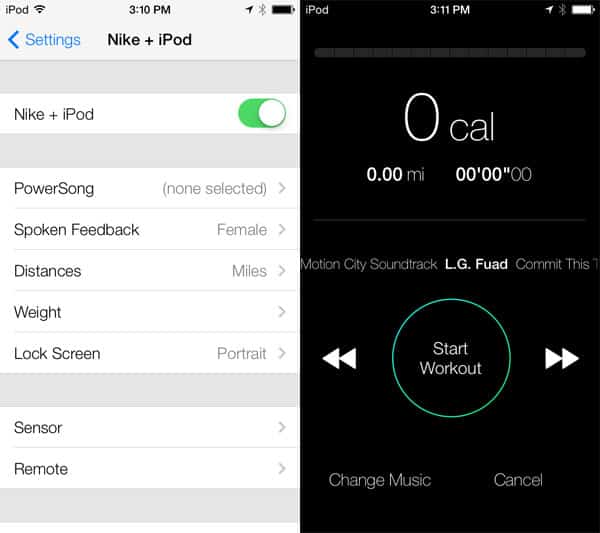
Absent in the first showing of iOS 7, but back in the second beta, is Nike + iPod, a run- and walk-tracking app that can be toggled on and off in the Settings menus of iPhones and iPod touches. Like many of Apple’s redesigned apps, it’s the look, and not how it works, that’s the big difference here.

The generations of the app seem to have the exact same capabilities.


iOS 7: Nike + iPod, Photo Booth + Voice Memos

You’re still able to separately calibrate a Nike+ Sensor for tracking walking and running, assuming you want the enhanced accuracy of Nike’s shoe-based tracking accessory. Settings menus have received iOS 7-style fonts and dial controls.


Photo Booth

Solely included with iPads, Photo Booth is a holdover from the Mac OS X operating system—a cute app primarily designed to let kids play with the iPad’s cameras using filter effects. The iOS 7 version of Photo Booth is substantially the same as its predecessor version, with the same eight realtime filters displaying alongside “Normal” on a 3×3 grid; only the fonts and borders around the live images have changed.


iOS 7: Nike + iPod, Photo Booth + Voice Memos

iOS 7: Nike + iPod, Photo Booth + Voice Memos

Apple has tweaked the snapshot-grabbing UI to resemble the iOS 7 Camera interface, but otherwise left the functionality unchanged.


iOS 7: Nike + iPod, Photo Booth + Voice Memos

iOS 7: Nike + iPod, Photo Booth + Voice Memos

What’s missing?


iOS 7: Nike + iPod, Photo Booth + Voice Memos

Predictably, Apple has nixed Photo Booth’s prior red curtain introduction, which for years served as a quick visual reference to classic photo booths. The app now appears with no more ceremony than other integrated iOS apps.

Voice Memos


iOS 7: Nike + iPod, Photo Booth + Voice Memos

Also missing from the first beta release of iOS 7, Apple’s Voice Memos is now back for the iPhone and iPod touch. Functionally, it’s very much the same, although the aesthetics are considerably different. Gone is the old-fashioned microphone that previously filled the screen; when recording with iOS 7, you’ll now see a waveform of your voice presented in real time. Audio clips can still be trimmed, and can be shared via AirDrop, Messages, or Mail.



Latest News
The Apple Watch Series 11 42mm GPS is $100 Off
1 Min Read
Apple Launching A New Education Hub In India Teaching Robotics and Swift Programming
1 Min Read
Women’s and Men’s Golf Added to Apple Sports
1 Min Read
Apple Adding Civilization VII and Other Games To Apple Arcade
1 Min Read
AirPods 4 ANC Is $59 Off
1 Min Read
Apple Using 2NM Process For Their M6 and A20 Chip
1 Min Read
iPhone 18 Models Will Not Have a Big Redesign
1 Min Read
Launch of MacBook Pro M5 Pro and M5 Max Models is Approaching
1 Min Read
Get the iPad Mini 7 256GB Wi-Fi at $99 Off
1 Min Read
Mozilla Now Allows Turning AI Features Off
1 Min Read
Barcelona Passeig de Gràcia Apple Store Temporarily Closing
1 Min Read
Apple’s Plans to Enter the Smart Glasses Market is Changing the Industry
1 Min Read

iLounge logo

iLounge is an independent resource for all things iPod, iPhone, iPad, and beyond. iPod, iPhone, iPad, iTunes, Apple TV, and the Apple logo are trademarks of Apple Inc.

This website is not affiliated with Apple Inc.
iLounge © 2001 - 2025. All Rights Reserved.
  • Contact Us
  • Submit News
  • About Us
  • Forums
  • Privacy Policy
  • Terms Of Use
Welcome Back!

Sign in to your account

Lost your password?








