Apple yesterday released iOS 6.1 for the iPhone, iPod touch and iPad, citing only a few relatively minor new features and fixes. The update primarily includes expanded LTE support for specific iPhone and iPad models, Siri and iTunes Match improvements, and a few other smaller changes. As with iOS 5.1 last year, the iOS 6.1 update seems to be primarily focused on fixing bugs and making incremental improvements.

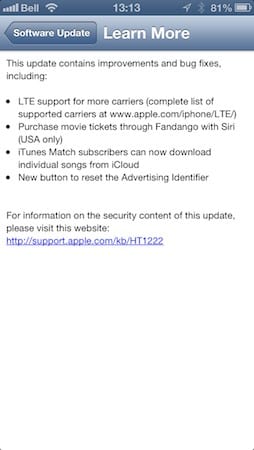
The easiest way to install the new iOS 6.1 update is over-the-air from Settings, General, Software Update, although the traditional method of updating via iTunes is still available for users who prefer that approach. As with any update, it’s a good idea to make sure you have a recent backup to either iCloud or iTunes—or both—before starting. The instructions in our Guide to Transferring Your Content to a New iPhone, iPad or iPod touch provide more information on how to backup your device and check that your backups are current.
Expanded LTE Support
iOS 6.1 improves international LTE carrier support by unlocking LTE capabilities for dozens of additional carriers worldwide, with one very important caveat: you must be using an iPhone 5, iPad mini or fourth-generation iPad. International users of Apple’s first LTE device—the third-generation iPad released last March—will unfortunately still be left out in the cold as both the AT&T and Verizon third-gen iPad models were seemingly built for North American carriers only, and therefore don’t support the LTE frequency bands now used by most carriers outside of North America.

For the same reasons, it’s important to keep in mind that even with iOS 6.1, only the iPhone and iPad models sold for Verizon/Sprint in the U.S. and international markets elsewhere will provide LTE support outside of North America; the GSM-only “AT&T” models sold for use on the AT&T network and Canadian cellular networks continue to be limited to only North American LTE frequencies.
The North American iPad models gained support in iOS 6.1 for two new Canadian regional carriers—Sasktel and MTS—as well as Mexican carrier Telcel, while the Verizon/Sprint/international models by comparison added support for 20 new carriers.
A complete list of models and supported carriers can be found at Apple’s iPad LTE support chart. Similarly, the North American iPhone 5 models have gained LTE support for several regional U.S. and Canadian carriers as well as Open Mobile and Claro in Puerto Rico, while the list of supported LTE carriers for the international model has grown from 13 to 39.
Siri and Fandango
iOS 6.1 users can now purchase movie tickets with some assistance from Siri—a process similar in concept to the restaurant reservations via OpenTable added in iOS 6.0. Users will need to have the Fandango app installed—a voice prompt encourages you to do so if it’s not already there—at which point making a request to purchase movie tickets will basically just hand you off to the Fandango app to complete your purchase.

Note that this Fandango feature is only available in the U.S. at this point. Siri can continue to handle movie lookups as before, but requests to book tickets will result in a message that it can’t do so at any of the available theaters—presumably the same response you’ll get even in the U.S. if no nearby theaters provide online ticket sales via Fandango.

iTunes Match Improvements
iOS 6.1 brings a relatively minor improvement to iTunes Match in the form of the ability to download individual tracks on demand—a feature that was available in iOS 5 but mysteriously disappeared with the release of iOS 6.0.
In iOS 6.1, each individual track now has an iCloud download icon that can be used to fetch the track from the cloud and download it to your local device’s storage. This is essentially the same thing that happens when playing a track from the cloud, but provides users with the ability to pre-download a few tracks without having to fetch an entire playlist—useful when you know you’re going into a place with a poor Internet connection, or if you’re on a limited data plan and are leaving Wi-Fi coverage.

Oddly, however, the Music app in iOS 6.1 treats manually downloaded tracks differently from automatically downloaded tracks—tracks played “from the cloud” are still downloaded as you listen to them in the same way that they have always been, and once played can be replayed without a network connection. However, these tracks retain the iCloud download icon beside them until you manually download them. Our past testing with iOS 6.0 suggests that automatically downloaded tracks are treated like a “cache” and will be removed from local storage first if your device runs low on space; manually downloaded tracks are likely preserved.

iOS 6.1 also brings back the ability to swipe to delete tracks from local storage. Note that this feature only works in the standard track views, not when viewing tracks within a playlist. Swiping left-to-right on an individual track will provide the option to remove that track, and when working from the Albums or Artists listing, you can swipe-to-delete to remove all downloaded content within a specific album or by a specific artist. As in iOS 5, content is only removed from your local device and remains available in your iCloud library.
The iOS 6.1 update also makes another minor change related to the Music app, with the playback controls now rendered with a metallic look, both in the Music app itself as well as on the lock screen.
Passbook Apps
In iOS 6.1, the built-in Passbook app now includes a predefined “welcome pass” that explains what Passbook is about and provides a link to passbook-enabled apps on the App Store.

iOS 6.0 provided this as a simple intro screen that became unavailable once you had added your first actual Passbook pass. Note that the default “welcome pass” appears to be handled like any other Passbook pass, and can be deleted in the same manner if you don’t want it cluttering up your pass list.