
Concurrent with yesterday’s major release of iOS 5 for the iPhone, iPad and iPod touch, Apple also quietly rolled out Apple TV Software Update 4.4. In addition to the expected support for the new iOS 5 AirPlay Mirroring and iCloud features, the update arrived with a few other nice surprises as well, with an additional new subscription-based sports service for hockey fans, a news video service, and some more new slideshow themes all showing up on the device’s increasingly crowded menus.

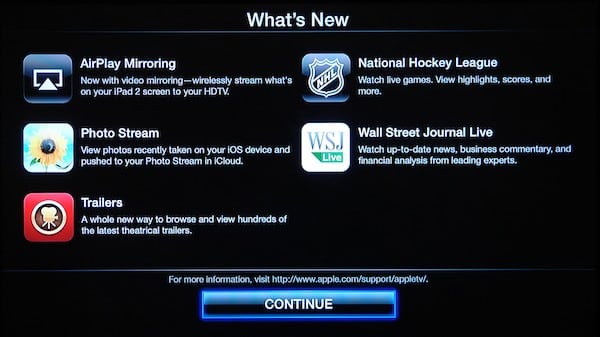
For reasons that are still somewhat confusing, Apple continues to number its Apple TV Software Updates differently from the corresponding iOS versions, despite the underlying OS build numbering being the same. Although the discrepancy was previously limited to point releases, this latest update has created a more significant difference: the update is officially designated “Apple TV Software Update 4.4” though the “OS Build” is listed as 5.0, in fact sharing a similar build number to the version of iOS 5.0 that released for the iPhone, iPad and iPod touch yesterday—9A334v for the Apple TV OS Build versus 9A334 for the iOS build. Whatever the reasons, it seems pretty clear that the official Apple TV version numbering will remain out of step with iOS at least until such time as Apple releases a much more significant update for the Apple TV… and perhaps beyond that.

Installing the Update
The new update installs in the same manner as prior Apple TV updates—your Apple TV will likely eventually notify you that an update is available, but if you want to check manually, you can choose the “Check for Updates” option from the Settings, General menu.

It is also possible to apply the update through iTunes by connecting the Apple TV to your computer using a micro-USB cable and choosing the “Restore” option. Note that this is intended for recovery purposes rather than normal updates, however, and will reset your device back to its default settings—you’ll need to re-enter passwords and the like all over again with that pesky Apple Remote.
The update is just under 400MB and should normally take around 10-15 minutes to download and install, after which your Apple TV will restart with the new version.
NHL Gamecenter
With the Apple TV Software Update 4.2 released in March, Apple began to take its first major steps in moving the set top box beyond iTunes by introducing access to two new major on-demand sports services: MLB.tv and NBA League Pass. It seems that it was only a matter of time before additional major sports services were added, and with the start of the 2011-2012 NHL season, this latest update invites hockey fans to the party with NHL GameCenter integration.

NHL GameCenter works on the Apple TV in much the same way as the MLB.tv and NBA services. An NHL option can be found on the “Internet” menu below Netflix and MLB.tv. From the NHL main menu you can see options to view full live and archived games, see a list of team standings or watch game highlight videos.


As with the MLB.tv and NBA options, watching full games that are live or archived requires an NHL GameCenter subscription, which can either be purchased online at http://nhl.com/gamecenterlive, or via an in-app purchase for users of the iOS application. Attempting to watch subscription-only content will prompt you for your NHL GameCenter username and password, or you can enter it manually by going to the Settings menu in the NHL section.

Without a subscription, users can still view team standings, schedules and scores of games, as well as watching game video highlights. An option in the NHL Settings menu also allows the display of scores to be toggled off for users who would rather not know the outcome before watching past games.


The “Teams” menu allows users to browse games and scores by individual teams, providing an artwork view of teams organized by conference. Selecting a team simply displays a filtered list of games specific to that team, presented in the same manner as the main Games menu.

Similar to the MLB.tv and NBA features, returning from the NHL menu will display a list of today’s games in the artwork browser at the top of the screen, including scores, if enabled, for completed games and those in progress.

For watching full games, users can choose from either the home or away broadcasts where available. Unfortunately, standard NHL Blackout rules apply, and extend beyond the live broadcast to 48 hours afterward for any game that was televised in the user’s local area or nationally. A list of blackout rules can be found on the NHL GameCenter Live FAQ at http://gamecenter.nhl.com/nhlgc/help.htm.

An “NHL on iTunes” menu item takes users to a list of NHL content available on iTunes, such as significant games and playoffs from prior seasons.

WSJ Live
The latest update also brings Apple’s first introduction of a video news service to the Apple TV in the form of WSJ Live, from the Wall Street Journal. The free service allows users to watch live WSJ programming when available, view a schedule of upcoming content, or browse past programming on demand.


WSJ Live broadcasts content on a specific schedule, so live streaming may not always be available if there is no programming on at the current time. During our initial testing, we more often saw grayed-out notices that nothing was being broadcast than actual video streams here; the next live broadcast time is generally shown on the screen if you want to show up at your TV to watch it. Without live video to watch, users can still view past episodes, browse content by category, or search for specific content.


Content is presented in a manner similar to other sections on the Apple TV, with the “All Videos” presented in an artwork view highlighting recent and popular content.

AirPlay Mirroring
Apple TV 4.4 also adds support for the new AirPlay Mirroring feature available in iOS 5.
This allows iPad 2 and iPhone 4S users to mirror their devices’ displays onto the Apple TV via AirPlay. There’s nothing specific to configure on the Apple TV to enable this feature other than ensuring that the AirPlay feature itself is turned on—which it is by default. Otherwise, using AirPlay Mirroring is as simple as selecting your Apple TV as a destination from the AirPlay menu on your iPhone 4S or iPad 2 via a double-click of the Home Button, swipe over to the multi-tasking bar’s control buttons, and turning on the “Mirroring” switch under AirPlay.

The AirPlay Mirroring feature is discussed further in our earlier article, Instant Expert: Secrets & Features of iOS 5.0.
Photo Stream
Photo Stream is a new feature included in iCloud that allows users to automatically synchronize new photos between all iOS devices and computers configured with the same iCloud account. With this recent update, the Apple TV can also participate in receiving pictures from the iCloud Photo Stream. A new entry for Photo Stream now appears under the Internet menu.

The first time you select this option, you will be prompted to sign in with your iCloud account and be prompted as to whether or not you want to use your Photo Stream as your screen saver. You can also select Photo Stream from the Screen Saver section under the main Settings menu—the option here is just a quick shortcut to doing so.


Once you’ve signed in, the Apple TV will begin downloading photos from your Photo Stream and caching them locally on the Apple TV. You can browse through your photos, viewing them individually or as a slideshow in the same way as for any other photo collection on your Apple TV.
There is one potentially important caveat that should be mentioned regarding Photo Stream, however: photos you take on an iOS device that has Photo Stream enabled are automatically uploaded to your Photo Stream in iCloud as long as you’re connected to a Wi-Fi network. This happens transparently and almost instantaneously as soon as you take a photo. Depending on what you’re snapping, this may be something to consider before configuring your Photo Stream as your screen saver in your family room.
New Slideshow Themes
Apple TV 4.4 also introduces three new slideshow themes: Flip-Up, Photo Wall and Shifting Tiles, bringing the total number up to eleven. These can be used for normal photo slideshows or for the built-in Screen Saver, and once again, they make nice use of the Apple TV’s graphics hardware to seamlessly animate the movement of your photographs on screen.











