
Three new applications have been added to the iPad 2 running iOS 4.3, all based upon the device’s new front and rear cameras. You have questions about the cameras and the apps, so we have answers. Here they are.

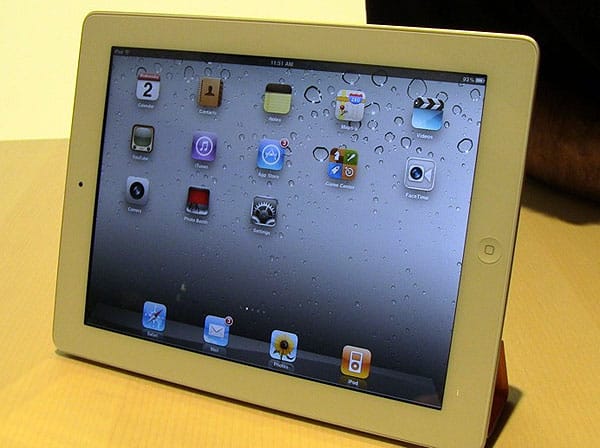
1. Camera Hardware. Good news: the iPad 2 now has twin cameras. Bad news: they’re low-resolution cameras, comparable to the ones in last year’s iPod touch. Expect VGA (640×480) resolution on the front, and 720p (1280×720) maximum resolution on the back. There’s no flash, and Apple hasn’t even said that the rear camera has autofocus. By 2011 standards—even late 2010 tablet standards—that’s not very impressive, and leaves Apple with two very obvious features to improve in the future iPad 3, which could gain a 720p front camera for FaceTime HD, and an iPhone 4-caliber rear camera with higher-resolution and autofocus capabilities.

2. Camera Application. Apple could have evolved the classic iPhone application Camera when bringing it to the iPad, but it didn’t: for the most part, Camera is the same on iPad 2 as it is on the iPhone 4 and iPod touch 4G.
Most of the screen is consumed by an upscaled version of what the front camera or rear camera is seeing, with four buttons scattered around: a front/rear camera toggle at the upper right, and a bar that provides one-touch access to the Camera Roll, snap/start camera button, and still/video toggle features.

The Camera Roll continues to offer a mix of still photos and videos, and enables you to do simple clip trimming and sharing through e-mail and YouTube. Oddly—very oddly, actually—Apple’s iPad 2 presentation and web pages make no reference to sharing videos through MobileMe using the Camera app, or the separately sold iMovie app. We’ll have to see what this means, but it could signal a major change to one of MobileMe’s most compelling prior features, instant iOS device video sharing with friends and family.

3. Photo Booth Application. This new iOS snapshot application is based upon the Mac program of the same name, but it’s been cut down and tweaked a little for the iPad. Photo Booth opens with a dramatic flourish, showing the red velvet curtain of a real life photo booth being pulled off to the side, then presents you with a choice of 8 different special effects—or “normal”—to use when creating still images.

The app is noteworthy for what it can and can’t do. It’s the first Apple-developed iOS camera program that can radically distort colors and shapes in the images it’s capturing. Kids have flocked to Photo Booth-equipped Macs in Apple Stores just to use the app for that feature. But whereas the Mac version includes 24 realtime special effects that can be applied to whatever the front camera is seeing, the iPad version’s 8 are limited to X-Ray, Light Tunnel, Stretch, Mirror, Twirl, Thermal Camera, Kaleidoscope, and Squeeze. Unlike the fifth-generation iPod nano, you can’t apply these effects to video recordings—just still pictures.
The iPod nano notably had 15 realtime video filters, plus Normal, before losing its camera in the 2010 model.

But you can share Photo Booth snapshots via e-mail from a pane that pops up at the bottom of the screen, and use the effects with both front and rear cameras, a first of sorts for this program. The shots are automatically saved to the iPad 2’s photo library for easy access outside of the Photo Booth app, as well.

4. FaceTime Application. FaceTime for iPad is a hybrid of the prior iPhone 4 and iPod touch 4G version and the Mac app of the same name, looking nearly identical to the Mac version at first. The screen is divided into a large video portion on the left, and a smoke black translucent pane on the right. “Favorites,” “Recents,” and “Contacts” buttons appear at the bottom of the screen, letting you easily touch your way to video calls with people who have previously FaceTime called you, or whose e-mail addresses or iPhone 4 phone numbers are stored in your Contacts application.


One interesting change: on the calling side, Apple has done away with the iPhone-styled top-of-screen name/number/“FaceTime…” bar that also appeared on the iPod touch 4G and Mac versions of the application, moving the information towards the bottom of the screen next to the “End” button. (An iPhone-style top-of-screen “Name/number would like FaceTime…” bar still appears on the receiver’s side if they’re using an iPad.) Unlike the Mac, which changes the FaceTime window’s size when the Favorites/Recents/Contacts bar slides left underneath the image, the iPad’s full screen is filled with the camera’s image as the bar zips out of sight to the right.


Video chats look basically the same on the iPad as on the iPhone 4 and iPod touch 4G. If both your iPad 2 and the caller’s device are in landscape orientation, the full screen is filled with the image of the person you’re calling, with a small movable preview window to let you see yourself in any of the display’s corners. If either device shifts to portrait orientation, black letterboxing bars appear on the screen to accommodate the automatically rotated image.











