
iLoungeiLounge
  • News
    • Apple
      • AirPods Pro
      • AirPlay
      • Apps
        • Apple Music
      • iCloud
      • iTunes
      • HealthKit
      • HomeKit
      • HomePod
      • iOS 13
      • Apple Pay
      • Apple TV
      • Siri
    • Rumors
    • Humor
    • Technology
      • CES
    • Daily Deals
    • Articles
    • Web Stories
  • iPhone
    • iPhone Accessories
  • iPad
  • iPod
    • iPod Accessories
  • Apple Watch
    • Apple Watch Accessories
  • Mac
    • MacBook Air
    • MacBook Pro
  • Reviews
    • App Reviews
  • How-to
    • Ask iLounge
Font ResizerAa
iLoungeiLounge
Font ResizerAa
Search
  • News
    • Apple
    • Rumors
    • Humor
    • Technology
    • Daily Deals
    • Articles
    • Web Stories
  • iPhone
    • iPhone Accessories
  • iPad
  • iPod
    • iPod Accessories
  • Apple Watch
    • Apple Watch Accessories
  • Mac
    • MacBook Air
    • MacBook Pro
  • Reviews
    • App Reviews
  • How-to
    • Ask iLounge
Follow US

How-to › Ask iLounge

Ask iLoungeiPhone

iMessages being sent as Text Messages

Last updated: May 16, 2021 4:20 pm UTC
By Jesse Hollington
iMessages being sent as Text Messages

Q: All of my immediate friends and family are iPhone users, so we regularly communicate via iMessage, which is great as we’ve been able to cancel our carrier’s expensive text messaging add-on. However, I notice that my Messages app sometimes randomly sends text messages instead of iMessages, with a green bubble and a note that says “Sent as Text Message.” Since I now pay for each of my text messages, this is a bit of a problem and I really don’t know why it’s happening or how to prevent it. Any ideas?


– Wilf
iMessages being sent as Text Messages

A: Unlike traditional text (SMS) messages, iMessage uses your iPhone’s cellular data or Wi-Fi connection to send and receive messages. This normally bypasses the carrier’s SMS services, which is why you aren’t charged for iMessages in the same way as for SMS.

The downside to this approach, however, is that for two iPhones to communicate via iMessage, they must both have an active data connection, over either a cellular data plan or a Wi-Fi network. If either iPhone is out of data coverage, your iPhone will still try to send an iMessage, however when it realizes that the message cannot be successfully delivered via the iMessage network, by default it will “fall back” to delivering it via SMS. This will result in the green bubble and the “Sent as Text Message” note that you’re seeing.


Fortunately, there is a way to turn this fallback off if you want to avoid unnecessary text messaging charges.

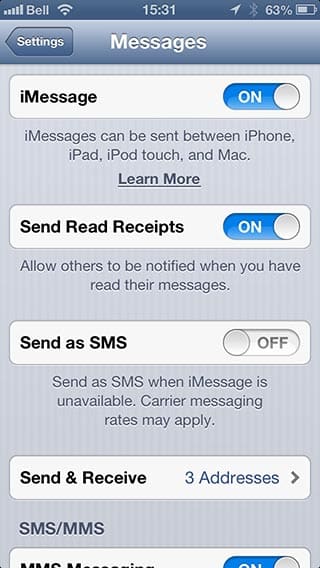
Simply go into your iPhone Settings app, select Messages, and then toggle the “Send as SMS” option to OFF.

This will prevent your iPhone from deciding to automatically fall back to sending SMS messages when iMessages cannot be sent. Note, however, that it does not disable text messages entirely; SMS will still be used when sending to non-iPhone users, for example, but this will be clearly indicated by the green “Send” button and title bar in the Messages app.


iMessages being sent as Text Messages

Further, even with this option off you can individually force an important message to go out as a text message in the event that iMessage is having problems delivering it.



Latest News
The 14-inch MacBook Pro with M5 Chip 16GB RAM/512GB is $250 Off
1 Min Read
Noise and Static on AirPods Pro 3 Still Unfixed
1 Min Read
New iMac with 24-inch OLED Display May be Brighter With 600 Nits
1 Min Read
The 15-inch M4 MacBook Air 256GB Is $250 Off
1 Min Read
Internal Kernel Debug Kit from Apple Reveals Tests for a MacBook with A15 Chip
1 Min Read
Apple Currently In Talks With Suppliers for Chip Assembly & Packaging of iPhones in India
1 Min Read
Apple Allows Easier Battery Replacement For M5 MacBook Pro with 14-inch Display
1 Min Read
The Apple Watch SE 3 44mm GPS is $50 Off
1 Min Read
20th Anniversary iPhone May Launch in Two Years
1 Min Read
Better Image Generation Capabilities and Apple Music Integration Coming to ChatGPT
1 Min Read
A20 Pro Chip Coming to Next Gen iPad Mini OLED
1 Min Read
Amazon has the AirTag 4 Pack Marked $29 off
1 Min Read

iLounge logo

iLounge is an independent resource for all things iPod, iPhone, iPad, and beyond. iPod, iPhone, iPad, iTunes, Apple TV, and the Apple logo are trademarks of Apple Inc.

This website is not affiliated with Apple Inc.
iLounge © 2001 - 2025. All Rights Reserved.
  • Contact Us
  • Submit News
  • About Us
  • Forums
  • Privacy Policy
  • Terms Of Use
Welcome Back!

Sign in to your account

Lost your password?








