
iLoungeiLounge
  • News
    • Apple
      • AirPods Pro
      • AirPlay
      • Apps
        • Apple Music
      • iCloud
      • iTunes
      • HealthKit
      • HomeKit
      • HomePod
      • iOS 13
      • Apple Pay
      • Apple TV
      • Siri
    • Rumors
    • Humor
    • Technology
      • CES
    • Daily Deals
    • Articles
    • Web Stories
  • iPhone
    • iPhone Accessories
  • iPad
  • iPod
    • iPod Accessories
  • Apple Watch
    • Apple Watch Accessories
  • Mac
    • MacBook Air
    • MacBook Pro
  • Reviews
    • App Reviews
  • How-to
    • Ask iLounge
Font ResizerAa
iLoungeiLounge
Font ResizerAa
Search
  • News
    • Apple
    • Rumors
    • Humor
    • Technology
    • Daily Deals
    • Articles
    • Web Stories
  • iPhone
    • iPhone Accessories
  • iPad
  • iPod
    • iPod Accessories
  • Apple Watch
    • Apple Watch Accessories
  • Mac
    • MacBook Air
    • MacBook Pro
  • Reviews
    • App Reviews
  • How-to
    • Ask iLounge
Follow US

How-to › Ask iLounge

ArticlesAsk iLoungeiTunes

How iTunes organizes music videos

Last updated: May 16, 2021 5:03 pm UTC
By Jesse Hollington
How iTunes organizes music videos

Q: I do not understand the organization of my iPod. I purchased the iPod classic 160 GB model because I have a lot of Music, Music videos and Movies. I loaded everything into iTunes 8 and all of my music went into the main Music category, and the Movies and Music Videos went into the Movie category. Then I plugged in my iPod in manual mode and created some play lists under the main categories on the iPod to separate out my movies, music videos and music. Using drag-and-drop from iTunes, I then loaded the movies into the movies section, the music videos into the “Music Videos” playlist, and the music into the various playlists that I had setup for different categories.

How iTunes organizes music videos

The problem I am having is that when I look at my iPod screen, things are NOT where I put them. For example, all the movies and music videos are still listed together under the main “Movies” heading. The thing is, that everything is in the iPod, just not in the right place, what am I missing or doing wrong?

– Alan

A: The thing to keep in mind is that iTunes and the iPod have three different categories for video content: Movies, TV Shows, and Music Videos. How a video track is categorized depends on a “Media Kind” tag within the file itself, and doesn’t really have any connection to where you try to put the specific item, either in iTunes or on your iPod.


While you would expect that things you add to a specific playlist should show up in that specific playlist, this is not always the case for video content, as the iPod tries to filter out content that is not relevant to the current category.

Therefore, if you have a “Movie” in a playlist, this will not show up when browsing your “Music” section on your iPod, as iTunes and the iPod don’t expect that you would want to listen to a movie as part of your music selection.


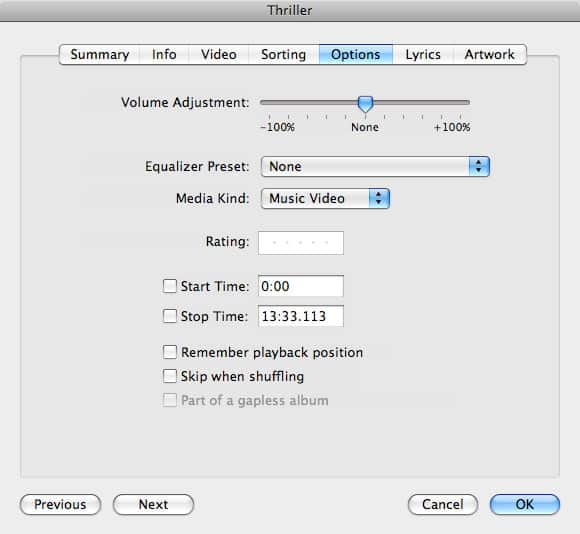
Every video file you import into iTunes begins as a “Movie” by default, and will therefore be listed under the “Movies” section and treated as a movie track. To change this, you need to edit the information within these tracks and change their “Media Kind” to something else, such as “Music Video.” This is accomplished by selecting the track(s) in question, choosing File, Get Info from the iTunes menu to bring up the track information dialog box and then choosing the “Options” tab.


How iTunes organizes music videos

From here, you can click on the drop-down menu beside “Media Kind” to change the selected video track(s) from their default setting of Movie to either Music Video or TV Show.

Once a track has been set as a Music Video, it will basically be catalogued in the same manner as any other music track; it should appear alongside your normal audio tracks when browsing your music library in iTunes or on your iPod, and will appear both in your playlists under the iPod’s “Music” section, as well as being listed under “Music Videos” in the iPod’s “Videos” section.



Latest News
The 14-inch MacBook Pro with M5 Chip 16GB RAM/512GB is $250 Off
1 Min Read
Noise and Static on AirPods Pro 3 Still Unfixed
1 Min Read
New iMac with 24-inch OLED Display May be Brighter With 600 Nits
1 Min Read
The 15-inch M4 MacBook Air 256GB Is $250 Off
1 Min Read
Internal Kernel Debug Kit from Apple Reveals Tests for a MacBook with A15 Chip
1 Min Read
Apple Currently In Talks With Suppliers for Chip Assembly & Packaging of iPhones in India
1 Min Read
Apple Allows Easier Battery Replacement For M5 MacBook Pro with 14-inch Display
1 Min Read
The Apple Watch SE 3 44mm GPS is $50 Off
1 Min Read
20th Anniversary iPhone May Launch in Two Years
1 Min Read
Better Image Generation Capabilities and Apple Music Integration Coming to ChatGPT
1 Min Read
A20 Pro Chip Coming to Next Gen iPad Mini OLED
1 Min Read
Amazon has the AirTag 4 Pack Marked $29 off
1 Min Read

iLounge logo

iLounge is an independent resource for all things iPod, iPhone, iPad, and beyond. iPod, iPhone, iPad, iTunes, Apple TV, and the Apple logo are trademarks of Apple Inc.

This website is not affiliated with Apple Inc.
iLounge © 2001 - 2025. All Rights Reserved.
  • Contact Us
  • Submit News
  • About Us
  • Forums
  • Privacy Policy
  • Terms Of Use
Welcome Back!

Sign in to your account

Lost your password?








