
Q: Can I remove the entire “Store” category, including the “iTunes Store” icon, from iTunes’ interface? I’ve found that I very seldom go to the store, and so I’d rather use the space in the left column for more playlists. I understand Apple is likely reluctant to allow this, but I thought I’d ask.
– Anonymous
A: Sure.
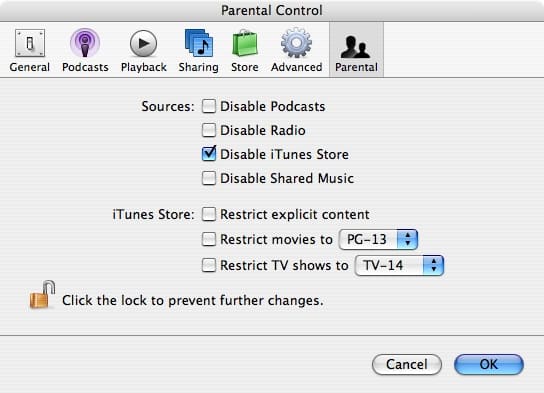
Although it isn’t obvious how, it is very easy to do. In previous versions of iTunes, one could simply uncheck the iTunes Music Store in an obvious list of viewable items in iTunes’ preferences. In recent versions of the software, this list doesn’t exist, but you can achieve the same result by imposing parental restrictions on yourself.
Simply open the “Parental Controls” tab of iTunes’ Preferences, and select “Disable iTunes Store.”
When this is checked, you’ll notice that the entire “Store” category disappears, unless you’ve downloaded items from the iTunes Store, in which your “Purchased” playlist will keep the category active. Delete this playlist to get rid of the entire category.
As can be seen in the figure above, you can also disable access to Podcasts, Radio, and Shared Music in the Parental Controls preferences window.











