
Not surprisingly, several companies in the automotive section were touting new Apple CarPlay integration as a coming feature. Among these, however, only Pioneer actually had a working system in place, expected to be available as part of their aftermarket systems in March. We had a chance to sit down for a demo and get some impressions.
CarPlay requires an iPhone 5 or later running at least iOS 7.1, and works only via a direct Lightning-to-USB connection, as mandated by Apple. Upon the initial connection, a CarPlay screen comes up briefly, but the iPhone will return to normal operation, allowing you to use it without having to disconnect it should you need to do something directly on the iPhone itself. For standard iPhone functions, however—calling, messaging, navigation, and music and podcast playback—once you’ve plugged in your iPhone you can effectively put it aside and let CarPlay take care of things.
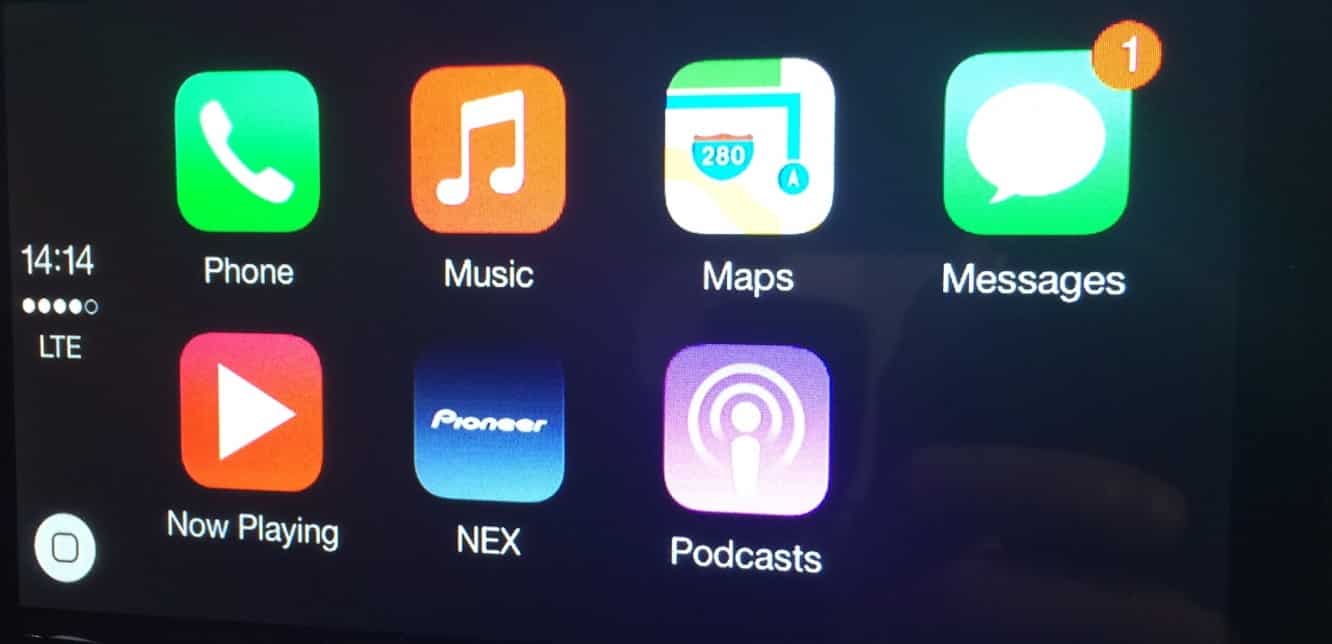

We were able to connect one of our own iPhones to the demo system to get the full experience, thereby working with our own data such as contacts, music, and messages. The CarPlay user interface is kept relatively simple; Apple only provides six buttons for Phone, Music, Maps, Messages, Now Playing, and Podcasts. Pioneer’s system adds a seventh button to switch from CarPlay mode to Pioneer’s own NEX mode, but otherwise, those are pretty much the only functions supported.
The left side of the screen shows the time, signal strength, and signal type from the connected iPhone, and a home button appears in the bottom left corner when away from the home screen.

CarPlay brings over other iOS interface elements, however, such as banner notifications that appear when text messages come in. And of course, there’s also integration with Siri, which is designed to be easily triggered using methods such as a steering wheel control. Siri takes the usual commands for placing phone calls, checking and sending messages, playing music, location search, and navigation.

For example, asking Siri to “Call Phil” will search the iPhone contacts and provide a list of “Phils” in the address book (assuming there is more than one), and the user can then select which one to call by tapping. A “Show Contacts” button is also provided if you decide you’d rather just browse your entire contacts list, which of course is totally accessible via CarPlay.

In fact, the Phone app on CarPlay is essentially just the standard iOS Phone app with a different layout. All of the usual sections are here: Favorites, Recents, Contacts, Keypad, and Voicemail, and they all work pretty much like you’d expect.

Placing a call brings up a familiar iOS call status screen, with the familiar buttons for ending or muting the current call, bringing up the onscreen keypad, or adding an additional party to the call.

The Music CarPlay app bears a similar resemblance to its iOS counterpart, with buttons for Genius Mixes, Playlists, Artists, Songs, and More across the top. Siri can also be used to play songs of course, in the same manner as it would be used directly on an iPhone, and a Now Playing screen is shown once a song starts playing. This can also be accessed from a button in the top right corner when the Music app is open, or from the “Now Playing” button on the CarPlay home screen.

The Podcasts app provides access to the Podcasts available on the user’s iPhone, and provides a similar user experience as the music section, complete with podcast cover art.

The Maps app also brings over the standard iOS Maps features with a display of recent and relevant contacts, including those found in e-mails stored in your iOS Mail app.


Siri-based point-of-interest search is also available here, so asking Siri to “find a nearby coffee shop” will return a list of appropriate results, which you can then navigate to simply by tapping on your preferred selection.

Messages in CarPlay are a bit of a different story from the other apps. Since reading while driving is generally considered to be a bad idea, the Messages app relies almost entirely on Siri for handling your actual Messages content. Tapping on the Messages button will introduce buttons to read back either all unread messages or only new messages, and Siri will take care of everything from there, reading your message content aloud to you, with buttons appearing as each message is read to either skip to the next message or dictate a reply.











