
iLoungeiLounge
  • News
    • Apple
      • AirPods Pro
      • AirPlay
      • Apps
        • Apple Music
      • iCloud
      • iTunes
      • HealthKit
      • HomeKit
      • HomePod
      • iOS 13
      • Apple Pay
      • Apple TV
      • Siri
    • Rumors
    • Humor
    • Technology
      • CES
    • Daily Deals
    • Articles
    • Web Stories
  • iPhone
    • iPhone Accessories
  • iPad
  • iPod
    • iPod Accessories
  • Apple Watch
    • Apple Watch Accessories
  • Mac
    • MacBook Air
    • MacBook Pro
  • Reviews
    • App Reviews
  • How-to
    • Ask iLounge
Font ResizerAa
iLoungeiLounge
Font ResizerAa
Search
  • News
    • Apple
    • Rumors
    • Humor
    • Technology
    • Daily Deals
    • Articles
    • Web Stories
  • iPhone
    • iPhone Accessories
  • iPad
  • iPod
    • iPod Accessories
  • Apple Watch
    • Apple Watch Accessories
  • Mac
    • MacBook Air
    • MacBook Pro
  • Reviews
    • App Reviews
  • How-to
    • Ask iLounge
Follow US

How-to › Ask iLounge

Ask iLoungeiPhone

Flashing LED for alerts on iPhone

Last updated: May 16, 2021 4:14 pm UTC
By Jesse Hollington
Flashing LED for alerts on iPhone

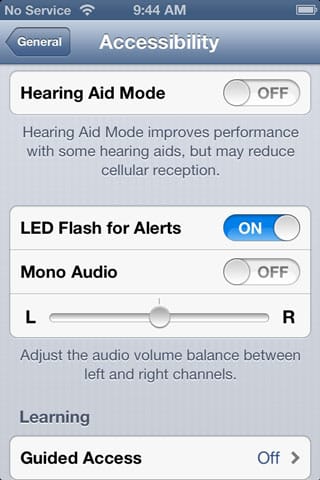
Q: My employer just switched from the BlackBerry to the iPhone 4. My supervisor mentioned one of the things that he really misses about the BlackBerry is its LED that constantly blinks to alert users of a new message. I know there is something similar in the iPhone’s accessibility settings that uses the camera’s flash, but having never enabled the feature, I’m not sure how closely it mimics the notification LED found on other smartphones (ie. does it blink just once or constantly until you acknowledge it).


– Paul
Flashing LED for alerts on iPhone

A: Unfortunately, unlike the Blackberry, the iPhone doesn’t include any kind of normal alert LED.

The “LED Flash for Alert” option found in the Accessibility settings uses the LED Flash on the back of the iPhone to draw attention to alerts for users with hearing difficulties, but only flashes in conjunction with an actual alert sound or vibration, rather than blinking repeatedly until an alert is acknowledged.

You may be able to work around this to some degree, however, by using repeating alerts for unacknowledged messages. For example, the iPhone provides a feature that allows you to repeat text message and iMessage alerts automatically at two-minute intervals up to 10 times until the message is actually read. Each of these alerts will be accompanied by the flashing LED if this is enabled. You can find this option in the Notifications section of the iOS Settings app.


Flashing LED for alerts on iPhone

Unfortunately, this type of option is not available natively for other types of alerts, but you may be able to use third-party apps such as MailTones or eNotify to provide repeated alerts for things like e-mail. Keep in mind, however, that these do not integrate with the built-in Mail app, but instead use other methods such as mail forwarding or a separate connection to the user’s mail server.

A key problem faced by developers in this case is that Apple doesn’t normally allow third-party apps to run in the background in such a way that they can intercept notifications and control the LED flash. If you’re willing to jailbreak the device, however, there are apps on the Cydia store that can be used for this purpose.

While we have not reviewed this product, another recent development that may be worth a look is an app and hardware accessory combination called myLED.



Latest News
The 14-inch MacBook Pro with M5 Chip 16GB RAM/512GB is $250 Off
1 Min Read
Noise and Static on AirPods Pro 3 Still Unfixed
1 Min Read
New iMac with 24-inch OLED Display May be Brighter With 600 Nits
1 Min Read
The 15-inch M4 MacBook Air 256GB Is $250 Off
1 Min Read
Internal Kernel Debug Kit from Apple Reveals Tests for a MacBook with A15 Chip
1 Min Read
Apple Currently In Talks With Suppliers for Chip Assembly & Packaging of iPhones in India
1 Min Read
Apple Allows Easier Battery Replacement For M5 MacBook Pro with 14-inch Display
1 Min Read
The Apple Watch SE 3 44mm GPS is $50 Off
1 Min Read
20th Anniversary iPhone May Launch in Two Years
1 Min Read
Better Image Generation Capabilities and Apple Music Integration Coming to ChatGPT
1 Min Read
A20 Pro Chip Coming to Next Gen iPad Mini OLED
1 Min Read
Amazon has the AirTag 4 Pack Marked $29 off
1 Min Read

iLounge logo

iLounge is an independent resource for all things iPod, iPhone, iPad, and beyond. iPod, iPhone, iPad, iTunes, Apple TV, and the Apple logo are trademarks of Apple Inc.

This website is not affiliated with Apple Inc.
iLounge © 2001 - 2025. All Rights Reserved.
  • Contact Us
  • Submit News
  • About Us
  • Forums
  • Privacy Policy
  • Terms Of Use
Welcome Back!

Sign in to your account

Lost your password?








