
Whenever Apple introduces a new iPod, accessory makers face three obvious challenges: physical, electronic, and practical. How do you make an FM transmitter that fits something as small as the iPod nano, especially when there’s no place to plug it in on the top? How do you make sure that it actually works, given that its antenna may be blocked by the nano’s partially metal body, and that the nano’s battery is so small? And how can you tune its stations on the go?

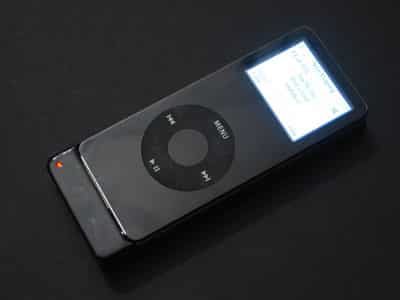
We’ve received a nearly final version of Griffin Technology’s new iTrip nano ($50), the first FM transmitter we’ve seen that has really good answers to each of these questions. Due out in time for the holidays – at least, to pre-orderers – the new add-on provides a practical alternative for people who need a truly portable way to broadcast nano audio to a radio. It is also the first transmitter to allow station tuning on an iPod’s screen without any special software, as shown in the photos below.
Body Design
Griffin’s design for iTrip nano is smart in a measured way: while not perfect, it becomes smarter the more you really think about the alternatives, such as Griffin’s earlier iTrip with Dock Connector, XtremeMac’s AirPlay2, and other devices that hang awkwardly off the nano’s bottom. It is built as a ‘sled’ that the nano slides into, doubling its thickness but adding comparatively little to its bottom, and nothing to its top or sides. The sled holds nano in place with what looks like an adhesive sticker, but isn’t – it’s a new micro suction cup pad that looks like white 3M tape but won’t wear out, and can be cleaned with scotch tape. It’s shown here with a protective sticker on; you peel it off to reveal an all-white surface.

It’s hard to quantify how much better this sled works than devices such as the earlier iTrip and AirPlay2, which constantly feel as if they’re going to snap on the iPod’s bottom if the wrong pressure is applied. iTrip nano feels solidly bound to the iPod, and even gives it the ability to stand up on its bottom edge. An antenna is mounted on the back bottom, letting tinkerers have easy access to a way to boost broadcasting power – something we don’t recommend, as it violates FCC regulations to do so.

If you’re willing to mount it or lay it on its back, a mini USB port at the bottom lets you charge the iPod at the same time as the iTrip is connected. A small red light on the bottom left corner is the only power indicator, and a three-position switch on the unit’s upper left is the only control system you’ll need.

What’s wrong with the design? Only two things we can think of. First, we’re not enamored with the three-position controller, which would have worked better as three small buttons in this design; Griffin’s older chrome dial was the best tuner yet, and this switch isn’t as easy to use. Second, there’s no way to use a case while it’s attached. Griffin plans to include a silicone skin for the nano in the iTrip’s package, but they can’t be used at the same time. The importance of solutions such as Power Support’s Crystal Film and InvisibleShield for iPod nano just shot up dramatically for potential iTrip users.
Menus
The biggest stroke of genius in iTrip nano is the one you can’t see on its body: Griffin has long obsessed over simple, smart radio tuning, and has taken that to the next level here. Old iTrips forced you to install a playlist full of tuning tracks if you wanted to change stations, a solution that worked pretty well until “shuffle songs” and better options became popular. When XtremeMac released AirPlay with an integrated LCD screen, it was obviously the best way to go… until now.

Since Apple has not included FM transmitter menus on an iPod, Griffin figured out a way to achieve the same effect: briefly convince the nano that it’s in the extended docking mode used in iPod docks and high-end car kits, and display menus as graphics on the “Do Not Disconnect” screen.
No second screen is needed; the iPod’s brightly lit LCD handles all the work.
You trigger this screen with the iTrip’s side switch, interrupting whatever the iPod is doing at a given moment to tell the attached transmitter what to do. The first thing that pops up is a station tuning screen with large, easy to read numbers. You can change FM stations by pressing the switch up or down, then select a station by pressing the switch inwards.

Multiple inwards presses cycle through a collection of menu choices: rather than presets, the three last stations tuned are automatically saved by iTrip, and can be scrolled through on the second screen.

Then there’s the Mono or Stereo mode screen, where you select between the iTrip’s wisely renamed LX and DX modes. Mono mode does away with stereo separation but lowers the noise/static floor. Stereo mode provides left and right channel audio, but with more noise.

Next, there’s a three-option menu, which lets you select between EQ, AutoP, and US/Intl.

EQ lets you turn a single predefined equalizer on or off, a feature similar to the one found in the latest version of iFM.

AutoP is AutoPlay, which sets iTrip to start playing automatically when you leave the menuing system.











