
iLoungeiLounge
  • News
    • Apple
      • AirPods Pro
      • AirPlay
      • Apps
        • Apple Music
      • iCloud
      • iTunes
      • HealthKit
      • HomeKit
      • HomePod
      • iOS 13
      • Apple Pay
      • Apple TV
      • Siri
    • Rumors
    • Humor
    • Technology
      • CES
    • Daily Deals
    • Articles
    • Web Stories
  • iPhone
    • iPhone Accessories
  • iPad
  • iPod
    • iPod Accessories
  • Apple Watch
    • Apple Watch Accessories
  • Mac
    • MacBook Air
    • MacBook Pro
  • Reviews
    • App Reviews
  • How-to
    • Ask iLounge
Font ResizerAa
iLoungeiLounge
Font ResizerAa
Search
  • News
    • Apple
    • Rumors
    • Humor
    • Technology
    • Daily Deals
    • Articles
    • Web Stories
  • iPhone
    • iPhone Accessories
  • iPad
  • iPod
    • iPod Accessories
  • Apple Watch
    • Apple Watch Accessories
  • Mac
    • MacBook Air
    • MacBook Pro
  • Reviews
    • App Reviews
  • How-to
    • Ask iLounge
Follow US

Articles

Articles

First Looks Special: Griffin iTrip for New iPod (5G)

Last updated: May 16, 2021 1:21 am UTC
By Jeremy Horwitz
First Looks Special: Griffin iTrip for New iPod (5G)

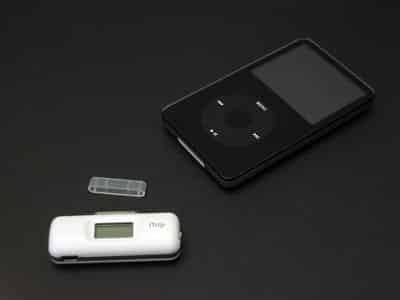
Even though Apple has discontinued the top-mounting accessory port used by most of the FM transmitters and remote controls released over the past two years, it was inevitable that companies would produce bottom-mounting versions for the new 5G iPod and iPod nano. Griffin Technology’s newest version of iTrip ($50) is the first we’ve received, and in all honesty, it’s underwhelming. We’ll explain why below.


First Looks Special: Griffin iTrip for New iPod (5G)

First, the good points. The new iTrip preserves almost all of the functionality from its recent iTrip (with LCD) predecessor: there’s a bright LCD screen on the front and a station toggle on the right. Audio performance appears to be similar, perhaps not identical – we’ll have more testing to do before we can come to any definitive conclusions.
First Looks Special: Griffin iTrip for New iPod (5G)

First Looks Special: Griffin iTrip for New iPod (5G)

Holding down the toggle button – on the unit’s right side – toggles between “international” and “US” radio tuning modes, giving users an extended collection of FM stations to tune through, and LX or DX modes, which let you choose between cleaner monaural broadcasting or weaker stereo broadcasting.


First Looks Special: Griffin iTrip for New iPod (5G)

New to the iTrip is a mini-USB port on the bottom left corner, which will enable you to connect an optional car charger cable at the same time as you’re broadcasting. Griffin also plans to release a dedicated automotive version of iTrip – iTrip Auto (previewed in our Holiday Buyers’ Guide) – with an integrated charging cable.

First Looks Special: Griffin iTrip for New iPod (5G)

One of the bad changes to the new iTrip is its new tuning toggle – a three position lever (up, down, and “in”) rather than the great rotary dial that was on the iTrip (with LCD). You press the lever up to go up in stations, down to go down, and inwards to select one. It’s not as easy as using the dial, and not as attractive.


First Looks Special: Griffin iTrip for New iPod (5G)

The back of the new iTrip isn’t quite as elegant as its predecessor, either. For the first time in Griffin history, the iTrip’s antenna is now visible on the back of the case, which has a plus and a minus: visually, it’s a minus, but tinkerers can more easily pull the antenna outwards for a boost in FM transmitting power. Neither we nor Griffin recommend this – it’s a violation of FCC transmitting regulations – but people hacked their iTrip minis with a similar trick, and it’s now easier than ever.


First Looks Special: Griffin iTrip for New iPod (5G)

Another oddball thing about the new iTrip – it doesn’t sit evenly on the bottom of any iPod to which it’s attached, bending off on an angle. But it does attach to all Dock Connecting iPods from 3G to 5G, mini and nano, and looks okay doing so. 
Why not make it perfect? We get the impression that Griffin is working on better versions of the iTrip, including iTrip Auto, iTrip for iPod nano, and perhaps others, and that this is just a temporary solution for people who need something right now (or in time for the holidays). Take that as you will.



Latest News
The Apple Watch Series 11 46mm GPS Is $100 Off
1 Min Read
Clamshell Style iPhone Being Looked Into By Apple
1 Min Read
Foldable iPhones May Have the Largest Battery Ever
1 Min Read
Apple and TSMC’s 10-Year Collaboration May Be Ending
1 Min Read
The 13-inch M5 iPad Pro 256GB Wi-Fi Is $149 Off
1 Min Read
M5 Pro and M5 Max Chips for the MacBook Pro could Roll Out with macOS 26.3
1 Min Read
Mac Ordering Process Revamped
1 Min Read
Check Signed By Steve Wozniak and Steve Jobs Sold For $2.4 Million
1 Min Read
The Anker 140W 4-Port GaN USB-C Charger is $35 Off
1 Min Read
No iPhone Air 2 This Year, according to Latest Report
1 Min Read
New Report Corroborates Split iPhone Release Dates
1 Min Read
Apple Losing More Researchers As They Plan To Release 2 Siri Versions
1 Min Read

iLounge logo

iLounge is an independent resource for all things iPod, iPhone, iPad, and beyond. iPod, iPhone, iPad, iTunes, Apple TV, and the Apple logo are trademarks of Apple Inc.

This website is not affiliated with Apple Inc.
iLounge © 2001 - 2025. All Rights Reserved.
  • Contact Us
  • Submit News
  • About Us
  • Forums
  • Privacy Policy
  • Terms Of Use
Welcome Back!

Sign in to your account

Lost your password?








