
iLoungeiLounge
  • News
    • Apple
      • AirPods Pro
      • AirPlay
      • Apps
        • Apple Music
      • iCloud
      • iTunes
      • HealthKit
      • HomeKit
      • HomePod
      • iOS 13
      • Apple Pay
      • Apple TV
      • Siri
    • Rumors
    • Humor
    • Technology
      • CES
    • Daily Deals
    • Articles
    • Web Stories
  • iPhone
    • iPhone Accessories
  • iPad
  • iPod
    • iPod Accessories
  • Apple Watch
    • Apple Watch Accessories
  • Mac
    • MacBook Air
    • MacBook Pro
  • Reviews
    • App Reviews
  • How-to
    • Ask iLounge
Font ResizerAa
iLoungeiLounge
Font ResizerAa
Search
  • News
    • Apple
    • Rumors
    • Humor
    • Technology
    • Daily Deals
    • Articles
    • Web Stories
  • iPhone
    • iPhone Accessories
  • iPad
  • iPod
    • iPod Accessories
  • Apple Watch
    • Apple Watch Accessories
  • Mac
    • MacBook Air
    • MacBook Pro
  • Reviews
    • App Reviews
  • How-to
    • Ask iLounge
Follow US

Articles

Articles

First Looks Special: Griffin iFM Radio, Remote, and Recorder

Last updated: May 16, 2021 6:05 am UTC
By Jeremy Horwitz
First Looks Special: Griffin iFM Radio, Remote, and Recorder

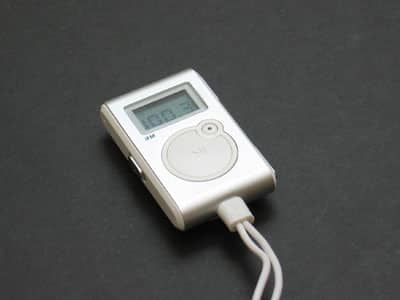
It’s here, and it performs as promised: after delays, cancellation, and then a complete restart of the project from the ground up, Griffin’s iFM radio tuner ($49.99 MSRP, approx. $30 street price) is finally ready to go. And other than one caveat, it’s highly impressive. Our full review will follow later, but here’s a First Look with pictures.


First Looks Special: Griffin iFM Radio, Remote, and Recorder

The biggest feature of iFM is its integrated digital radio tuner, which jumps in .2 increments from 87.9 to 107.9FM. Tuning is quick and easy with the unit’s forward and backward switch, located on its bottom right corner. More importantly, it sounds great. Griffin has been promising for months that iFM would rival the best portable FM radio tuners, and in our testing, it actually does.
First Looks Special: Griffin iFM Radio, Remote, and Recorder

It’s on the same general level as the best of the tuners we’ve tried, which we’ll expand upon further in our full review.


First Looks Special: Griffin iFM Radio, Remote, and Recorder

iFM’s light blue/green backlit screen is easy to see, and indicates its mode – FM / REMOTE / REC on the top. REC? Yes, iFM records FM radio to the iPod with a single button press, and stops recording with a single button press. The little button to the northeast of the large play button activates recording, lighting up red when it’s happening. The iPod’s screen – normally turned off while iFM is connected – turns on when recording begins, and stays on until it’s over. Your Voice Memos list then contains a time/date stamped recording, which sounds just about as good as the iPod can muster with its low sampling rate.


First Looks Special: Griffin iFM Radio, Remote, and Recorder


First Looks Special: Griffin iFM Radio, Remote, and Recorder

And yes, you can also use iFM as a remote control – a better one, in fact, than the one Apple has been selling in a package with extra headphones for $39 since the launch of the third-generation iPod back in 2003. While the LCD screen is mostly useless in remote mode, the iFM’s tuning button (the same as its radio tuning button) and volume control button (on the top of its right side) work well, and the play/pause button is easy to find and use.


First Looks Special: Griffin iFM Radio, Remote, and Recorder

But the big surprise is that you can use iFM as a voice recorder, too. A mic on its top left corner mimics part of the functionality of the company’s earlier iTalk accessory, controllable now via a single press of the record button at any time. The iPod drops what it’s doing and begins recording, then shuts off with a second button press. It’s pretty impressive.

First Looks Special: Griffin iFM Radio, Remote, and Recorder

There’s a three-position switch on the left side of iFM to toggle between OFF, FM and REMOTE positions. Since it runs off of the iPod’s battery, you’ll want to turn it off when you’re not using it. The iFM otherwise stays on when the iPod’s turned off, even in remote mode.

First Looks Special: Griffin iFM Radio, Remote, and Recorder

A plastic belt clip on the rear is small and not especially resilient feeling, but not awful, either.



Latest News
The 14-inch MacBook Pro with M5 Chip 16GB RAM/512GB is $250 Off
1 Min Read
Noise and Static on AirPods Pro 3 Still Unfixed
1 Min Read
New iMac with 24-inch OLED Display May be Brighter With 600 Nits
1 Min Read
The 15-inch M4 MacBook Air 256GB Is $250 Off
1 Min Read
Internal Kernel Debug Kit from Apple Reveals Tests for a MacBook with A15 Chip
1 Min Read
Apple Currently In Talks With Suppliers for Chip Assembly & Packaging of iPhones in India
1 Min Read
Apple Allows Easier Battery Replacement For M5 MacBook Pro with 14-inch Display
1 Min Read
The Apple Watch SE 3 44mm GPS is $50 Off
1 Min Read
20th Anniversary iPhone May Launch in Two Years
1 Min Read
Better Image Generation Capabilities and Apple Music Integration Coming to ChatGPT
1 Min Read
A20 Pro Chip Coming to Next Gen iPad Mini OLED
1 Min Read
Amazon has the AirTag 4 Pack Marked $29 off
1 Min Read

iLounge logo

iLounge is an independent resource for all things iPod, iPhone, iPad, and beyond. iPod, iPhone, iPad, iTunes, Apple TV, and the Apple logo are trademarks of Apple Inc.

This website is not affiliated with Apple Inc.
iLounge © 2001 - 2025. All Rights Reserved.
  • Contact Us
  • Submit News
  • About Us
  • Forums
  • Privacy Policy
  • Terms Of Use
Welcome Back!

Sign in to your account

Lost your password?








