
iLoungeiLounge
  • News
    • Apple
      • AirPods Pro
      • AirPlay
      • Apps
        • Apple Music
      • iCloud
      • iTunes
      • HealthKit
      • HomeKit
      • HomePod
      • iOS 13
      • Apple Pay
      • Apple TV
      • Siri
    • Rumors
    • Humor
    • Technology
      • CES
    • Daily Deals
    • Articles
    • Web Stories
  • iPhone
    • iPhone Accessories
  • iPad
  • iPod
    • iPod Accessories
  • Apple Watch
    • Apple Watch Accessories
  • Mac
    • MacBook Air
    • MacBook Pro
  • Reviews
    • App Reviews
  • How-to
    • Ask iLounge
Font ResizerAa
iLoungeiLounge
Font ResizerAa
Search
  • News
    • Apple
    • Rumors
    • Humor
    • Technology
    • Daily Deals
    • Articles
    • Web Stories
  • iPhone
    • iPhone Accessories
  • iPad
  • iPod
    • iPod Accessories
  • Apple Watch
    • Apple Watch Accessories
  • Mac
    • MacBook Air
    • MacBook Pro
  • Reviews
    • App Reviews
  • How-to
    • Ask iLounge
Follow US

How-to › Ask iLounge

ArticlesAsk iLoungeiTunes

Finding MP3 tracks in iTunes

Last updated: May 16, 2021 4:49 pm UTC
By Jesse Hollington
Finding MP3 tracks in iTunes

Q: For a while now I have been trying to figure out how to locate all of the MP3 formatted songs in my iTunes library and convert them to AAC. This becomes increasingly difficult when your iTunes is over 50 GB and the only way I have is to use the search feature in Finder to see a list then go back into iTunes and search again then convert. This takes forever as you might imagine. Is there a better way to do this?


– Kyle
Finding MP3 tracks in iTunes

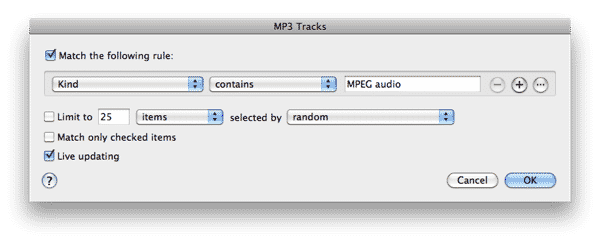
A: There are definitely much easier ways to do this; you can create a Smart Playlist to gather all of your MP3 files in one place and then view and convert them from there or simply display the “Kind” column in your main iTunes library by going to your View Options and then sort by that column to group all of your MP3 tracks together.

Ideally, if you have a lot of tracks you’re planning to convert, a Smart Playlist is the easiest option.


A Smart Playlist is basically a saved search of your iTunes library that will always display tracks based on selected criteria. You can therefore easily tell it to only include MP3 tracks and it will remain updated to only display those tracks in your library that are in MP3 format.

To create a new Smart Playlist, simply choose New Smart Playlist from the File menu in iTunes, and a dialog box will appear asking you to specify the criteria for your Smart Playlist. Set “Kind” to “MPEG Audio” and the Smart Playlist will only include your MP3 files.


Finding MP3 tracks in iTunes

You can also specify additional criteria if you want to narrow the list down further, such as ensuring you include only Music tracks, or filtering your list to a certain bit rate only.


Finding MP3 tracks in iTunes

There are a couple of things to keep in mind about converting your tracks to AAC. Firstly, be aware that iTunes makes a copy of any converted tracks rather than overwriting the original track. This means that the MP3 file will still remain in your Smart Playlist and a new, duplicate track will be created in AAC format. You’ll have to manually delete each MP3 track yourself once you’re satisfied with the conversion; you can do this directly from a Smart Playlist by holding down the SHIFT key (Windows) or OPT key (Mac) while hitting the delete button.

More importantly, however, you may want to consider the issue of quality loss from converting between lossy formats.



Latest News
The 14-inch MacBook Pro with M5 Chip 16GB RAM/512GB is $250 Off
1 Min Read
Noise and Static on AirPods Pro 3 Still Unfixed
1 Min Read
New iMac with 24-inch OLED Display May be Brighter With 600 Nits
1 Min Read
The 15-inch M4 MacBook Air 256GB Is $250 Off
1 Min Read
Internal Kernel Debug Kit from Apple Reveals Tests for a MacBook with A15 Chip
1 Min Read
Apple Currently In Talks With Suppliers for Chip Assembly & Packaging of iPhones in India
1 Min Read
Apple Allows Easier Battery Replacement For M5 MacBook Pro with 14-inch Display
1 Min Read
The Apple Watch SE 3 44mm GPS is $50 Off
1 Min Read
20th Anniversary iPhone May Launch in Two Years
1 Min Read
Better Image Generation Capabilities and Apple Music Integration Coming to ChatGPT
1 Min Read
A20 Pro Chip Coming to Next Gen iPad Mini OLED
1 Min Read
Amazon has the AirTag 4 Pack Marked $29 off
1 Min Read

iLounge logo

iLounge is an independent resource for all things iPod, iPhone, iPad, and beyond. iPod, iPhone, iPad, iTunes, Apple TV, and the Apple logo are trademarks of Apple Inc.

This website is not affiliated with Apple Inc.
iLounge © 2001 - 2025. All Rights Reserved.
  • Contact Us
  • Submit News
  • About Us
  • Forums
  • Privacy Policy
  • Terms Of Use
Welcome Back!

Sign in to your account

Lost your password?








