
iLoungeiLounge
  • News
    • Apple
      • AirPods Pro
      • AirPlay
      • Apps
        • Apple Music
      • iCloud
      • iTunes
      • HealthKit
      • HomeKit
      • HomePod
      • iOS 13
      • Apple Pay
      • Apple TV
      • Siri
    • Rumors
    • Humor
    • Technology
      • CES
    • Daily Deals
    • Articles
    • Web Stories
  • iPhone
    • iPhone Accessories
  • iPad
  • iPod
    • iPod Accessories
  • Apple Watch
    • Apple Watch Accessories
  • Mac
    • MacBook Air
    • MacBook Pro
  • Reviews
    • App Reviews
  • How-to
    • Ask iLounge
Font ResizerAa
iLoungeiLounge
Font ResizerAa
Search
  • News
    • Apple
    • Rumors
    • Humor
    • Technology
    • Daily Deals
    • Articles
    • Web Stories
  • iPhone
    • iPhone Accessories
  • iPad
  • iPod
    • iPod Accessories
  • Apple Watch
    • Apple Watch Accessories
  • Mac
    • MacBook Air
    • MacBook Pro
  • Reviews
    • App Reviews
  • How-to
    • Ask iLounge
Follow US

How-to › Ask iLounge

Ask iLoungeiCloud

Find My Friends always reports home location

Last updated: May 16, 2021 4:28 pm UTC
By Jesse Hollington
Find My Friends always reports home location

Q: The Apple “Find My Friends” app doesn’t seem to be working properly for my partner and I. We’ve both installed it and set it up on each of our iPhones and my iPad, and I can find her accurately almost all the time from either of my devices, but when she looks for me I’m almost always showing at home, even when I’m several miles away. Weirder yet, this isn’t always the case… it seems to be hit or miss as to whether she gets my actual location or simply my house. Any ideas?


– Sara
Find My Friends always reports home location

A: The most likely cause of this behaviour is that Find My Friends is using the location from your iPad instead of your iPhone.

If you’re leaving your iPad at home, and it’s turned on and connected to a Wi-Fi or cellular network, then anybody querying your current location is going to get the location reported by your iPad instead of your iPhone.

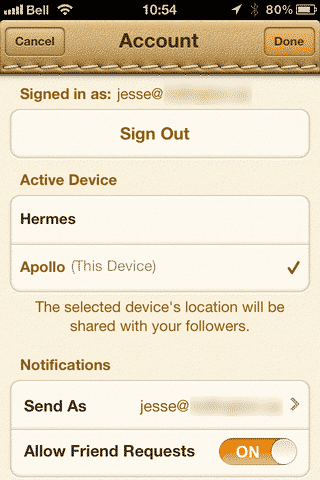
You can control which device is used to transmit your location by opening the Find My Friends app on any of your devices, going to the Me tab and then tapping on the Accounts button near the top-left corner.


From here you can also swipe-to-delete to remove devices from this list that you are no longer using—particularly useful if you’ve upgraded or replaced an iOS device. Find My Friends uses your device’s physical hardware ID, so when you set it up on a replacement device, even if you restore your backup, it registers as a new device.

The device you’re currently using will be indicated by the words “(This Device)” beside the name; feel free to remove any other entries that appear here with the same name as long as you’re sure they don’t actually represent other iOS devices.


Note that although Apple’s support documentation on Find My Friends suggests that your location will only ever be reported from the “Active Device” listed on this screen, in our experience it does appear that if your primary device is unreachable, Find My Friends will sometimes fall back to using a location from one of your other iOS devices. This does not appear to be consistent and in light of Apple’s own support documentation may simply be a bug as opposed to an intentional feature.

Keep in mind as well that unlike most other location-based apps such as Google Latitude, the Find My Friends app does not update your location automatically; location is only reported by your device when one of your friends actually requests it.



Latest News
The 14-inch MacBook Pro with M5 Chip 16GB RAM/512GB is $250 Off
1 Min Read
Noise and Static on AirPods Pro 3 Still Unfixed
1 Min Read
New iMac with 24-inch OLED Display May be Brighter With 600 Nits
1 Min Read
The 15-inch M4 MacBook Air 256GB Is $250 Off
1 Min Read
Internal Kernel Debug Kit from Apple Reveals Tests for a MacBook with A15 Chip
1 Min Read
Apple Currently In Talks With Suppliers for Chip Assembly & Packaging of iPhones in India
1 Min Read
Apple Allows Easier Battery Replacement For M5 MacBook Pro with 14-inch Display
1 Min Read
The Apple Watch SE 3 44mm GPS is $50 Off
1 Min Read
20th Anniversary iPhone May Launch in Two Years
1 Min Read
Better Image Generation Capabilities and Apple Music Integration Coming to ChatGPT
1 Min Read
A20 Pro Chip Coming to Next Gen iPad Mini OLED
1 Min Read
Amazon has the AirTag 4 Pack Marked $29 off
1 Min Read

iLounge logo

iLounge is an independent resource for all things iPod, iPhone, iPad, and beyond. iPod, iPhone, iPad, iTunes, Apple TV, and the Apple logo are trademarks of Apple Inc.

This website is not affiliated with Apple Inc.
iLounge © 2001 - 2025. All Rights Reserved.
  • Contact Us
  • Submit News
  • About Us
  • Forums
  • Privacy Policy
  • Terms Of Use
Welcome Back!

Sign in to your account

Lost your password?








