
iLoungeiLounge
  • News
    • Apple
      • AirPods Pro
      • AirPlay
      • Apps
        • Apple Music
      • iCloud
      • iTunes
      • HealthKit
      • HomeKit
      • HomePod
      • iOS 13
      • Apple Pay
      • Apple TV
      • Siri
    • Rumors
    • Humor
    • Technology
      • CES
    • Daily Deals
    • Articles
    • Web Stories
  • iPhone
    • iPhone Accessories
  • iPad
  • iPod
    • iPod Accessories
  • Apple Watch
    • Apple Watch Accessories
  • Mac
    • MacBook Air
    • MacBook Pro
  • Reviews
    • App Reviews
  • How-to
    • Ask iLounge
Font ResizerAa
iLoungeiLounge
Font ResizerAa
Search
  • News
    • Apple
    • Rumors
    • Humor
    • Technology
    • Daily Deals
    • Articles
    • Web Stories
  • iPhone
    • iPhone Accessories
  • iPad
  • iPod
    • iPod Accessories
  • Apple Watch
    • Apple Watch Accessories
  • Mac
    • MacBook Air
    • MacBook Pro
  • Reviews
    • App Reviews
  • How-to
    • Ask iLounge
Follow US

How-to › Ask iLounge

Ask iLoungeiCloudiPadiPhoneiPod

Estimated iCloud backup size doesn’t add up

Last updated: May 16, 2021 4:09 pm UTC
By Jesse Hollington
Estimated iCloud backup size doesn’t add up

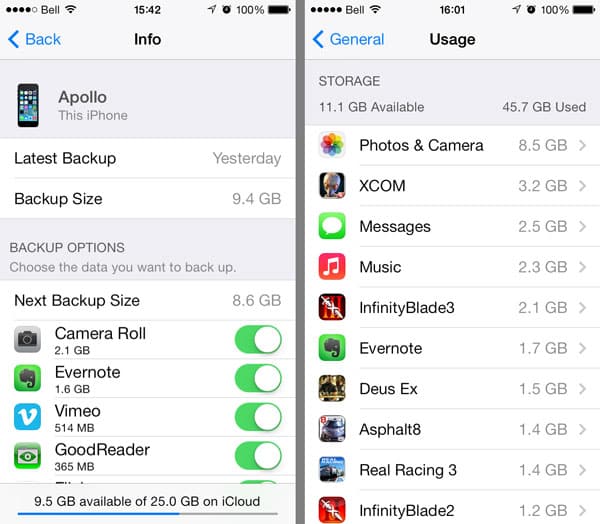
A: I saw your article last week about reducing iCloud storage. It’s helpful as I’m in the same boat of losing my 20GB of free storage and having to trim things down. My problem though is that when I go into my settings, my iCloud backups is well over 5GB by itself, yet when I look at the stuff that’s being backed up, it just doesn’t add up to that number—I’ve cleaned out most of my camera roll, and only have a couple of apps with more than 100MB of data in them. Even if I turn everything OFF on that list, my backup is still saying it’s 3.5GB.


Any ideas how I can trim this down further? Also, what happens if I don’t get this cut down before I lose my extra 20GB?
Estimated iCloud backup size doesn’t add up

– Daniel

A: The likely reason for this discrepancy is that your iCloud backup actually includes some data that can’t be excluded and therefore doesn’t appear on this list. If you go into your Settings app and check under General, Usage you should see a list of the storage being used by all of the apps on your iPhone, including those that don’t appear on the iCloud


Unfortunately, this doesn’t tell the whole story either, as the listing here shows what’s actually on your device, much of which doesn’t get included in your iCloud backups at all. Your actual applications aren’t backed up to iCloud as they can be re-downloaded from the App Store; only your application data gets backed up. The same applies to your Music and Videos for much the same reasons.

Photos & Camera here will also likely show a larger number as it includes your Photo Stream and any photos that have been synced on through iTunes—neither of which are backed up to iCloud either.


Estimated iCloud backup size doesn’t add up

One section that does get backed up to iCloud and can grow particularly large, however, is your Messages data. While normal text messages don’t take up a lot of space, if you’ve been using iMessage to share photos and videos with your friends, this can add up quickly—particularly as iMessage sends and receives photos and videos in full resolution, and these remain in your Messages database unless you specifically delete them.


Estimated iCloud backup size doesn’t add up

This database is backed up to iCloud, and factors into the sizes you see in your iCloud backup summary.



Latest News
The Apple Watch Series 11 46mm GPS Is $100 Off
1 Min Read
Clamshell Style iPhone Being Looked Into By Apple
1 Min Read
Foldable iPhones May Have the Largest Battery Ever
1 Min Read
Apple and TSMC’s 10-Year Collaboration May Be Ending
1 Min Read
The 13-inch M5 iPad Pro 256GB Wi-Fi Is $149 Off
1 Min Read
M5 Pro and M5 Max Chips for the MacBook Pro could Roll Out with macOS 26.3
1 Min Read
Mac Ordering Process Revamped
1 Min Read
Check Signed By Steve Wozniak and Steve Jobs Sold For $2.4 Million
1 Min Read
The Anker 140W 4-Port GaN USB-C Charger is $35 Off
1 Min Read
No iPhone Air 2 This Year, according to Latest Report
1 Min Read
New Report Corroborates Split iPhone Release Dates
1 Min Read
Apple Losing More Researchers As They Plan To Release 2 Siri Versions
1 Min Read

iLounge logo

iLounge is an independent resource for all things iPod, iPhone, iPad, and beyond. iPod, iPhone, iPad, iTunes, Apple TV, and the Apple logo are trademarks of Apple Inc.

This website is not affiliated with Apple Inc.
iLounge © 2001 - 2025. All Rights Reserved.
  • Contact Us
  • Submit News
  • About Us
  • Forums
  • Privacy Policy
  • Terms Of Use
Welcome Back!

Sign in to your account

Lost your password?








