
As we ready our reviews of the 2008 iPod nano, classic, and touch, we wanted to provide a little bit of early information on surprising updates to features found in prior versions of these devices. There will be a number of others—including changes in the way certain iPods charge—but here’s an early list of things that you might find interesting.

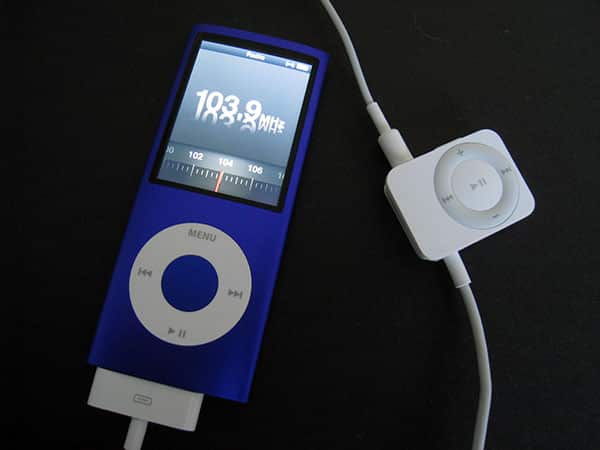
11. Radio. The fourth-generation iPod nano works with the prior iPod Radio Remote accessory, and now includes a feature called Tagged Songs, which can tag songs you hear on the radio for later purchase through iTunes. FM radio tagging has recently been touted as a new built-in feature in Microsoft’s Zune; Apple previously supported HD Radio tagging, which uses a less popular form of digital radio tuner and has required dock-like radio hardware. The 120GB iPod classic has not gained this feature, and the second-generation iPod touch brings up an unsupported accessory message when it’s connected.


10. Games. Surprise! The fourth-generation iPod nano plays Click Wheel iPod Games—the same ones sold last year by Apple after the release of the 2007 iPods. Since these games display in the nano’s widescreen video format, a new screen comes up to explain that the buttons have been remapped to correspond to the vertical orientation of the device, which may be a little confusing for some people.

9. Genius. The 120GB iPod classic includes Genius, a feature that creates automatic playlists of similar songs, just like the iPod nano and iPod touch. It’s still unclear whether Apple will get around to adding the feature to the original iPod classic.

8. Fonts and Accessibility. The new iPod nano has the ability to increase its font size from “Standard” to “Large.” Large makes the text roughly as big as the iPod classic’s, or nine lines of text versus the standard ten. To aid those with visual disabilities, Apple has also created a series of audio prompts for the nano’s menus, which can be turned on using iTunes 8. When you select Enable spoken menus for accessibility, iTunes 8 creates a collection of spoken menus for your device, then synchronizes them to the nano, a process that takes a few minutes. So far, it appears that this feature only works in English. Notably, Apple also includes a new English (UK) option as an alternative to English (US).

7. Crossfade. The iPod nano now has an Audio Crossfade feature to blend songs smoothly into one another; the iPod classic has not gained this feature.

6. Video-Out. Apple’s worst decision of 2007 lives on in the 2008 iPod family: video-out is still locked, requiring an overpriced authentication chip-based video cable (or similarly expensive docking device) to function.


5. Nike + iPod. We’ve been able to successfully pair an older Nike + iPod Sensor to both the iPod nano and the iPod touch.
Connecting the iPod classic to the Nike+ Receiver brings up an unsupported accessory screen. Nike + iPod is its own optional icon on the iPod touch, featuring the ability to pair with a sensor, record your performance, and play back audio during workouts in the same manner as the iPod nano version. Audio feedback is still provided. The iPod nano version is very similar to its prior incarnation, except you can now rotate the screen on your preferred orientation during the workout.


4. Screen rotation and Accelerometer. The iPod nano allows for a surprising amount of screen rotation within its features—not just music, but also Nike + iPod, which can be set to your preferred display orientation in a settings menu. You can also do the same with Nike + iPod on the iPod touch, rotating the screen if you’re so inclined. This likely will facilitate better workout solutions, and potentially a new generation of accelerometer-based iPod games that work solely on the new nano. Apple has also included “Shake,” which lets you shake the nano to activate shuffle mode; this can be turned off.

3. Maze Versus iQuiz. The iPod classic still ships with iQuiz, Apple’s music and video trivia game, but the fourth-generation iPod nano replaces it with Maze, an accelerometer-based game that tracks the progress of a ball moving through on-screen mazes. You tilt the nano to move the ball through the maze to the finish point.











