
iLoungeiLounge
  • News
    • Apple
      • AirPods Pro
      • AirPlay
      • Apps
        • Apple Music
      • iCloud
      • iTunes
      • HealthKit
      • HomeKit
      • HomePod
      • iOS 13
      • Apple Pay
      • Apple TV
      • Siri
    • Rumors
    • Humor
    • Technology
      • CES
    • Daily Deals
    • Articles
    • Web Stories
  • iPhone
    • iPhone Accessories
  • iPad
  • iPod
    • iPod Accessories
  • Apple Watch
    • Apple Watch Accessories
  • Mac
    • MacBook Air
    • MacBook Pro
  • Reviews
    • App Reviews
  • How-to
    • Ask iLounge
Font ResizerAa
iLoungeiLounge
Font ResizerAa
Search
  • News
    • Apple
    • Rumors
    • Humor
    • Technology
    • Daily Deals
    • Articles
    • Web Stories
  • iPhone
    • iPhone Accessories
  • iPad
  • iPod
    • iPod Accessories
  • Apple Watch
    • Apple Watch Accessories
  • Mac
    • MacBook Air
    • MacBook Pro
  • Reviews
    • App Reviews
  • How-to
    • Ask iLounge
Follow US

How-to › Ask iLounge

Ask iLoungeiCloudiPhone

Disappearing iPhone Calendar events

Last updated: May 16, 2021 4:28 pm UTC
By Jesse Hollington
Disappearing iPhone Calendar events

Q: My iPhone calendar seems to have a problem saving events that I try and enter for dates in the past. When I try to enter an event more than a couple of weeks old, it shows up in my calendar for a few seconds, and then suddenly disappears right before my eyes. I don’t have any problem with entering current or future events, but anything I try to enter too far back in the past just vanishes from my calendar entirely. I’ve tried creating the same event numerous times in several different ways, but it disappears every time.


Any ideas?
Disappearing iPhone Calendar events

– Kathryn

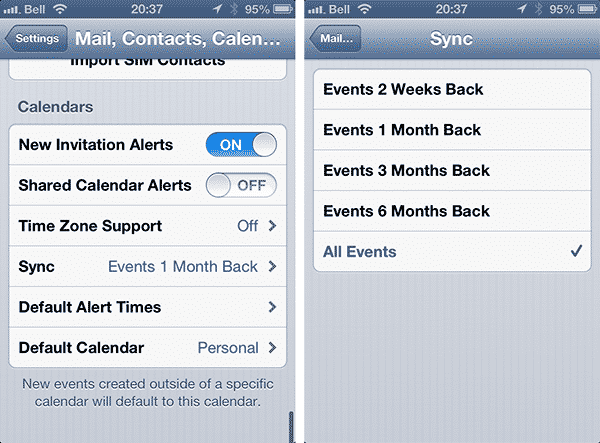
A: The likely cause of this problem is that you’re synchronizing your iPhone Calendar with iCloud or another online calendar service and your iPhone is set to sync only recent events. This option can be found under Mail, Contacts, Calendars in your iPhone Settings app. The default setting is one month, however you can tap on this option and choose from either two weeks, one month, three months or six months or simply choose All Events to sync everything in your calendar.


New events created in the iPhone Calendar outside of this time frame are still saved and synchronized to your online calendar (e.g.

iCloud), but once the online calendar has been updated, they are removed from the local iPhone Calendar; hence these events appear to vanish shortly after you’ve created them. Items you have created on these older dates will actually have been saved in the cloud and you would likely be able to see them on a desktop computer; iCal for Mac, for example, automatically synchronizes all events from iCloud to your desktop calendar, regardless of the setting on your iPhone. Further, if you’re using iCloud you can log onto iCloud.com from any web browser and you should see these events in your Calendar there as well. In fact, if you adjust the sync setting above to a longer time frame—or All Events—all of these “lost” events should automatically be synced back down from the cloud and reappear; you’ll likely even see all of the instances of events that you tried to create multiple times.



Latest News
The 14-inch MacBook Pro with M5 Chip 16GB RAM/512GB is $250 Off
1 Min Read
Noise and Static on AirPods Pro 3 Still Unfixed
1 Min Read
New iMac with 24-inch OLED Display May be Brighter With 600 Nits
1 Min Read
The 15-inch M4 MacBook Air 256GB Is $250 Off
1 Min Read
Internal Kernel Debug Kit from Apple Reveals Tests for a MacBook with A15 Chip
1 Min Read
Apple Currently In Talks With Suppliers for Chip Assembly & Packaging of iPhones in India
1 Min Read
Apple Allows Easier Battery Replacement For M5 MacBook Pro with 14-inch Display
1 Min Read
The Apple Watch SE 3 44mm GPS is $50 Off
1 Min Read
20th Anniversary iPhone May Launch in Two Years
1 Min Read
Better Image Generation Capabilities and Apple Music Integration Coming to ChatGPT
1 Min Read
A20 Pro Chip Coming to Next Gen iPad Mini OLED
1 Min Read
Amazon has the AirTag 4 Pack Marked $29 off
1 Min Read

iLounge logo

iLounge is an independent resource for all things iPod, iPhone, iPad, and beyond. iPod, iPhone, iPad, iTunes, Apple TV, and the Apple logo are trademarks of Apple Inc.

This website is not affiliated with Apple Inc.
iLounge © 2001 - 2025. All Rights Reserved.
  • Contact Us
  • Submit News
  • About Us
  • Forums
  • Privacy Policy
  • Terms Of Use
Welcome Back!

Sign in to your account

Lost your password?








