
iLoungeiLounge
  • News
    • Apple
      • AirPods Pro
      • AirPlay
      • Apps
        • Apple Music
      • iCloud
      • iTunes
      • HealthKit
      • HomeKit
      • HomePod
      • iOS 13
      • Apple Pay
      • Apple TV
      • Siri
    • Rumors
    • Humor
    • Technology
      • CES
    • Daily Deals
    • Articles
    • Web Stories
  • iPhone
    • iPhone Accessories
  • iPad
  • iPod
    • iPod Accessories
  • Apple Watch
    • Apple Watch Accessories
  • Mac
    • MacBook Air
    • MacBook Pro
  • Reviews
    • App Reviews
  • How-to
    • Ask iLounge
Font ResizerAa
iLoungeiLounge
Font ResizerAa
Search
  • News
    • Apple
    • Rumors
    • Humor
    • Technology
    • Daily Deals
    • Articles
    • Web Stories
  • iPhone
    • iPhone Accessories
  • iPad
  • iPod
    • iPod Accessories
  • Apple Watch
    • Apple Watch Accessories
  • Mac
    • MacBook Air
    • MacBook Pro
  • Reviews
    • App Reviews
  • How-to
    • Ask iLounge
Follow US

How-to › Ask iLounge

Ask iLoungeiPhone

Disabling data on iPhone 3G

Last updated: May 16, 2021 5:09 pm UTC
By Jesse Hollington
Disabling data on iPhone 3G

Q: I wanted to know if it is possible to block the iPhone from using data services on the 3G/EDGE network. I wish to use it only on Wi-Fi so as to not be charged for any data.


– Eric
Disabling data on iPhone 3G

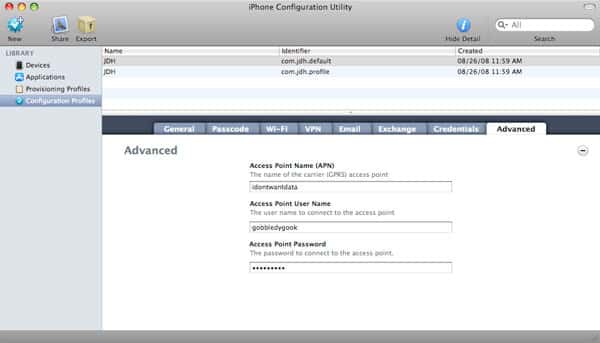
A: There are a couple of ways that you can go about preventing your iPhone from using data services on the cellular network. The simplest method is to change the APN (Access Point Name) information on your iPhone. This APN information is basically used to “log on” to your carrier’s data network, and if this information is invalid, then your iPhone will not be able to access cellular data services.

Unfortunately, most carriers hard-code the APN information into the iPhone and will not allow you to change this APN information directly on the iPhone itself when in your home network. However, you can change these settings via Apple’s own iPhone Configuration Utility, which can be downloaded from Apple’s iPhone Enterprise Support page.


The iPhone Configuration Utility is primarily targeted at enterprise organizations who wish to standardize certain configurations across all of the iPhones in their organization, and includes the ability to create customized configuration and application provisioning profiles to distribute to multiple iPhones. Among the settings that can be customized is the APN configuration. Simply setting the APN to an invalid random value is generally sufficient to block your iPhone from accessing the cellular data network.

Using the iPhone Configuration Utility will generate a .mobileConfig file that can then be loaded onto your iPhone simply by e-mailing it to yourself or loading it from a web site via a web browser.


Unfortunately, this can be a somewhat cumbersome process for a novice user, so an enterprising Vodafone user in New Zealand has graciously provided an iPhone-optimized web site that does the exact same thing that the iPhone Configuration Utility would do, simply by generating and providing the same .mobileConfig file that would be built by Apple’s own utility.

Visiting http://unlockit.co.nz on your iPhone will bring you to a page that you can use to set a custom APN or a “Fake APN” on your iPhone in order to disable data access:


Disabling data on iPhone 3G

After selecting the option from the web site itself, a mobile configuration file will be downloaded to your iPhone and you will be prompted to install it:


Disabling data on iPhone 3G

Once these settings have been applied, your iPhone should no longer be able to access the cellular data network. This will not affect your WiFi configuration in any way whatsoever, but when you are out of range of a WiFi access point and attempt to access data, the iPhone will indicate that it cannot activate the cellular data network in order to do so.


Disabling data on iPhone 3G

Should you later decide that you do in fact want to turn cellular data access back on, you simply need to remove the customized mobile configuration file under the Settings, General, Profiles option:


Disabling data on iPhone 3G

This will remove the customized settings and return your iPhone to its carrier-default configuration.



Latest News
The Apple Watch Series 11 46mm GPS Is $100 Off
1 Min Read
Clamshell Style iPhone Being Looked Into By Apple
1 Min Read
Foldable iPhones May Have the Largest Battery Ever
1 Min Read
Apple and TSMC’s 10-Year Collaboration May Be Ending
1 Min Read
The 13-inch M5 iPad Pro 256GB Wi-Fi Is $149 Off
1 Min Read
M5 Pro and M5 Max Chips for the MacBook Pro could Roll Out with macOS 26.3
1 Min Read
Mac Ordering Process Revamped
1 Min Read
Check Signed By Steve Wozniak and Steve Jobs Sold For $2.4 Million
1 Min Read
The Anker 140W 4-Port GaN USB-C Charger is $35 Off
1 Min Read
No iPhone Air 2 This Year, according to Latest Report
1 Min Read
New Report Corroborates Split iPhone Release Dates
1 Min Read
Apple Losing More Researchers As They Plan To Release 2 Siri Versions
1 Min Read

iLounge logo

iLounge is an independent resource for all things iPod, iPhone, iPad, and beyond. iPod, iPhone, iPad, iTunes, Apple TV, and the Apple logo are trademarks of Apple Inc.

This website is not affiliated with Apple Inc.
iLounge © 2001 - 2025. All Rights Reserved.
  • Contact Us
  • Submit News
  • About Us
  • Forums
  • Privacy Policy
  • Terms Of Use
Welcome Back!

Sign in to your account

Lost your password?








