
iLoungeiLounge
  • News
    • Apple
      • AirPods Pro
      • AirPlay
      • Apps
        • Apple Music
      • iCloud
      • iTunes
      • HealthKit
      • HomeKit
      • HomePod
      • iOS 13
      • Apple Pay
      • Apple TV
      • Siri
    • Rumors
    • Humor
    • Technology
      • CES
    • Daily Deals
    • Articles
    • Web Stories
  • iPhone
    • iPhone Accessories
  • iPad
  • iPod
    • iPod Accessories
  • Apple Watch
    • Apple Watch Accessories
  • Mac
    • MacBook Air
    • MacBook Pro
  • Reviews
    • App Reviews
  • How-to
    • Ask iLounge
Font ResizerAa
iLoungeiLounge
Font ResizerAa
Search
  • News
    • Apple
    • Rumors
    • Humor
    • Technology
    • Daily Deals
    • Articles
    • Web Stories
  • iPhone
    • iPhone Accessories
  • iPad
  • iPod
    • iPod Accessories
  • Apple Watch
    • Apple Watch Accessories
  • Mac
    • MacBook Air
    • MacBook Pro
  • Reviews
    • App Reviews
  • How-to
    • Ask iLounge
Follow US

How-to › Ask iLounge

Ask iLoungeMac

Disabled iMessages on iPhone still appearing on Mac

Last updated: May 16, 2021 4:21 pm UTC
By Jesse Hollington
Disabled iMessages on iPhone still appearing on Mac

Q: My family is having some issues with iMessage. A couple of months ago I turned off the iMessage option on my iPhone because my carrier gave me an unlimited SMS plan and overall, my carrier’s SMS service seems to be more reliable than what I’ve experienced with iMessage. I basically chose the reliability of SMS over the convenience of receiving iMessages on both my iPhone and MacBook.


For some reason though, it now seems that whenever I have my MacBook open, SMS messages sent from my wife and daughter no longer come to my phone but have restarted coming to my MacBook. We’ve made sure they are sending the SMS to my phone number instead of my iCloud address and also noted that the message bubble color is green rather than blue.
Disabled iMessages on iPhone still appearing on Mac

It may just be coincidence but I didn’t start having this problem until I updated to iOS 6.1 last week. Could there be something I missed or inadvertently changed during the setup procedure?


– Paul

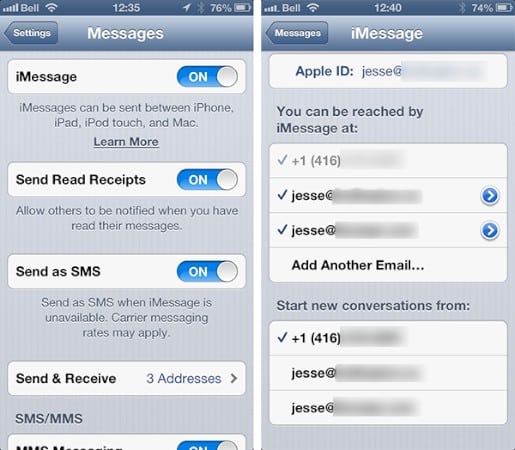
A: When sending a text message from the Messages app on an iPhone, the app first checks with Apple’s servers to see if the phone number is registered to receive iMessages. If so, then the message is sent as an iMessage, otherwise it is sent out as a normal text message. Even if the phone number is registered for iMessage, if a message cannot be delivered via iMessage, such as if the receiving device is turned off, then the Messages app will normally fall back to sending text messages.


iOS 6.0 and OS X 10.8.2 introduced the ability to receive iMessages addressed to a phone number on non-iPhone devices, such as the iPad, iPod touch and Mac.

This is handled by logging into iMessages on your iPhone using your Apple ID, at which point your phone number is added to your profile and becomes available on your other devices.

Note that turning iMessages OFF on your iPhone does not remove your phone number from other devices that have already been configured for it. In fact, this doesn’t even happen when signing out of your Apple ID in the Messages settings on your iPhone. It seems the only way to remove a phone number from your iMessage profile is to register it to a different Apple ID.


Disabled iMessages on iPhone still appearing on Mac

However, while it will remain part of your iMessage profile, you can easily disable it on your Mac by going into your Messages settings and deselecting it.



Latest News
The 14-inch MacBook Pro with M5 Chip 16GB RAM/512GB is $250 Off
1 Min Read
Noise and Static on AirPods Pro 3 Still Unfixed
1 Min Read
New iMac with 24-inch OLED Display May be Brighter With 600 Nits
1 Min Read
The 15-inch M4 MacBook Air 256GB Is $250 Off
1 Min Read
Internal Kernel Debug Kit from Apple Reveals Tests for a MacBook with A15 Chip
1 Min Read
Apple Currently In Talks With Suppliers for Chip Assembly & Packaging of iPhones in India
1 Min Read
Apple Allows Easier Battery Replacement For M5 MacBook Pro with 14-inch Display
1 Min Read
The Apple Watch SE 3 44mm GPS is $50 Off
1 Min Read
20th Anniversary iPhone May Launch in Two Years
1 Min Read
Better Image Generation Capabilities and Apple Music Integration Coming to ChatGPT
1 Min Read
A20 Pro Chip Coming to Next Gen iPad Mini OLED
1 Min Read
Amazon has the AirTag 4 Pack Marked $29 off
1 Min Read

iLounge logo

iLounge is an independent resource for all things iPod, iPhone, iPad, and beyond. iPod, iPhone, iPad, iTunes, Apple TV, and the Apple logo are trademarks of Apple Inc.

This website is not affiliated with Apple Inc.
iLounge © 2001 - 2025. All Rights Reserved.
  • Contact Us
  • Submit News
  • About Us
  • Forums
  • Privacy Policy
  • Terms Of Use
Welcome Back!

Sign in to your account

Lost your password?








