
iLoungeiLounge
  • News
    • Apple
      • AirPods Pro
      • AirPlay
      • Apps
        • Apple Music
      • iCloud
      • iTunes
      • HealthKit
      • HomeKit
      • HomePod
      • iOS 13
      • Apple Pay
      • Apple TV
      • Siri
    • Rumors
    • Humor
    • Technology
      • CES
    • Daily Deals
    • Articles
    • Web Stories
  • iPhone
    • iPhone Accessories
  • iPad
  • iPod
    • iPod Accessories
  • Apple Watch
    • Apple Watch Accessories
  • Mac
    • MacBook Air
    • MacBook Pro
  • Reviews
    • App Reviews
  • How-to
    • Ask iLounge
Font ResizerAa
iLoungeiLounge
Font ResizerAa
Search
  • News
    • Apple
    • Rumors
    • Humor
    • Technology
    • Daily Deals
    • Articles
    • Web Stories
  • iPhone
    • iPhone Accessories
  • iPad
  • iPod
    • iPod Accessories
  • Apple Watch
    • Apple Watch Accessories
  • Mac
    • MacBook Air
    • MacBook Pro
  • Reviews
    • App Reviews
  • How-to
    • Ask iLounge
Follow US

How-to › Ask iLounge

Ask iLoungeiTunes

Deauthorizing computers revisited

Last updated: May 16, 2021 5:24 pm UTC
By Jesse Hollington
Deauthorizing computers revisited

Q: I have already used 4 of my 5 computer authorizations available to me. How do I deauthorize a computer I no longer have access to? I read someone else’s query about the same matter in a previous article, and your response indicated that I could go to the Music Store and select “Deauthorize All” from my account settings page, but I cannot seem to do this, as the “Deauthorize All” button does not appear for me.


– Shauna
Deauthorizing computers revisited

A: The “Deauthorize All” button will only appear in your iTunes Store account settings once you have actually reached your five-computer limit for authorizations. The primary purpose of this function is to allow you to reset your authorization count in the event that you cannot authorize any additional computers due to having reached your limit.

Prior to reaching this limit you therefore wouldn’t have a need to deauthorize any other computers as long as you still have authorizations remaining.


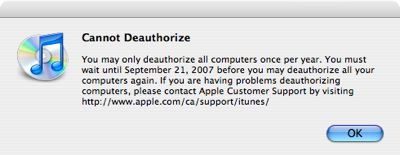
Note as well that you can only use the “Deauthorize All” option once per year. If you have already used the option within the past year, the button will still appear (providing you have reached your five-computer limit), but attempts to select this option will result in a dialog box advising you of this and on what date you will be able to use the deauthorization option again.

While it is always a good practice to deauthorize any computers you will no longer be using (in addition to removing your iTunes library and any other personal data from them), forgetting to do this for an inaccessible computer does not put any of your personal data or iTunes account information at risk.


Even on an authorized computer, iTunes requires entry of your iTunes Store user name and password in order to perform any iTunes Store transactions, such as purchasing new content and viewing or updating your iTunes Store account information. A computer left authorized will be able to do no more than play any existing tracks that have been previously purchased with your account and are still stored on that particular computer.

Further, the “Deauthorize All” option in the iTunes Store will not proactively force deauthorization of any remote computers—rather it just resets the authorization counts in your iTunes Store profile and invalidates all keys previously issued for those computers. The authorization keys are not removed from the remote computer itself until it reconnects to your iTunes Store account to download new content.



Latest News
The 14-inch MacBook Pro with M5 Chip 16GB RAM/512GB is $250 Off
1 Min Read
Noise and Static on AirPods Pro 3 Still Unfixed
1 Min Read
New iMac with 24-inch OLED Display May be Brighter With 600 Nits
1 Min Read
The 15-inch M4 MacBook Air 256GB Is $250 Off
1 Min Read
Internal Kernel Debug Kit from Apple Reveals Tests for a MacBook with A15 Chip
1 Min Read
Apple Currently In Talks With Suppliers for Chip Assembly & Packaging of iPhones in India
1 Min Read
Apple Allows Easier Battery Replacement For M5 MacBook Pro with 14-inch Display
1 Min Read
The Apple Watch SE 3 44mm GPS is $50 Off
1 Min Read
20th Anniversary iPhone May Launch in Two Years
1 Min Read
Better Image Generation Capabilities and Apple Music Integration Coming to ChatGPT
1 Min Read
A20 Pro Chip Coming to Next Gen iPad Mini OLED
1 Min Read
Amazon has the AirTag 4 Pack Marked $29 off
1 Min Read

iLounge logo

iLounge is an independent resource for all things iPod, iPhone, iPad, and beyond. iPod, iPhone, iPad, iTunes, Apple TV, and the Apple logo are trademarks of Apple Inc.

This website is not affiliated with Apple Inc.
iLounge © 2001 - 2025. All Rights Reserved.
  • Contact Us
  • Submit News
  • About Us
  • Forums
  • Privacy Policy
  • Terms Of Use
Welcome Back!

Sign in to your account

Lost your password?








