
iLoungeiLounge
  • News
    • Apple
      • AirPods Pro
      • AirPlay
      • Apps
        • Apple Music
      • iCloud
      • iTunes
      • HealthKit
      • HomeKit
      • HomePod
      • iOS 13
      • Apple Pay
      • Apple TV
      • Siri
    • Rumors
    • Humor
    • Technology
      • CES
    • Daily Deals
    • Articles
    • Web Stories
  • iPhone
    • iPhone Accessories
  • iPad
  • iPod
    • iPod Accessories
  • Apple Watch
    • Apple Watch Accessories
  • Mac
    • MacBook Air
    • MacBook Pro
  • Reviews
    • App Reviews
  • How-to
    • Ask iLounge
Font ResizerAa
iLoungeiLounge
Font ResizerAa
Search
  • News
    • Apple
    • Rumors
    • Humor
    • Technology
    • Daily Deals
    • Articles
    • Web Stories
  • iPhone
    • iPhone Accessories
  • iPad
  • iPod
    • iPod Accessories
  • Apple Watch
    • Apple Watch Accessories
  • Mac
    • MacBook Air
    • MacBook Pro
  • Reviews
    • App Reviews
  • How-to
    • Ask iLounge
Follow US

How-to › Ask iLounge

Ask iLoungeiTunes

Creating an iTunes Store account without a credit card

Last updated: May 16, 2021 5:21 pm UTC
By Jesse Hollington
Creating an iTunes Store account without a credit card

Q: I’m wondering if it’s possible for me to download iTunes and sign up/make my own account, even though I’m only 13. You see, my parents don’t want to use their credit card, and I’ve heard you need a credit card to buy songs from the iTunes store and create an account. If it is possible to make an own account for myself, could I just use an iTunes Gift Card and buy songs that way?


– Sara
Creating an iTunes Store account without a credit card

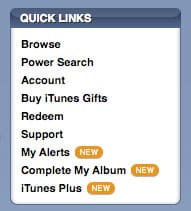
A: Absolutely. The trick to doing this is to buy an iTunes Gift Card or gift certificate first, and then use that to create your iTunes Store account. Instead of creating a new account in the usual way, which will require you to input a credit card or Paypal account for payment, you simply head over to the Redeem option in the iTunes Store first:

This will prompt you to enter your iTunes Gift Card or Gift Certificate code, and then take you through the process of creating a new iTunes Store account.


Creating an iTunes Store account without a credit card

Once the account has been created, you will notice your Gift Card amount has been added to an available balance which will appear beside your account name when you are logged into the iTunes Store:


Creating an iTunes Store account without a credit card

You can then proceed to use this available balance to make purchases from the iTunes Store. Note that if your balance is insufficient to cover the cost of the items you wish to purchase, you will either need to add more gift card credit or use a credit card or Paypal account to make up the difference.  Adding additional gift cards or gift certificate codes is handled in the same way that you originally created your account.


Note that you can also redeem other types of codes in order to create an account, but be aware that many of these codes are single-purpose codes that can only be used to purchase specific types of content such as individual songs or videos. These will be displayed in iTunes as a number of songs or videos, rather than a dollar balance.

Another option that your parents may want to consider is setting up the iTunes Allowance feature.

This would require them to sign up for their own iTunes Store account using their credit card. However, rather than giving you access to their account (and their credit card), they would instead setup a secondary account for you, which could be automatically topped up on a monthly basis with a pre-determined amount of money. Once this was established, they would only need to log into their own iTunes Store account to adjust or modify the allowance options. The monthly allotment would otherwise happen automatically.


Creating an iTunes Store account without a credit card

Your account would be topped up with a credit equivalent to your allowance each month, which would work in the same way as a gift card or gift certificate.



Latest News
The Apple Watch Series 11 46mm GPS Is $100 Off
1 Min Read
Clamshell Style iPhone Being Looked Into By Apple
1 Min Read
Foldable iPhones May Have the Largest Battery Ever
1 Min Read
Apple and TSMC’s 10-Year Collaboration May Be Ending
1 Min Read
The 13-inch M5 iPad Pro 256GB Wi-Fi Is $149 Off
1 Min Read
M5 Pro and M5 Max Chips for the MacBook Pro could Roll Out with macOS 26.3
1 Min Read
Mac Ordering Process Revamped
1 Min Read
Check Signed By Steve Wozniak and Steve Jobs Sold For $2.4 Million
1 Min Read
The Anker 140W 4-Port GaN USB-C Charger is $35 Off
1 Min Read
No iPhone Air 2 This Year, according to Latest Report
1 Min Read
New Report Corroborates Split iPhone Release Dates
1 Min Read
Apple Losing More Researchers As They Plan To Release 2 Siri Versions
1 Min Read

iLounge logo

iLounge is an independent resource for all things iPod, iPhone, iPad, and beyond. iPod, iPhone, iPad, iTunes, Apple TV, and the Apple logo are trademarks of Apple Inc.

This website is not affiliated with Apple Inc.
iLounge © 2001 - 2025. All Rights Reserved.
  • Contact Us
  • Submit News
  • About Us
  • Forums
  • Privacy Policy
  • Terms Of Use
Welcome Back!

Sign in to your account

Lost your password?








