
iLoungeiLounge
  • News
    • Apple
      • AirPods Pro
      • AirPlay
      • Apps
        • Apple Music
      • iCloud
      • iTunes
      • HealthKit
      • HomeKit
      • HomePod
      • iOS 13
      • Apple Pay
      • Apple TV
      • Siri
    • Rumors
    • Humor
    • Technology
      • CES
    • Daily Deals
    • Articles
    • Web Stories
  • iPhone
    • iPhone Accessories
  • iPad
  • iPod
    • iPod Accessories
  • Apple Watch
    • Apple Watch Accessories
  • Mac
    • MacBook Air
    • MacBook Pro
  • Reviews
    • App Reviews
  • How-to
    • Ask iLounge
Font ResizerAa
iLoungeiLounge
Font ResizerAa
Search
  • News
    • Apple
    • Rumors
    • Humor
    • Technology
    • Daily Deals
    • Articles
    • Web Stories
  • iPhone
    • iPhone Accessories
  • iPad
  • iPod
    • iPod Accessories
  • Apple Watch
    • Apple Watch Accessories
  • Mac
    • MacBook Air
    • MacBook Pro
  • Reviews
    • App Reviews
  • How-to
    • Ask iLounge
Follow US

How-to › Ask iLounge

ArticlesAsk iLounge

Copying from DVR to the iPod

Last updated: May 16, 2021 5:24 pm UTC
By Jesse Hollington
Copying from DVR to the iPod

Q: Is there a way to transfer video from a Dish Network DVR to a 30GB Video iPod?


– Alan
Copying from DVR to the iPod

A: Unlike TivoToGo, there are not yet any canned software or hardware solutions that specifically do this for cable or satellite DVR devices/receivers.

However, depending on the model of receiver you are using it may be possible to record a video stream from the receiver’s FireWire port directly to your computer, assuming that you also have a FireWire port on your computer. Almost all HDTV cable receivers and many satellite receivers with FireWire ports provide an MPEG2-TS stream through the FireWire port that can be captured by your computer with the right software.


Unfortunately, due to the lack of simple packaged tools available for this, and the time and disk space required, this isn’t a canned “just works” solution for the faint of heart. If you’re comfortable working with your computer, however, and want to invest some time in getting it to work, it can certainly be accomplished, and isn’t an unreasonable solution.

Essentially, in this case, you would have to record and encode the content onto your computer first, either from a live stream or a pre-recorded show from your DVR, in much the same way as you would from a FireWire video camera. You could then take the resulting MPEG-2 stream and convert it into an iPod or Apple TV ready format, using any number of the video conversion tools presently available.


The stream that comes out of the FireWire port on a cable or satellite receiver is the same raw MPEG-2 Transport Stream (MPEG2-TS for short) that is being received by the cable/satellite receiver itself. Unfortunately, normal video capture protocols that are used for camcorders do not normally work with cable/satellite receivers and MPEG2-TS streams, so you would need to obtain a software package that can specifically record this stream.

If you’re a Mac user, Apple themselves provide some rudimentary tools that can be used to do this as part of the FireWire SDK available from the Apple Developer Connection site, although a free basic membership registration is required to download it.


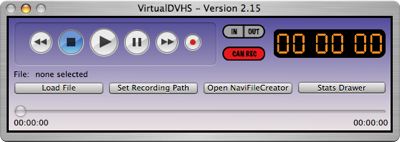
The AVCVideoCap and VirtualDVHS tools in this package should be all you need to get started.

Copying from DVR to the iPod

For Windows users, special FireWire drivers will also be required, making this something of a more cumbersome solution, and the choice of software will depend largely upon the cable or satellite receiver that you are using, since many of the applications out there use device-specific commands and protocols. If you’re adventurous and want to explore this area, however, a great place to start is with a search through the AV Science Forums.

One very important caveat to all of this, however: More and more cable and satellite companies are transmitting their signals in encrypted form, particularly for their premium and/or HDTV channels. If a channel is encrypted when it is being broadcast, the cable/satellite receiver will simply output the same encrypted stream via the FireWire port.



Latest News
The 14-inch MacBook Pro with M5 Chip 16GB RAM/512GB is $250 Off
1 Min Read
Noise and Static on AirPods Pro 3 Still Unfixed
1 Min Read
New iMac with 24-inch OLED Display May be Brighter With 600 Nits
1 Min Read
The 15-inch M4 MacBook Air 256GB Is $250 Off
1 Min Read
Internal Kernel Debug Kit from Apple Reveals Tests for a MacBook with A15 Chip
1 Min Read
Apple Currently In Talks With Suppliers for Chip Assembly & Packaging of iPhones in India
1 Min Read
Apple Allows Easier Battery Replacement For M5 MacBook Pro with 14-inch Display
1 Min Read
The Apple Watch SE 3 44mm GPS is $50 Off
1 Min Read
20th Anniversary iPhone May Launch in Two Years
1 Min Read
Better Image Generation Capabilities and Apple Music Integration Coming to ChatGPT
1 Min Read
A20 Pro Chip Coming to Next Gen iPad Mini OLED
1 Min Read
Amazon has the AirTag 4 Pack Marked $29 off
1 Min Read

iLounge logo

iLounge is an independent resource for all things iPod, iPhone, iPad, and beyond. iPod, iPhone, iPad, iTunes, Apple TV, and the Apple logo are trademarks of Apple Inc.

This website is not affiliated with Apple Inc.
iLounge © 2001 - 2025. All Rights Reserved.
  • Contact Us
  • Submit News
  • About Us
  • Forums
  • Privacy Policy
  • Terms Of Use
Welcome Back!

Sign in to your account

Lost your password?








