
iLoungeiLounge
  • News
    • Apple
      • AirPods Pro
      • AirPlay
      • Apps
        • Apple Music
      • iCloud
      • iTunes
      • HealthKit
      • HomeKit
      • HomePod
      • iOS 13
      • Apple Pay
      • Apple TV
      • Siri
    • Rumors
    • Humor
    • Technology
      • CES
    • Daily Deals
    • Articles
    • Web Stories
  • iPhone
    • iPhone Accessories
  • iPad
  • iPod
    • iPod Accessories
  • Apple Watch
    • Apple Watch Accessories
  • Mac
    • MacBook Air
    • MacBook Pro
  • Reviews
    • App Reviews
  • How-to
    • Ask iLounge
Font ResizerAa
iLoungeiLounge
Font ResizerAa
Search
  • News
    • Apple
    • Rumors
    • Humor
    • Technology
    • Daily Deals
    • Articles
    • Web Stories
  • iPhone
    • iPhone Accessories
  • iPad
  • iPod
    • iPod Accessories
  • Apple Watch
    • Apple Watch Accessories
  • Mac
    • MacBook Air
    • MacBook Pro
  • Reviews
    • App Reviews
  • How-to
    • Ask iLounge
Follow US

News › iTunes

How-toiTunes

Converting Video for iPod with iTunes 6 (Mac & PC)

Last updated: May 12, 2021 7:21 pm UTC
By Jerrod H.
Converting Video for iPod with iTunes 6 (Mac & PC)

When the video-capable fifth-generation iPod first shipped last year, Apple’s iTunes disappointed many users by lacking built-in tools to convert their existing videos to iPod-ready format. During those months, a handful of third-party solutions were required to encode video content for the iPod. We’ve covered several of them here for the Mac, but they’ve just become largely unnecessary for the casual user.


Why? Well, it’s not often that a small point revision to iTunes brings major new features, but iTunes 6.0.2 is an exception. It now handles video conversion to an iPod-compatible format, giving iPod owners access to the power of a key QuickTime Pro feature without the $29 cost.
Converting Video for iPod with iTunes 6 (Mac & PC)

As is typical for Apple, the added features are so subtly integrated that they may be difficult for some users to find. iLounge is here to help in this mini-tutorial.

Converting Video Clips with iTunes 6.0.2


iTunes 6.0.2 can make iPod-ready files from most QuickTime-compatible video formats, including MOV, MPEG, and MP4. The files are automatically converted to H.264-format video 320 pixels wide, and this setting cannot be customized within iTunes. To determine whether or not this is a satisfactory format choice for your usage habits, read our video formats tutorial here. Suffice to say that it’s perfectly good for iPod viewing, but on-TV or on-Mac/PC viewing is another story.

If you haven’t already, begin by adding your MOV, MPEG, or MP4 files to your iTunes Library either by using the “File → Add to Library…” menu item or by simply dragging them into your main iTunes Library window.


Then, highlight any videos you would like to convert. Multiple items can be selected at once by holding down “Shift” or “Control” (Mac: “Command”) while clicking on multiple items.

Shift will select all files between two clicks, and Control/Command will select discrete individual items.

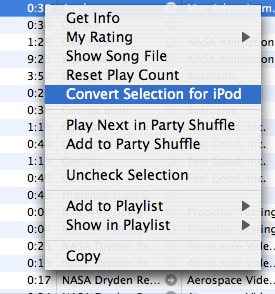
Then, right-click (Mac: Control-click) on one of the items you’ve selected, and select “Convert Selection for iPod.”

Instantly, iTunes will begin work on your files. You can monitor its progress in two locations. First, the iTunes header will display the conversion progress through a single file:


iTunes Converting Status in Header

To see how far through your multiple-file selection iTunes has progressed, monitor the list made available under the “Converting Songs…” item that has appeared in your “Source” column:


iTunes Converting Status in Sidebar

When the conversion is complete, you will now have two files identically named, one of which is your original, and one of which is the new iPod-compatible version. How does one determine which file to delete? The new file may be either larger or smaller in size than the original, so don’t use this criteria. However, the “Kind” column for the new file will display “MPEG-4 video file,” and its “Date Added” will be more recent than the original. Remove the older file from your library.



Latest News
The 14-inch MacBook Pro with M5 Chip 16GB RAM/512GB is $250 Off
1 Min Read
Noise and Static on AirPods Pro 3 Still Unfixed
1 Min Read
New iMac with 24-inch OLED Display May be Brighter With 600 Nits
1 Min Read
The 15-inch M4 MacBook Air 256GB Is $250 Off
1 Min Read
Internal Kernel Debug Kit from Apple Reveals Tests for a MacBook with A15 Chip
1 Min Read
Apple Currently In Talks With Suppliers for Chip Assembly & Packaging of iPhones in India
1 Min Read
Apple Allows Easier Battery Replacement For M5 MacBook Pro with 14-inch Display
1 Min Read
The Apple Watch SE 3 44mm GPS is $50 Off
1 Min Read
20th Anniversary iPhone May Launch in Two Years
1 Min Read
Better Image Generation Capabilities and Apple Music Integration Coming to ChatGPT
1 Min Read
A20 Pro Chip Coming to Next Gen iPad Mini OLED
1 Min Read
Amazon has the AirTag 4 Pack Marked $29 off
1 Min Read

iLounge logo

iLounge is an independent resource for all things iPod, iPhone, iPad, and beyond. iPod, iPhone, iPad, iTunes, Apple TV, and the Apple logo are trademarks of Apple Inc.

This website is not affiliated with Apple Inc.
iLounge © 2001 - 2025. All Rights Reserved.
  • Contact Us
  • Submit News
  • About Us
  • Forums
  • Privacy Policy
  • Terms Of Use
Welcome Back!

Sign in to your account

Lost your password?








