
iLoungeiLounge
  • News
    • Apple
      • AirPods Pro
      • AirPlay
      • Apps
        • Apple Music
      • iCloud
      • iTunes
      • HealthKit
      • HomeKit
      • HomePod
      • iOS 13
      • Apple Pay
      • Apple TV
      • Siri
    • Rumors
    • Humor
    • Technology
      • CES
    • Daily Deals
    • Articles
    • Web Stories
  • iPhone
    • iPhone Accessories
  • iPad
  • iPod
    • iPod Accessories
  • Apple Watch
    • Apple Watch Accessories
  • Mac
    • MacBook Air
    • MacBook Pro
  • Reviews
    • App Reviews
  • How-to
    • Ask iLounge
Font ResizerAa
iLoungeiLounge
Font ResizerAa
Search
  • News
    • Apple
    • Rumors
    • Humor
    • Technology
    • Daily Deals
    • Articles
    • Web Stories
  • iPhone
    • iPhone Accessories
  • iPad
  • iPod
    • iPod Accessories
  • Apple Watch
    • Apple Watch Accessories
  • Mac
    • MacBook Air
    • MacBook Pro
  • Reviews
    • App Reviews
  • How-to
    • Ask iLounge
Follow US

How-to › Ask iLounge

ArticlesAsk iLoungeiCloudiTunes

Converting Purchased Videos to 1080p HD

Last updated: May 16, 2021 4:28 pm UTC
By Jesse Hollington
Converting Purchased Videos to 1080p HD

Q: I have purchased a lot of videos from iTunes over the years, some standard definition and some in the original iTunes 720p HD format. I know that iTunes has never offered a way to convert my standard definition shows over to HD without repurchasing them completely, which I always thought was a bit of a gyp. I read somewhere (I think it was on your site) that I could convert my 720p HD movies and TV shows to 1080p HD versions, but I can’t seem to find any option for this on the iTunes Store. Is this only available in the U.S. (I’m in Canada), or am I missing something?


– Eric
Converting Purchased Videos to 1080p HD

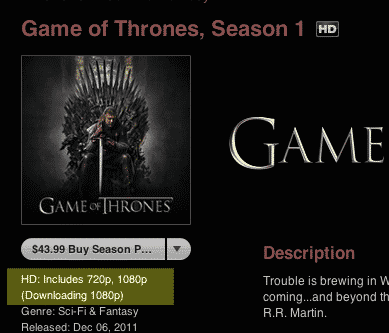
A: The good news is that you can download 1080p versions of HD content you’ve already purchased, provided that it’s available on the iTunes Store in 1080p and is available for re-downloading from iTunes in the Cloud in your country. Keep in mind that not all content has been updated to the higher-quality 1080p format; you will need to check the individual content pages on the iTunes Store to confirm what format an item is available in.

Converting Purchased Videos to 1080p HD

Note that there isn’t really a “conversion” process involved here; in reality the iTunes Store considers HD content to be a single catalog item, regardless of whether it’s in 720p or 1080p resolution. So basically, all you need to do is use iTunes in the Cloud to re-download your previous HD purchases and you will get the best version available, subject to your preferences in iTunes, as specified on the Store screen.


Converting Purchased Videos to 1080p HD

With the When downloading High Definition videos option set to prefer 1080p content, any HD video you purchase or re-download will be delivered in 1080p whenever possible, regardless of the format that it was in when you purchased it. This applies not only to past purchases, but can also be used for any current and future 720p purchases should 1080p versions later become available.

To actually re-download the items, you will need to go to the iTunes Store home page and choose “Purchased” from the Quick Links section in the top right corner. This will take you to the section where you can access all of your previously purchased items available for re-download from iTunes in the Cloud.


Note that the available categories of content vary between countries—TV Shows will be available in most countries where TV Shows are sold on the iTunes Store, however Movies are available for re-download in the U.S. only.


Converting Purchased Videos to 1080p HD

Although iTunes does not normally allow you to re-download items that are already in your iTunes library, it does recognize the difference between 720p and 1080p content; as long as your iTunes Preferences are set to 1080p you should see active download links for any available 1080p content that is not already in your library in that format.


Converting Purchased Videos to 1080p HD

If you see greyed out buttons with the word “Downloaded” instead of the iCloud icon, this means that that the content in question is already in your library in the format you’re trying to re-download it in—likely because it’s only available in 720p from the iTunes Store, your iTunes Preferences are set to prefer 720p, or you’ve already downloaded the 1080p version.


Converting Purchased Videos to 1080p HD

Unfortunately, iTunes doesn’t provide any information on the re-download pages as to the specific format of HD content; you’ll need to go back to the main iTunes Store page for the particular item to determine this.

Note that 720p and 1080p content can co-exist in the same iTunes library; re-downloading your TV shows as 1080p does not remove the original 720p versions.



Latest News
The 14-inch MacBook Pro with M5 Chip 16GB RAM/512GB is $250 Off
1 Min Read
Noise and Static on AirPods Pro 3 Still Unfixed
1 Min Read
New iMac with 24-inch OLED Display May be Brighter With 600 Nits
1 Min Read
The 15-inch M4 MacBook Air 256GB Is $250 Off
1 Min Read
Internal Kernel Debug Kit from Apple Reveals Tests for a MacBook with A15 Chip
1 Min Read
Apple Currently In Talks With Suppliers for Chip Assembly & Packaging of iPhones in India
1 Min Read
Apple Allows Easier Battery Replacement For M5 MacBook Pro with 14-inch Display
1 Min Read
The Apple Watch SE 3 44mm GPS is $50 Off
1 Min Read
20th Anniversary iPhone May Launch in Two Years
1 Min Read
Better Image Generation Capabilities and Apple Music Integration Coming to ChatGPT
1 Min Read
A20 Pro Chip Coming to Next Gen iPad Mini OLED
1 Min Read
Amazon has the AirTag 4 Pack Marked $29 off
1 Min Read

iLounge logo

iLounge is an independent resource for all things iPod, iPhone, iPad, and beyond. iPod, iPhone, iPad, iTunes, Apple TV, and the Apple logo are trademarks of Apple Inc.

This website is not affiliated with Apple Inc.
iLounge © 2001 - 2025. All Rights Reserved.
  • Contact Us
  • Submit News
  • About Us
  • Forums
  • Privacy Policy
  • Terms Of Use
Welcome Back!

Sign in to your account

Lost your password?








