
iLoungeiLounge
  • News
    • Apple
      • AirPods Pro
      • AirPlay
      • Apps
        • Apple Music
      • iCloud
      • iTunes
      • HealthKit
      • HomeKit
      • HomePod
      • iOS 13
      • Apple Pay
      • Apple TV
      • Siri
    • Rumors
    • Humor
    • Technology
      • CES
    • Daily Deals
    • Articles
    • Web Stories
  • iPhone
    • iPhone Accessories
  • iPad
  • iPod
    • iPod Accessories
  • Apple Watch
    • Apple Watch Accessories
  • Mac
    • MacBook Air
    • MacBook Pro
  • Reviews
    • App Reviews
  • How-to
    • Ask iLounge
Font ResizerAa
iLoungeiLounge
Font ResizerAa
Search
  • News
    • Apple
    • Rumors
    • Humor
    • Technology
    • Daily Deals
    • Articles
    • Web Stories
  • iPhone
    • iPhone Accessories
  • iPad
  • iPod
    • iPod Accessories
  • Apple Watch
    • Apple Watch Accessories
  • Mac
    • MacBook Air
    • MacBook Pro
  • Reviews
    • App Reviews
  • How-to
    • Ask iLounge
Follow US

How-to › Ask iLounge

Ask iLoungeiPhone

Changing iPhone number for iMessage

Last updated: May 16, 2021 4:18 pm UTC
By Jesse Hollington
Changing iPhone number for iMessage

Q: I recently changed my iPhone number with my cell phone company after moving back home from University by going to my account on their web site. The change seems to have taken affect for my phone calls already, but I’m wondering if there’s anything special I need to do to change it for iMessage, as I’m still receiving iMessages to my old phone number and text messages to the new one. Also, what happens to iMessage on my other devices like my iPad and my Mac? Do I need to do something to change the phone number there as well?


– Kathryn
Changing iPhone number for iMessage

A: Unlike SMS messages, which travel over your carrier’s network and are directly tied to your phone number, iMessages travel over the Internet via Apple’s servers. Your cellular phone number is used as an iMessage “address” to make this process as transparent as possible, but is not directly tied to your carrier’s network.

What happens is that when your iPhone is setup for iMessage, your cellular phone number is registered with Apple by sending a hidden SMS message to Apple’s servers.


Since this SMS message comes from the phone number assigned to you by your carrier, this allows Apple to verify that it’s a correct and valid phone number, and allows iMessage to “just work” without requiring the user to go through a potentially complicated manual validation process.

To allow your phone number to be used for iMessage on other devices such as an iPad, iPod touch, or Mac, your iPhone automatically associates it with your Apple ID once it’s been verified and assigned to your iPhone. So basically, any phone number associated with iMessage on your iPhone will automatically be available to your other iOS and OS X devices, provided they’re signed in with the same Apple ID. Again, this process is designed to be entirely transparent.


When you change your phone number with your carrier, the carrier network sends out an internal message to your iPhone to notify it of the new numberer, and your iPhone should re-register with iMessage using the new number as soon as it detects this update, although sometimes it may take a few minutes for this to take effect.

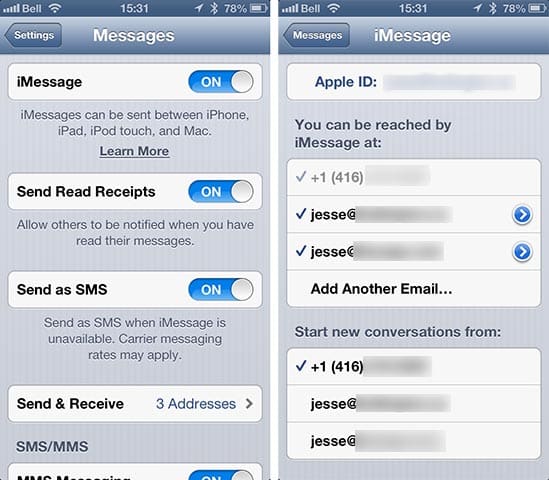
You can confirm which phone number is being used for iMessage by going into Messages in your iPhone Settings app and selecting the “Send & Receive” option. This will show you the phone number(s) and addresses that you can receive iMessages at.


If your new phone number is not appearing here, you can go back to the prior screen and simply toggle iMessage OFF and back ON again, which should for it to re-register with Apple’s servers using your new phone number. When turning iMessage back ON, you should see a “Waiting for activation” status and the “Send & Receive” list will only show your Apple ID e-mail address(es) as being active. Once iMessage activation completes, your new phone number will appear selected, and should also be pushed to your iPad and the Messages app on your Mac.



Latest News
The 14-inch MacBook Pro with M5 Chip 16GB RAM/512GB is $250 Off
1 Min Read
Noise and Static on AirPods Pro 3 Still Unfixed
1 Min Read
New iMac with 24-inch OLED Display May be Brighter With 600 Nits
1 Min Read
The 15-inch M4 MacBook Air 256GB Is $250 Off
1 Min Read
Internal Kernel Debug Kit from Apple Reveals Tests for a MacBook with A15 Chip
1 Min Read
Apple Currently In Talks With Suppliers for Chip Assembly & Packaging of iPhones in India
1 Min Read
Apple Allows Easier Battery Replacement For M5 MacBook Pro with 14-inch Display
1 Min Read
The Apple Watch SE 3 44mm GPS is $50 Off
1 Min Read
20th Anniversary iPhone May Launch in Two Years
1 Min Read
Better Image Generation Capabilities and Apple Music Integration Coming to ChatGPT
1 Min Read
A20 Pro Chip Coming to Next Gen iPad Mini OLED
1 Min Read
Amazon has the AirTag 4 Pack Marked $29 off
1 Min Read

iLounge logo

iLounge is an independent resource for all things iPod, iPhone, iPad, and beyond. iPod, iPhone, iPad, iTunes, Apple TV, and the Apple logo are trademarks of Apple Inc.

This website is not affiliated with Apple Inc.
iLounge © 2001 - 2025. All Rights Reserved.
  • Contact Us
  • Submit News
  • About Us
  • Forums
  • Privacy Policy
  • Terms Of Use
Welcome Back!

Sign in to your account

Lost your password?








