
iLoungeiLounge
  • News
    • Apple
      • AirPods Pro
      • AirPlay
      • Apps
        • Apple Music
      • iCloud
      • iTunes
      • HealthKit
      • HomeKit
      • HomePod
      • iOS 13
      • Apple Pay
      • Apple TV
      • Siri
    • Rumors
    • Humor
    • Technology
      • CES
    • Daily Deals
    • Articles
    • Web Stories
  • iPhone
    • iPhone Accessories
  • iPad
  • iPod
    • iPod Accessories
  • Apple Watch
    • Apple Watch Accessories
  • Mac
    • MacBook Air
    • MacBook Pro
  • Reviews
    • App Reviews
  • How-to
    • Ask iLounge
Font ResizerAa
iLoungeiLounge
Font ResizerAa
Search
  • News
    • Apple
    • Rumors
    • Humor
    • Technology
    • Daily Deals
    • Articles
    • Web Stories
  • iPhone
    • iPhone Accessories
  • iPad
  • iPod
    • iPod Accessories
  • Apple Watch
    • Apple Watch Accessories
  • Mac
    • MacBook Air
    • MacBook Pro
  • Reviews
    • App Reviews
  • How-to
    • Ask iLounge
Follow US

How-to › Ask iLounge

Ask iLoungeiPodiTunes

Can’t eject iPod nano without closing Firefox

Last updated: May 16, 2021 4:19 pm UTC
By Jesse Hollington
Can’t eject iPod nano without closing Firefox

Q: I recently purchased a used third-generation iPod nano. I do not have a manual for it. I’m using Windows 7 on my PC with iTunes 11 and Firefox 19. When I try to eject the nano, I get a message that it can’t be ejected because a file is in use. I have found that if I close Firefox it will then let me eject. Do you know if this is a nano, iTunes, Firefox, or Windows problem? It can be annoying if I have something up on Firefox that I need, but I want to eject the nano.

Can’t eject iPod nano without closing Firefox

– Dave

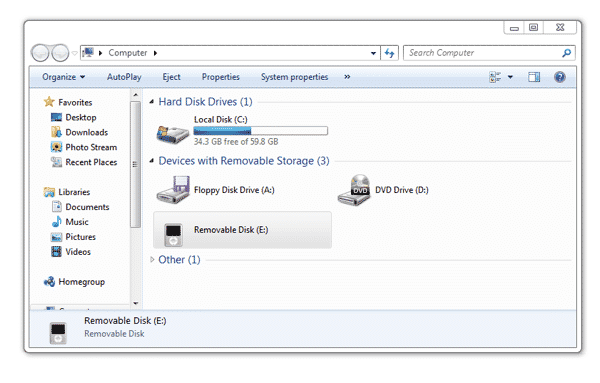
A: The reason this is happening is because the traditional iPod models such as the iPod nano actually get mounted on your computer as a removable storage device, in much the same way as a USB memory key or external hard drive.

This means that Windows will actually assign a drive letter to your iPod nano while it is connected. Which letter gets assigned depends on your specific configuration, but it’s usually something like E: or F:. If you go into Windows Explorer while your iPod nano is connected, you should see it listed there as a removable storage device.


iTunes actually uses this connection to copy your music to your iPod nano and update the appropriate database files. If you’re using automatic sync and do not have “disk use” enabled, iTunes should normally eject your iPod automatically as soon as it is finished syncing, so you would normally rarely notice it appearing in Windows Explorer in this case.

If you’re managing the content on the iPod manually or have chosen to enable “disk use” in order to store other files on the iPod nano, iTunes leaves it connected until you eject it manually.


What is most likely happening with Firefox in your case is that for whatever reason it is trying to access or open files on whichever drive letter is assigned to your iPod nano. As with any removable storage device, Windows prevents the iPod nano from being ejected when there are open files to protect against the possibility of corrupted data. Under normal circumstances, Firefox shouldn’t actually be doing this, unless you’ve at some point used it to access information on that particular drive letter. It’s also possible that certain plug-ins may have an impact, so you may want to try disabling some of these to see if that helps.

You can also try switching the drive letter that gets assigned to your iPod nano.


Latest News
The 14-inch MacBook Pro with M5 Chip 16GB RAM/512GB is $250 Off
1 Min Read
Noise and Static on AirPods Pro 3 Still Unfixed
1 Min Read
New iMac with 24-inch OLED Display May be Brighter With 600 Nits
1 Min Read
The 15-inch M4 MacBook Air 256GB Is $250 Off
1 Min Read
Internal Kernel Debug Kit from Apple Reveals Tests for a MacBook with A15 Chip
1 Min Read
Apple Currently In Talks With Suppliers for Chip Assembly & Packaging of iPhones in India
1 Min Read
Apple Allows Easier Battery Replacement For M5 MacBook Pro with 14-inch Display
1 Min Read
The Apple Watch SE 3 44mm GPS is $50 Off
1 Min Read
20th Anniversary iPhone May Launch in Two Years
1 Min Read
Better Image Generation Capabilities and Apple Music Integration Coming to ChatGPT
1 Min Read
A20 Pro Chip Coming to Next Gen iPad Mini OLED
1 Min Read
Amazon has the AirTag 4 Pack Marked $29 off
1 Min Read

iLounge logo

iLounge is an independent resource for all things iPod, iPhone, iPad, and beyond. iPod, iPhone, iPad, iTunes, Apple TV, and the Apple logo are trademarks of Apple Inc.

This website is not affiliated with Apple Inc.
iLounge © 2001 - 2025. All Rights Reserved.
  • Contact Us
  • Submit News
  • About Us
  • Forums
  • Privacy Policy
  • Terms Of Use
Welcome Back!

Sign in to your account

Lost your password?










